
If you want an effortless way to keep cherished family photos on display without any hassle, grab a Skylight Frame today. You will love how friends and relatives send pictures straight to it through email, turning your home into a living memory album.
I bought one last year and it still makes me smile every single morning. Do not wait—your walls deserve this upgrade.
My Experience With The Skylight Frame
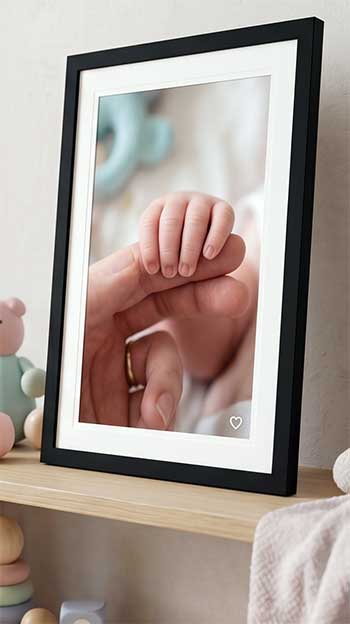
I remember unboxing my Skylight Frame on a quiet Sunday afternoon.
The package felt premium with its clean design and simple instructions.
I attached the stand, plugged it in, and connected to my home Wi-Fi within minutes.
No complicated apps or lengthy sign-ups at first.
The frame guided me through everything on its responsive touchscreen.
Once set up, I created my unique email address for the frame.
My sister sent vacation shots from her phone right away, and they popped up instantly.
I tapped to approve them, and suddenly my living room filled with laughter from those beach days.
My parents, who avoid technology, loved forwarding grandkid pictures without downloading anything.
Over the following weeks, I loaded hundreds of photos. The 10-inch screen showed bright colors and decent clarity for everyday use. I rotated between landscape and portrait modes easily by adjusting the stand. When guests visited, they asked about the frame and started sharing their own snaps. It became a conversation starter that brought everyone closer.
I noticed how the frame handled different photo orientations without much cropping. Some images looked better than others depending on lighting in the room, but overall the display kept memories vivid. I even preloaded a few favorites before gifting a second unit to my aunt.
She called me the next day thrilled that pictures from the whole family arrived automatically.
Daily use felt seamless. I swipe to browse, pause on a special shot, or delete duplicates with simple taps. The built-in storage holds plenty, and Wi-Fi updates happen in the background. After several months, the frame still works reliably, even during brief internet outages thanks to local storage.
It transformed how I relive moments without scrolling through my phone endlessly. You will feel the same warmth when your own collection comes alive on the wall.
Also Read: Comparison of Mixtiles And Smallwoods.
Pros of Owning A Skylight Frame
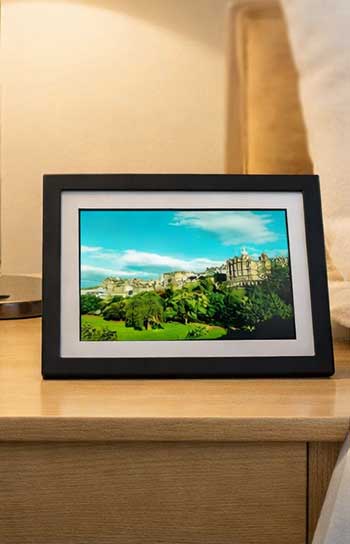
- Super Easy Setup And Sharing For Everyone You connect in minutes and share via email without forcing family members to install apps. I send photos from my phone and my tech-shy relatives do the same. It feels inclusive and stress-free because anyone with an email address can contribute instantly. You no longer chase people to download yet another app, which makes family gatherings more about memories and less about technology struggles.
- Responsive Touchscreen That Anyone Can Use The screen reacts quickly to swipes and taps. You control everything directly on the frame like rotating images or pausing slideshows. Kids and grandparents navigate it without help, and the interface stays simple enough that even first-time users feel confident within seconds. I love watching my niece swipe through photos like a pro during visits.
- Sleek Design That Blends Into Any Home The minimalist look matches modern or traditional décor. You choose from different colors and styles, including magnetic frame options on newer models. It sits nicely on shelves or mantels without looking out of place. The slim profile gives your space a polished feel while staying completely unobtrusive.
- Reliable Wi-Fi With Local Storage Backup Photos update smoothly over the internet, but the onboard storage keeps your collection visible even offline. I appreciate this peace of mind during travel or outages because the frame never goes blank. You always have your favorite memories ready to view no matter what happens with your connection.
- Great For Gifting Preloaded Memories You load photos before wrapping it up. Recipients open the box to instant joy. I gifted one and watched my aunt tear up seeing family pictures right away. It turns gift-giving into something deeply personal and emotional without any setup frustration on their end.
- Unlimited Cloud Storage With Subscription Options Once you add the optional service, storage feels endless. You organize albums and enjoy extra features without worrying about space limits. This becomes especially helpful as your family grows and more people start sending photos regularly.
Cons of The Skylight Frame

- Screen Quality Not The Sharpest Compared To Rivals Colors look good but lack the vibrant punch or matte finish you find elsewhere. In bright rooms, reflections appear, and details sometimes soften around the edges. You notice this most when comparing side-by-side with higher-end options, though it still serves daily viewing purposes adequately for most people.
- Some Features Locked Behind Subscription Basic photo display works fine, yet videos, advanced organization, and certain app tools require payment. You notice prompts urging upgrades frequently, which can feel a bit pushy over time. The constant reminders sometimes interrupt the simple joy you want from a digital frame.
- Limited Upload Methods Email works wonderfully, but you miss direct integrations with major photo libraries or social platforms. Resizing photos manually for perfect fit adds small effort on your part. It would feel smoother if more seamless options existed right from the start.
- No Video Or Music Playback In Base Model You stick to still images unless you subscribe. This feels restrictive if you want lively slideshows with sound or short video clips from family events. The absence of these extras makes the frame feel less dynamic than it could be.
- Touchscreen Collects Fingerprints Quickly Frequent use means cleaning often. The glossy surface shows smudges, especially with kids around who love touching the screen. You end up wiping it down more than you might expect in a busy household.
Also Read: Comparison of Storyboards And Mixtiles.
Maintenance And Tips For Your Skylight Frame
- Clean The Screen Gently Every Week Use a soft microfiber cloth slightly dampened with water or screen cleaner. Wipe in circular motions to remove fingerprints and dust without scratching the surface. Avoid harsh chemicals that damage the coating because they can leave permanent streaks or cloud the display over time. I make this part of my Sunday routine and it keeps the frame looking brand new.
- Place It Away From Direct Sunlight Position the frame where sunlight does not hit the screen for long periods. This prevents fading and keeps colors consistent throughout the year. I keep mine on a shaded shelf away from windows, and the difference in longevity shows clearly after months of use.
- Check Wi-Fi Connection Regularly Ensure stable internet for smooth updates. Restart the frame monthly by unplugging it for thirty seconds. This clears temporary glitches and keeps the connection reliable. You avoid those frustrating moments when new photos fail to appear because of minor network hiccups.
- Manage Photo Quality Before Sending Crop and resize images to match the frame ratio on your phone first. Landscape shots often display best, so you rotate vertical ones when needed to avoid awkward cropping. Taking this extra minute upfront saves you from disappointment when pictures arrive looking stretched or cut off.
- Update Firmware When Prompted The frame notifies you of software improvements. Install them promptly for better performance and new features. It takes just a couple of minutes and prevents compatibility issues down the line. I always update right away because it keeps everything running smoothly.
- Organize Your Email Shares Create folders or labels on your email to track what you sent. Delete unwanted photos directly on the frame to free space and keep the collection fresh. This simple habit prevents your slideshow from becoming cluttered with duplicates or low-quality shots over time.
- Adjust Brightness For Different Times Of Day Use the automatic setting or manual controls so the display looks natural morning or evening. This saves energy and reduces eye strain for you and your family. I tweak it seasonally because lighting changes in my living room, and the frame always looks its best.
- Rotate Photos Periodically Change the slideshow order or add new images monthly. Fresh content keeps the frame exciting instead of blending into the background like forgotten décor. You stay engaged with your memories when the display feels alive and ever-changing.
Following these habits, your Skylight Frame stays looking new and performing well for years. I clean mine consistently and it still shines like day one while delivering reliable joy every single day.
Comparing Skylight Frame With Other Brands
- How Skylight Frame Compares To Nixplay Frame
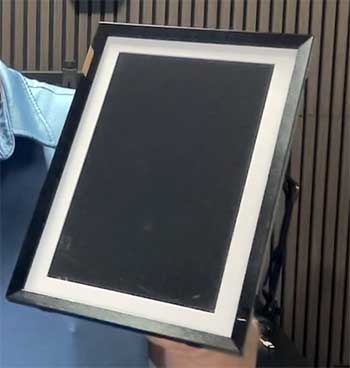
When I placed the Skylight Frame next to a Nixplay Frame, the differences stood out immediately.
You enjoy simpler email sharing with Skylight, while Nixplay leans more on its dedicated app for building playlists.
The Nixplay screen often appears sharper with better color balance in my testing, but Skylight wins on touchscreen responsiveness and offline storage capability.
Setup feels quicker on Skylight for non-tech users since relatives email photos without accounts.
Nixplay offers motion sensors that turn the frame off in empty rooms, saving power, yet Skylight provides a more tablet-like interactive experience.
Price-wise, both sit similarly, but Skylight edges ahead if you value gifting ease and local backup. You choose based on whether you prefer app depth or straightforward sharing.
- How Skylight Frame Compares To Keepsake Frames
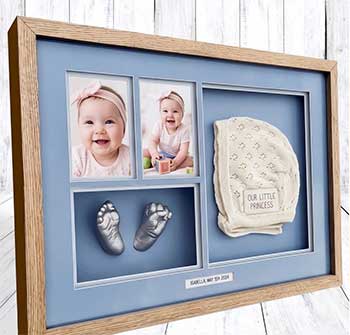
Keepsake Frames focus heavily on sentimental gifting with custom engraving options and simpler static displays in many models.
I found Skylight more dynamic because of its Wi-Fi updates and touchscreen controls that let you interact daily.
Keepsake units often lack the seamless email-from-anyone feature that makes Skylight special for large families.
Build quality on Skylight feels more modern and slim, blending better with contemporary homes, while some Keepsake designs lean traditional.
Storage and update flexibility favor Skylight, though Keepsake might appeal if you want a one-time loaded frame without ongoing connectivity.
You get more everyday engagement with Skylight, making memories feel alive rather than frozen in time.
- How Skylight Frame Compares To Aura Frame

Aura Frame delivers stunning screen quality with vivid colors and a matte finish that mimics printed photos closely.
When I compared them side by side, Aura images popped more naturally with less pillarboxing on portrait shots.
Skylight counters with easier email sharing that requires zero app downloads from senders, perfect for grandparents.
Aura provides free unlimited cloud storage without nagging subscriptions for core use, while Skylight pushes optional paid features more aggressively.
Design-wise, Skylight offers interchangeable magnetic frames for style changes, giving you flexibility Aura lacks in base models.
Setup speed goes to Skylight for quick family involvement, but Aura feels more premium overall in display realism.
You pick Aura for visual excellence or Skylight for inclusive sharing.
- How Skylight Frame Compares To Frame It Easy

Frame It Easy specializes in custom physical frames with precise sizing for traditional prints rather than digital displays.
Skylight brings the digital advantage of endless photo rotation and remote updates, something Frame It Easy cannot match since it holds one static image.
You pay more upfront for Skylight but save long-term by avoiding print costs and framing labor.
Frame It Easy excels in artisanal quality and wall-mount aesthetics for gallery walls, yet Skylight adds interactivity and family contributions via email.
If you crave changing memories weekly, Skylight transforms your space dynamically.
Frame It Easy suits classic décor lovers who prefer tangible prints. The choice depends on whether you want evolving digital joy or timeless physical elegance.
Frequently Asked Questions (FAQ)
Wi-Fi disconnections, subscription prompts for basic features, and occasional blurry photo scaling appear most often.
No monthly fee exists for core photo display, though optional yearly subscriptions unlock extras.
Aura often wins on screen vibrancy and free storage, while Skylight excels in easy email sharing and touchscreen use.
Subscription paywall for key features like meal planning and auto-imports plus occasional sync glitches with recurring events.
Wrapping Up
After months with my Skylight Frame, I still recommend it wholeheartedly for anyone seeking simple, heartfelt photo sharing. The convenience outweighs minor drawbacks, especially when family stays connected through pictures.
You will create daily moments of joy that traditional frames cannot match. Treat yourself or someone you love—you deserve this easy happiness filling your home.