
I tested both the Skylight Calendar and Cozyla Calendar in real family settings over several weeks so you can decide which one actually fits your household.
This article walks through their everyday performance, key features, costs, and trade-offs from a practical user viewpoint so you can pick the right digital family planner without guesswork.
| Feature | Skylight Calendar | Cozyla Calendar+ 2 |
| Screen sizes | 10″, 15″, 27″ | 15.6″, 24″, 32″ |
| Starting price | Around $170–$300 (15″) | Around $350–$900 |
| Subscription | Optional Plus (~$79/year) for advanced tools | None required for full features |
| Calendar sync | Google, Apple, Outlook, Yahoo, Cozi | Google, Apple, Outlook, others |
| Profiles | Unlimited | Up to 8 |
| Chore charts & rewards | Basic free; full rewards with Plus | Full included |
| Meal planning | With Plus | Full included with recipes |
| Photo frame mode | With Plus | Included |
| App store / extra apps | No | Yes (Android / Google Play) |
| Customization | Clean and guided | Highly flexible widgets |
| Mounting | Wall or stand (smaller models) | Primarily wall (heavier) |
| Best for | Simple, polished family scheduling | Full command-center style hub |
Key Differences Between Skylight Calendar And Cozyla
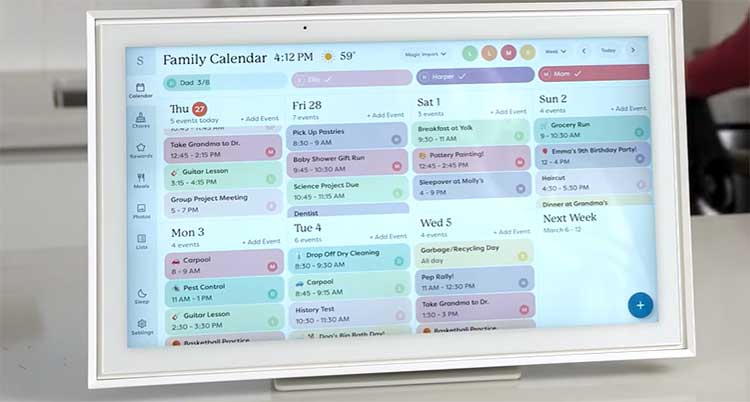
- Pricing structure and long-term cost Skylight keeps the hardware price lower on the 15-inch model that most families buy, but the real power sits behind an annual Plus fee. Once you add Magic Import, meal tools, and rewards, the yearly cost stacks up. Cozyla asks for more money on day one, especially in the larger sizes, yet every feature stays unlocked forever. Over two or three years the gap often closes or flips in Cozyla’s favor if you would have paid for Skylight Plus anyway.
- Screen real estate and visibility Skylight tops out at 27 inches. Cozyla offers 32-inch options that dominate a kitchen wall and remain readable from across the room. The bigger canvas lets Cozyla show multiple widgets at once without feeling cramped. Skylight’s 15-inch version still works well on a counter or smaller wall but feels tighter when you try to display calendar, chores, and weather together.
- Software philosophy Skylight runs a locked-down experience built only for family organization. You never wander into random apps or settings. Cozyla runs a full Android system. You can install streaming services, note apps, or anything from the Play Store. That freedom turns Cozyla into a true home hub but also opens the door to distraction and a steeper learning curve for some users.
- Setup and daily friction Skylight usually takes under fifteen minutes from unboxing to full calendar sync. Profiles appear quickly and color-coding is automatic. Cozyla needs more time, especially the wall-mount process on larger models. Once running, both stay reliable, yet Skylight feels more guided while Cozyla rewards people who enjoy customizing every corner of the home screen.
- Family profile limits and sharing Skylight supports unlimited profiles, which helps blended families or households that include grandparents. Cozyla caps at eight. Most nuclear families never hit the limit, but larger groups notice the difference.
- Power and placement flexibility Both devices need constant power. Skylight’s smaller models include a stand so you can move them between counter and shelf. Cozyla’s bigger screens are designed for permanent wall mounting and weigh enough that careful installation matters.
Also Read: Is Level Frames Worth Your Money?
Key Features of the Skylight Calendar
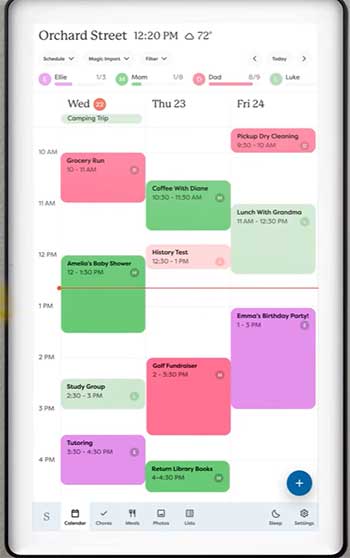
- Two-way calendar sync that actually works Link Google, Apple, Outlook, Yahoo, or Cozi accounts and events flow both directions. Add something on the wall display and it shows up on your phone. Color-coded profiles make it obvious at a glance who owns each appointment. I watched my kids start checking the board themselves instead of asking me every morning.
- Touchscreen interface built for quick glances The screen responds cleanly. Day, week, and month views switch with a tap. Weather sits in the corner so you can decide coats and umbrellas without opening another app. The whole design feels calm rather than busy.
- Tasks and basic chore charts without extra cost Assign recurring or one-time jobs to any profile. Kids can check items off right on the screen. Parental locks stop accidental deletions. This alone reduced the number of “Did you feed the dog?” conversations in my house.
- Magic Import and Sidekick (Plus plan) Forward a school PDF, party invite email, or photo of a flyer and the system turns it into calendar events. It saved me from typing the same details twice during soccer season. Meal planning and the recipe box also live here, letting you attach ingredients straight to a shared grocery list.
- Photo screensaver and rewards (Plus plan) When idle the display becomes a digital frame. Rewards turn completed chores into points that unlock screen time or small prizes. The system feels lightweight yet motivating for younger kids.
- Companion app that mirrors the wall unit Add or edit events from anywhere. Grocery lists update in real time so whoever is already at the store sees the latest items. Setup stays simple even for the less tech-comfortable adults in the family.
Pros of the Skylight Calendar
- Faster path to usefulness Most people finish setup and see every family calendar on the wall within the first half hour. The interface never feels like a tablet you have to configure; it feels like a dedicated organizer.
- Clean visual design that fits most kitchens Frame options and color choices blend into home décor. The screen stays bright enough to read from a distance without looking like an office gadget.
- Unlimited profiles and strong two-way sync Blended families and multi-generational households stay organized without hitting artificial limits. Changes made on the phone appear on the wall and vice versa with almost no lag in normal use.
- Lower entry price for solid core features The 15-inch model delivers calendar, tasks, lists, and weather without any subscription. Many households run happily on the free tier for months before deciding whether the extras justify the yearly fee.
- Kid-friendly and low-distraction No open app store means children cannot wander into games or browsers. The focused design keeps the device useful rather than becoming another screen that needs policing.
- Reliable companion app Editing from a phone while standing in the grocery aisle or sitting at work feels seamless. Lists and events stay in sync without constant refreshes.
Cons of the Skylight Calendar
- Subscription wall around the most helpful extras Meal planning, full rewards, photo mode, and Magic Import all require Plus. After the free trial month the $79 annual charge becomes the only way to unlock the features that made the device special during testing.
- Hardware cost still feels high for a single-purpose screen Even the mid-size model sits near three hundred dollars. Compared with a tablet or smart display that can do more, the price invites second thoughts until the organization payoff becomes clear.
- Limited expandability You cannot install extra apps or change the operating environment. If you later want weather radar, a music player, or a different list tool, the device cannot grow with you.
- Always needs power and Wi-Fi A power outage or router glitch blanks the board. There is no battery backup, so the calendar disappears exactly when you might need the schedule most.
- Touchscreen shows fingerprints easily The plastic surface attracts smudges. Daily cleaning becomes part of the routine if the unit sits at kid height.
- Occasional sync quirks with tightly secured work calendars Corporate accounts protected by heavy security sometimes refuse to connect. Personal Google and Apple accounts usually work without drama.
Also Read: Comparison of Skylight And Aura Frame.
Key Features of the Cozyla Calendar
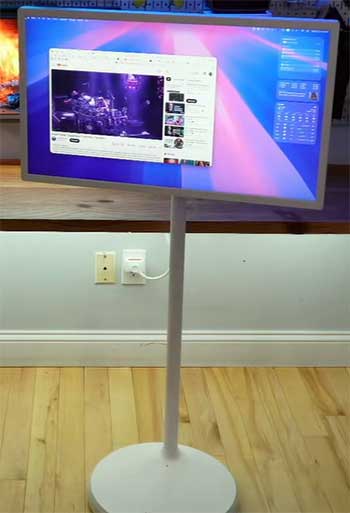
- Large customizable dashboard with widgets You decide what sits on the home screen. Calendar, weather, chore list, meal plan, notes, and even streaming shortcuts can share space. The 32-inch model turns the wall into a true command center rather than a single-purpose calendar.
- Full chore and rewards system included Assign tasks, set point values, and define rewards without paying extra. Kids race to check boxes and watch their totals climb. The gamification feels more complete than Skylight’s free version and matches what Skylight only offers after the subscription.
- Built-in meal planning with recipe library Browse thousands of recipes, schedule dinners, and auto-generate grocery lists that also track pantry items. One tester in my circle called this the biggest mental-load reducer. Ingredients move to the shopping list with almost no extra taps.
- Android foundation and app access Install Netflix, YouTube, or any other tool you need. Google Assistant responds to voice commands. The device can double as entertainment during quiet evenings once the day’s schedule is confirmed.
- Photo frame and smart import tools Idle mode rotates family photos. Smart Import handles PDFs and documents, though it works one profile at a time rather than assigning across the whole household the way Skylight’s Magic Import can.
- Multiple mounting and orientation options Portrait or landscape, fixed or rotating mounts appear in the box. Larger units feel solid once installed, though the process takes longer and the weight requires proper anchors.
Pros of the Cozyla Calendar
- Everything unlocked from the first day No second payment later. Chores, rewards, meals, recipes, photos, and imports all work the moment the device is online. That single-price clarity removes the mental accounting that comes with Skylight Plus.
- Serious screen size options The 24-inch and 32-inch models give a true wall presence. Multiple widgets stay readable at once, so the whole week, the dinner plan, and the chore list share the same view without constant switching.
- Deep customization and Android flexibility Rearrange widgets, add streaming apps, or pull in any tool that helps your household. Google Assistant adds voice convenience. The device can evolve into whatever the family needs rather than staying locked to one manufacturer’s vision.
- Complete meal and pantry system Recipes, automatic grocery lists, and pantry tracking reduce the daily “what’s for dinner” stress more thoroughly than Skylight’s paid meal tools in my experience.
- Strong motivation tools for kids The built-in rewards system feels polished and immediate. Children respond to the visible point totals and clear goals without extra parental prompting.
- Photo mode and entertainment crossover When the schedule is quiet the screen becomes a digital frame or even a media player. The dual purpose makes the higher price feel more justified in a busy household.
Cons of the Cozyla Calendar
- Higher upfront investment Even the smallest model costs more than Skylight’s popular 15-inch version. Larger screens climb toward nine hundred dollars or more, which can feel steep before the long-term savings from no subscription appear.
- More involved installation Wall mounting the heavier units takes time, tools, and careful measuring. A stand-alone option exists on smaller sizes, yet most buyers commit to a permanent wall location.
- Steeper learning curve The open Android environment and widget system give more control but also more decisions. Some users feel overwhelmed at first compared with Skylight’s guided simplicity.
- Profile limit of eight Larger or multi-household families may run out of slots. Unlimited profiles on Skylight avoid that constraint.
- Occasional reports of sync lag Calendar updates sometimes take longer to appear than on Skylight. Most days the system stays solid, yet the lag appears more often in user feedback.
- Can feel like a tablet rather than a pure calendar Access to the Play Store is a strength for power users and a potential distraction for households that want a focused organizer only.
Which One Fits Real Family Life Better?
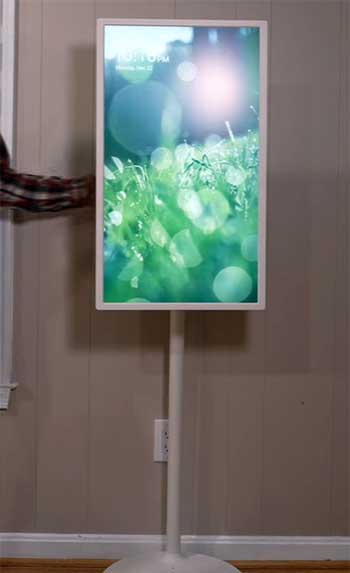
After living with both, the choice hinges on how you value simplicity versus flexibility and how you feel about ongoing fees.
Skylight wins when you want the fastest path to a calm, color-coded wall calendar that the whole family actually checks.
The interface stays focused, setup is nearly painless, and the free tier already covers the basics well.
If Magic Import and meal tools matter enough to justify the yearly fee, the device becomes a polished daily companion.
Cozyla wins when you prefer to pay once and own every feature, when a larger screen makes sense for your space, and when you like the idea of a true home hub that can also stream a show or run extra apps.
The meal and rewards systems feel more complete out of the box. The trade-off is higher initial cost and a bit more setup effort.
I noticed the biggest daily difference in two places: morning chaos and dinner planning. Skylight’s clean color grid stopped the “who is where” questions almost immediately.
Cozyla’s larger view plus recipe tools cut the evening decision fatigue further.
Neither device replaces good communication, yet both reduce the mental load that usually falls on one person.
Power reliability and Wi-Fi stability matter for both. Place either unit where the router signal is strong and a power outlet is permanent. Fingerprints and dust appear on both screens; a microfiber cloth becomes part of the weekly routine.
Also Read: Comparison of Frameo And Skylight Digital Frame.
Frequently Asked Questions (FAQ)
Cozyla offers larger screens, full features without a subscription, and more customization, so many families prefer it once they accept the higher starting price.
The best tools sit behind a yearly fee, the hardware cost is still high for a focused device, and you cannot expand it with extra apps.
Yes for households that want a large, subscription-free command center and are willing to invest more up front for complete features and flexibility.
No. The Calendar+ series includes all core and advanced tools with the one-time purchase.
Final Thoughts
After weeks of side-by-side use I can tell you both products deliver real relief from scattered schedules and sticky-note chaos. You will spend less time chasing information and more time simply living the plan that already sits on the wall.
Skylight gives you polished simplicity and a gentler entry price if you stay on the free tier or accept the annual fee. Cozyla asks for a bigger check first but then stays fully unlocked and grows with your needs through its open system and larger displays.
Look at your actual habits. If you want the calendar up and running this weekend with almost no learning curve, reach for Skylight. If you want one screen that handles schedules, meals, chores, photos, and occasional streaming without any future invoices, Cozyla is the stronger long-term partner.
Either choice beats juggling five different phone calendars and a paper planner that no one ever updates. Pick the one that matches how your household actually works, hang it where everyone can see it, and watch the daily questions start to quiet down.