
If you’re like me and clock long hours at a desk, the search for a chair that actually supports your back instead of fighting it gets real personal real fast.
The Steelcase Leap and its updated version, the Leap V2, both use that signature LiveBack system to move with your spine, but they part ways in ways that change how they feel during an eight-hour stretch.
In this article I’ll walk you through the real differences so you can figure out which one fits the way you sit, move, and work without second-guessing the purchase later.
| Aspect | Original Steelcase Leap (V1) | Leap V2 | Notes for You |
| Backrest | Shorter, wider flare at top | Taller, narrower, more contoured upper back | V2 gives better shoulder support for most adults |
| Armrests | 3-way (height, width, pivot) | 4-way (adds front-to-back depth slide) | Big upgrade on V2 for keyboard and mouse reach |
| Seat & Back Cushion | Thicker molded foam, plusher initial feel | Thinner cut foam, firmer and more responsive | Some prefer V1 plushness; V2 feels more dynamic |
| Lumbar | Adjustable with noticeable lower arch | Height + separate firmness dial, refined flex | V2 lets you fine-tune pressure without overdoing it |
| Recline Mechanism | Natural Glide system, solid 4-position lock | Natural Glide with 5 stops, smoother tension | Both keep you close to the desk; V2 feels more polished |
| Seat Depth Slider | Good range | Slightly wider travel | Both accommodate different thigh lengths well |
| Weight Capacity | 400 lbs | 400 lbs | Tie – both handle a wide range of body types |
| Aesthetics & Build | Boxier corporate look, steel elements in arms/base | Cleaner modern lines, refined plastic components | V2 looks and feels more current in most offices |
| Availability (new) | Discontinued | Still in production | Easier full warranty and parts on V2 |
| Approx. New Price | Mostly found used/refurb ($300–800) | $1,300–1,450 configured with 4D arms | Refurb V2 often lands near $650–800 with strong warranty |
Key Differences Between Steelcase Leap And Leap V2
- Backrest shape and height
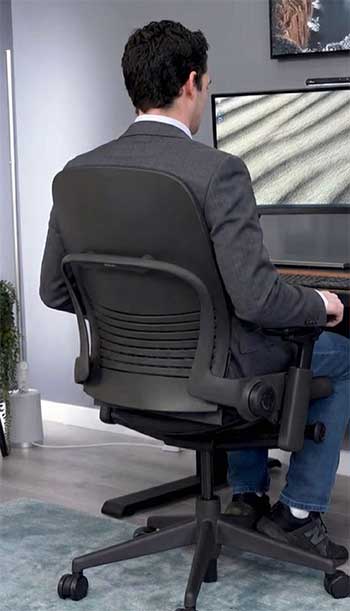
The original Leap carries a shorter back that flares wider near the shoulders.
That design worked fine for many when it launched, but taller users or anyone who leans back often can find the upper back and shoulder blades left with less consistent contact.
The Leap V2 stretches the backrest taller and pulls the sides in for a more contoured profile.
When I sat in the V2 after time in the original, the extra height let my upper spine stay supported without me having to consciously straighten up every few minutes.
The LiveBack flex still does its job on both, bending and shifting as you change posture, but the V2 distributes that movement across a longer surface so you feel even pressure from lower back all the way up.
If your day includes video calls where you lean back or stretch, the taller back on the V2 reduces the chance of that nagging upper-back fatigue creeping in by mid-afternoon.
- Armrest adjustability
This is where the V2 pulls ahead in a way you notice immediately.
The original Leap gave you solid 3-way arms that handled height, width, and some pivot.
They felt sturdy thanks to the steel frame underneath. The Leap V2 adds a full depth slide so the arm pads move forward and back.
That extra axis matters more than it sounds when your keyboard sits at a certain distance or you like to pull the chair in close for focused typing then push back slightly during a call.
I found myself tweaking the depth on the V2 to keep my elbows at a neutral angle without shrugging my shoulders or letting my wrists drop.
The V2 arms also tightened up the play you sometimes felt in older 3-way designs. Both sets stay comfortable for hours once dialed in, but the V2 simply gives you more ways to match the exact setup on your desk.
Also Read: Comparison of Branch Verve And Ergonomic Chair.
- Seat and back cushion feel
Here the two chairs trade places depending on what your body prefers.
The original Leap uses thicker molded foam that feels plusher right away and gives a bit more sink.
Some people love that initial softness, especially if they come from very firm budget chairs. The Leap V2 switched to a thinner foam layer cut to shape.
It starts firmer and lets the LiveBack mechanism show through more clearly because there is less padding between you and the flexing shell.
After a few weeks the V2 cushion still supports without bottoming out, but it never quite matches the cloud-like first impression of the thicker original.
If you tend to shift weight a lot or want the back flex to feel more immediate, the V2 wins.
If you like a little extra plushness under the sit bones and don’t mind the back feeling slightly less “alive,” the original can feel more forgiving on long days.
- Lumbar support tuning
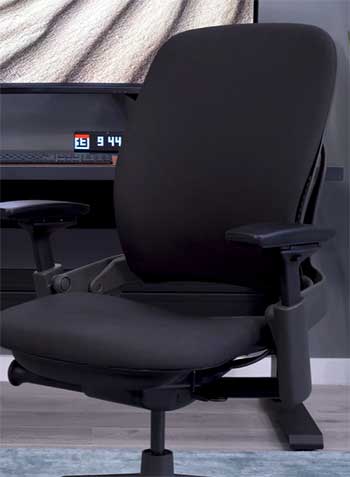
Both chairs let you raise and lower the lumbar pad and change overall firmness, which already puts them ahead of most office chairs.
The Leap V2 adds a dedicated lower-back firmness knob that works independently of the main tension.
You can keep the height perfect for your spine curve while dialing the pressure up or down without affecting the upper back flex.
On the original the lumbar feels a touch more fixed in its arch once set.
In practice that means the V2 lets you respond to how your back feels at different times of day.
After lunch when you might slouch a little more, a quick turn of the V2 knob brings targeted support back without forcing a full re-adjust of the whole chair.
The difference shows up most clearly if you deal with specific lower-back tightness rather than general discomfort.
- Recline motion and lock positions
The Natural Glide system appears on both models and remains one of the smartest parts of the design.
As you lean back the seat pan slides forward so your hips stay under you instead of sliding forward into a banana shape.
The original Leap offered four solid lock positions and reliable tension adjustment. The Leap V2 added a fifth stop and smoothed the tension curve so the motion feels more consistent across body weights.
When I tested recline on both back-to-back, the V2 let me find that sweet spot between upright focus and relaxed thinking posture with fewer clicks.
The glide still keeps you within easy reach of the keyboard either way, but the extra position on the V2 gives finer control if you like to rock gently or lock at a precise angle for calls.
- Build details, weight, and looks
The original Leap carries a bit more of that early-2000s corporate tank feel with visible steel in the arm structure and base on some units. It feels indestructible but looks dated next to modern offices.
The Leap V2 cleaned up the lines, swapped some steel for reinforced composites in the arms, and ended up slightly lighter while keeping the 400-pound rating.
The updated aesthetic blends into home offices or open-plan spaces without screaming “cubicle furniture.”
Both hold up for well over a decade with normal use, but the V2 parts are still being made new, which matters if you ever need a replacement arm pad or cylinder years down the road.
- Who each chair actually fits best in real life
If you are shorter, prefer a plusher initial sit, or are buying used on a tighter budget, the original Leap still delivers excellent dynamic support and can be found at lower prices.
Taller users, people who want maximum arm flexibility, or anyone planning to keep the chair ten-plus years with a full warranty usually land on the Leap V2.
The V2 simply removes the small compromises the original carried while keeping every strength that made the Leap line famous.
Key Features of Steelcase Leap And Leap V2
Both chairs center on the LiveBack system. The backrest is not a rigid board; it is a flexible polymer shell covered in foam and fabric that changes shape as you move.
When you shift forward to type or lean back to think, the shell flexes in multiple zones so support follows your spine instead of staying in one fixed curve. That single feature reduces the constant micro-adjustments most people make in ordinary chairs.
The Natural Glide recline works with LiveBack. Lean back and the seat moves forward with you. Your feet stay flat, your eyes stay level with the screen, and you never feel like you are falling away from the desk. It is one of those mechanisms you stop noticing after the first day because it just works.
Seat depth adjustment lets you slide the front edge in or out so the seat supports your thighs without pressing behind the knees. Both models give several inches of travel, which matters if you are between standard sizes or share the chair with someone else.
Lumbar height and firmness controls appear on both. You set the pad where your lower back curves, then tune how much push you feel. The V2 adds that independent firmness knob so you can keep the height locked and still vary pressure through the day.
The 4D arms on the V2 (height, width, depth, pivot) let you position each arm pad exactly where your elbows want to rest. The original’s 3-way arms cover the basics but lack the depth slide that prevents you from reaching or shrugging.
Weight capacity sits at 400 pounds on both, with a seat height range that works for most adults from roughly 5’2″ to 6’6″. The chairs carry BIFMA and GREENGUARD certifications, so they meet commercial durability and low-emission standards.
Also Read: Comparison of Steelcase Amia And Leap.
Pros of the Original Steelcase Leap
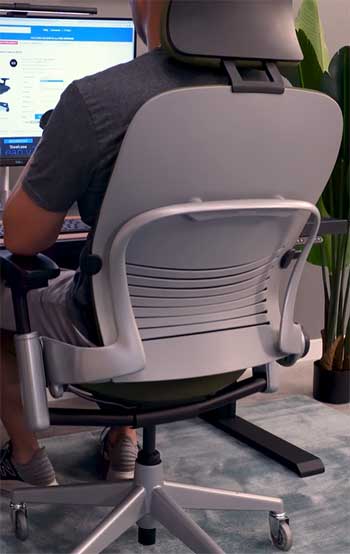
- Thick molded foam cushioning gives an immediate plush feel that some users never want to give up. If you come from mesh chairs or firm budget seats, the extra padding under the sit bones can feel like a relief during the first few weeks. The thicker back pad also softens the LiveBack flex slightly, which some people prefer when they want support without strong pressure points.
- Proven long-term durability shows up in units still working smoothly after fifteen or twenty years. The steel elements in the arm frames and base on many original models contribute to that tank-like reputation. When you find a well-maintained used example, you are often getting a chair that has already survived heavy office use and still has life left.
- Lower price on the used and remanufactured market makes the original Leap accessible when a new premium chair feels out of reach. Good examples surface regularly between a few hundred dollars and low eight hundreds, letting you test the LiveBack experience without the full new-chair commitment.
- Simpler, more “solid” arm feel appeals to people who like a no-nonsense, heavy-duty sensation under their forearms. The steel construction transmits less flex than the updated V2 arms, which some users read as more confidence-inspiring during aggressive recline or when shifting weight side to side.
- Distinct lower lumbar arch on many original units provides a more pronounced curve that some backs respond to immediately. If your lower back likes a stronger default push before you start fine-tuning, the original can feel more “set it and forget it” than the more neutral V2 profile.
- Wide availability of replacement parts from the used ecosystem keeps older chairs running longer. Because the model ran for years, third-party and remanufactured components remain easy to source even if Steelcase no longer stocks everything new.
Cons of the Original Steelcase Leap
- Shorter backrest leaves taller users or anyone who reclines often with less upper-back contact. You can still get great lower lumbar support, but the shoulder and mid-back area sometimes requires conscious posture work to stay fully supported through long sessions.
- 3-way arms lack the depth adjustment that makes fine positioning easy on modern desks. You can get close, but you may still end up with slight forward lean or elbows too far back depending on your keyboard tray or desk depth.
- Older foam on used units has often compressed after a decade or more of use. What felt plusher new can now feel flatter and less responsive than a fresh V2 cushion, reducing some of the original comfort advantage.
- Dated aesthetics and heavier look stand out in contemporary home offices or open workspaces. The boxier shape and visible hardware read more corporate-cubicle than the cleaner V2 profile.
- Parts for very early units can require hunting through refurbishers rather than ordering direct from Steelcase. While still doable, it adds a small layer of hassle compared with the still-current V2.
- Fewer lock positions and slightly coarser recline tension mean you have less granular control when you want to fine-tune your lean-back angle throughout the day.
Also Read: Comparison of Steelcase Gesture And Leap.
Pros of the Leap V2
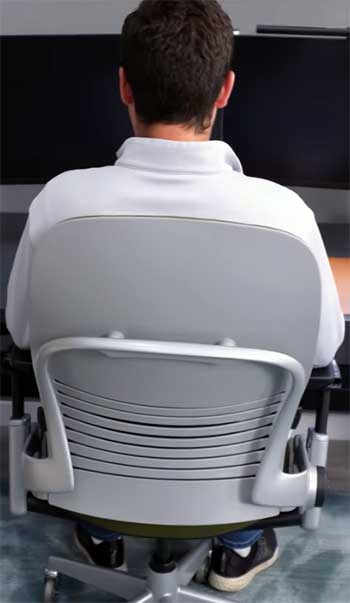
- Taller, contoured backrest delivers consistent support from lower lumbar all the way through the shoulder blades. For anyone over six feet or anyone who shifts between upright and reclined postures, the extra coverage removes a common fatigue point without adding bulk.
- Full 4D armrests let you dial in height, width, depth, and pivot independently. That depth slide alone changes how natural your typing posture feels when the keyboard sits at different distances or when you move between mouse work and writing.
- Refined LiveBack flex and independent lumbar firmness knob give you more precise control over how much push you feel in the lower back. You can keep the pad at the perfect height and still soften or strengthen the pressure as your back loosens or tightens during the day.
- Smoother Natural Glide with an extra lock position makes the recline motion feel more predictable and customizable. The tension adjustment works across a wider range of body weights without feeling either too light or too heavy.
- Cleaner modern design and lighter overall feel blend into both home offices and professional environments without looking like leftover corporate furniture. The updated arm and base components reduce visual clutter while maintaining strength.
- Full 12-year warranty on new units plus ongoing parts availability removes worry about long-term ownership. Steelcase still services these chairs, and authorized dealers can handle adjustments or repairs on site in many areas.
- Strong value on the remanufactured market. Well-done V2 refurbs often come with new foam, new arms, new cylinders, and a solid dealer warranty at prices that sit well below new-list while still giving you the updated feature set.
Cons of the Leap V2
- Thinner seat and back cushions start firmer and can feel less forgiving if you prefer deep plushness right away. The foam does break in and stays supportive, but it never matches the initial sink of the thicker original pads for people who like that sensation.
- Higher new price puts the fully optioned V2 at the top end of what many individuals want to spend on a chair, even though the longevity and warranty help justify it over time.
- Fabric upholstery runs warmer than mesh alternatives during hot months or in rooms without strong airflow. You stay comfortable, but you may notice the difference compared with a Pellicle seat if heat buildup bothers you.
- Optional headrest adds cost and some users report it can push the head slightly forward or drift out of position over months of use. Many people skip it entirely and stay happy with the standard back height.
- Firm initial feel of the thinner foam can surprise people who expect every premium chair to feel soft from minute one. It takes a short break-in period for some users to appreciate how the responsive cushion works with the LiveBack system.
- Still a substantial chair at roughly fifty pounds assembled, so moving it between rooms or up stairs takes a little effort even though the design is refined.
Also Read: Comparison of Steelcase Leap And Herman Miller Aeron.
So Which One Actually Belongs In Your Space?
After sitting with both and talking to plenty of people who have lived with each for years, the Leap V2 comes out ahead for most current buyers because the taller back, 4D arms, and refined adjustments remove the small limitations the original carried while keeping every strength that made the Leap line famous.
You get better support for tall users, more ways to match your exact desk setup, and a chair still fully supported by the manufacturer.
That said, the original Leap remains a strong choice if you find a clean used or remanufactured example at a good price, you like a plusher initial cushion feel, or you simply do not need the extra arm depth adjustment.
Both chairs will outperform the vast majority of standard office chairs when it comes to keeping your back supported through real workdays.
Final Thoughts
You now have the details to match the chair to how you actually move and sit. If your back tends to tighten in one specific spot, the V2’s extra lumbar tuning will probably feel worth it.
If you want maximum plushness and are comfortable sourcing a solid used unit, the original still delivers that classic LiveBack experience without compromise.
Either way, you are choosing between two chairs built to last and designed around the way real bodies shift during long hours at the desk.