
As someone who’s been on a fitness journey for years, tracking my weight and body composition has become a daily ritual. I’ve owned the Wyze Scale X for quite some time, and recently I added the Wyze Scale Ultra to my routine to see how it stacks up.
In this article, I’ll share my real experiences comparing these two affordable smart scales, breaking down their features, performance, and value to help you decide which one fits your needs best. My goal is to give you a clear, honest picture so you can make the right choice for your health tracking.
| Feature | Wyze Scale X | Wyze Scale Ultra |
| Price (approximate) | $33–$35 | $42–$44 |
| Display | Hidden LED (shows weight and body fat %) | 4.3-inch full-color TFT (customizable, shows multiple metrics and trends) |
| Connectivity | Bluetooth only | Wi-Fi + Bluetooth |
| Body Metrics Measured | 13 | 13 |
| On-Scale Metric Viewing | Weight and body fat % only | Most metrics (except heart rate) |
| Battery Life | Up to 22 months | Up to 9 months |
| Weight Capacity | 11–400 lbs | 11–400 lbs |
| Special Modes | Baby, pet, luggage, pregnancy | Baby, pet, luggage, pregnancy |
| App Sync Options | Apple Health, Google Fit, Fitbit | Apple Health, Google Fit, Fitbit |
| Battery Type | 4 AAA (included) | 4 AAA (included) |
| User Recognition | Up to 8 users + unlimited guests | Up to 8 users + unlimited guests |
Key Differences Between Wyze Scale X And Wyze Scale Ultra
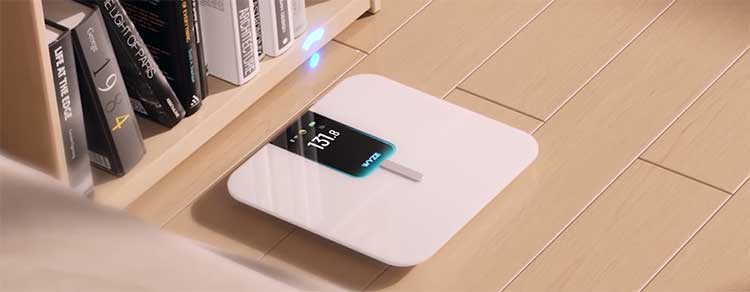
While these scales share a lot of DNA, the differences come down to how you interact with your data day to day. Here’s a detailed breakdown:
- Display technology and size
The Scale X uses a hidden LED screen that only activates when you step on, showing weight in large numbers followed by body fat percentage. It’s clean and energy-efficient, but that’s it for on-device info.
The Ultra, on the other hand, features a massive 4.3-inch full-color TFT display that’s always ready to go.
It shows weight, body fat, muscle mass, BMI, and even short-term trends right there—no squinting or guessing. I love how the colors make everything pop, especially in low light, and it turns a quick weigh-in into something more insightful.
- What you see without opening the app
With the Scale X, I almost always reach for my phone to understand the full picture because the scale itself only reveals two metrics. The Ultra changes that completely. It cycles through most of the 13 readings (everything except heart rate, which still goes to the app), plus it can display motivational messages or simple graphs.
On days when I’m rushing, getting that immediate feedback on muscle mass gains or water percentage shifts keeps me engaged without extra steps.
- Customization of the on-scale interface
The Scale X keeps things simple with no options to tweak what appears. The Ultra lets me personalize the display order, choose which metrics show first, or even add custom text like “Keep going!” or my goal weight.
I’ve set mine to prioritize muscle mass since that’s my current focus, and it feels like the scale is tailored just for me—something the X can’t match.
- Connectivity and syncing behavior
This is one of the biggest practical differences. The Scale X relies solely on Bluetooth, meaning my phone has to be in range and the app open (or at least running in the background) for data to transfer. If I’m downstairs and the scale is upstairs, I sometimes end up with delayed syncs.
The Ultra adds Wi-Fi connectivity, so readings upload automatically to the cloud as soon as I step off. It doesn’t matter if my phone is charging in another room or even turned off—the data is there waiting in the app next time I check.
- Sync reliability in real-world use
Bluetooth on the Scale X has been rock-solid for me, rarely failing when conditions are right. But life isn’t always perfect, and I’ve had moments where I forgot to open the app and lost a day’s reading until later. The Ultra’s Wi-Fi eliminates that hassle entirely.
In a multi-person household like mine, where everyone weighs in at different times, automatic uploads mean no one misses data, and trends stay complete.
- Battery life and power management
The minimalist approach of the Scale X pays off here—it runs on four AAA batteries for up to 22 months with daily use. I’ve gone over a year without swapping them. The Ultra’s vibrant, larger screen and Wi-Fi radio draw more power, dropping battery life to around 9-12 months depending on usage.
It’s still impressive for what it offers, but I do find myself checking the battery icon more often and planning replacements sooner.
- Trends and historical data on the device
Neither scale is a full replacement for the app’s detailed graphs, but the Ultra goes further by showing basic weekly or monthly trend arrows for key metrics like weight and body fat right on the screen. It’s incredibly motivating to see a little downward arrow after a good week.
The Scale X offers zero historical context on the device itself—you step on, get the numbers, and that’s it until you check the app.
- Overall user interface and engagement
The Scale X feels like a straightforward tool: efficient, no-nonsense, and quick. Weigh-ins take seconds, and I’m on my way. The Ultra adds a layer of interactivity that makes the process more enjoyable.
The color animations, smooth transitions between metrics, and customizable elements turn it into something I actually look forward to using. It’s subtle, but over weeks and months, that extra engagement has helped me stay more consistent.
- Price positioning and perceived value
The Scale X typically retails around $33-35, making it one of the best bargains in smart scales. The Ultra comes in at about $42-50 (depending on sales), so you’re paying roughly $10-15 more.
For me, that premium feels justified by the screen and Wi-Fi alone, but if you’re purely budget-focused and already happy checking the app regularly, the X delivers 95% of the experience for less.
- Build quality and aesthetics in the bathroom
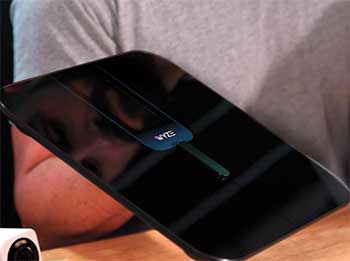
Both have premium glass platforms with full-surface ITO coating for consistent readings no matter where your feet land. The Scale X’s hidden display keeps the top completely black and minimalist when off—perfect if you want it to blend in.
The Ultra’s large screen makes it more of a statement piece; it’s noticeably more modern but also draws more attention sitting out. I don’t mind, but in a shared or minimalist bathroom, the X might feel less obtrusive.
- Heart rate measurement and display
Both scales measure heart rate using the same electrode technology, and accuracy feels comparable in my testing.
However, the Ultra can show a basic heart rate reading on its larger screen in some configurations, while the X pushes everything to the app. It’s a small edge for the Ultra if you’re curious about resting heart rate trends alongside weight.
- Setup and initial pairing experience
Setting up the Scale X is dead simple: pair via Bluetooth and go. The Ultra adds a Wi-Fi setup step, which takes an extra minute or two to connect to your 2.4GHz network, but once done, it’s set-and-forget. I found the process smooth on both, though the Ultra’s bigger screen makes following on-device prompts easier.
- Potential for future features
With Wi-Fi built in, the Ultra feels more future-proof. Wyze could push over-the-air updates or new display modes more easily. The Scale X, limited to Bluetooth, might not get the same level of ongoing enhancements.
That’s speculation based on how connected devices usually evolve, but it’s something I consider for long-term ownership.
Getting To Know The Wyze Scale X
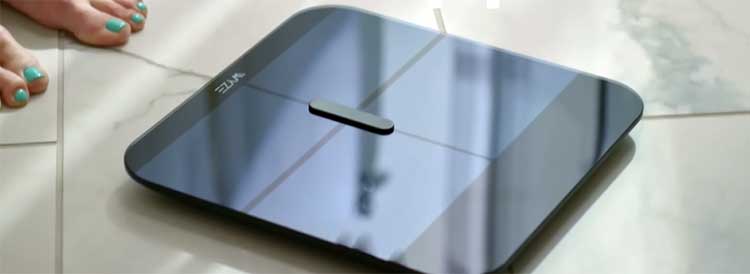
I’ve relied on the Wyze Scale X as my go-to bathroom scale for over a year now. It’s straightforward, reliable, and doesn’t overwhelm you with unnecessary bells and whistles.
- Sleek and minimalist design — The square glass platform with ITO coating feels premium underfoot. It comes in black or white, blending seamlessly into any bathroom. At just over an inch thick, it slides easily under a vanity when not in use.
- Hidden LED display — The screen lights up only when you step on, showing your weight clearly and then body fat percentage. It’s subtle and saves battery.
- 13 body composition metrics — It tracks everything from basic weight to advanced readings like visceral fat and metabolic age. I appreciate how it gives a fuller picture than a traditional scale.
- Special modes for versatility — Baby mode lets me weigh my toddler accurately by holding them, pet mode works great for my dog, and luggage mode helps before trips. Pregnancy mode turns off bioelectrical impedance for safety.
- Bluetooth syncing — It connects quickly to the Wyze app, pushing data to Apple Health or Google Fit without fuss.
- Long battery life — With power-saving features, I’ve only changed batteries once in 18 months of daily use.
- User recognition — It auto-detects me versus my partner, keeping data separate for up to eight profiles.
The Scale X feels like a solid daily driver—nothing flashy, but it gets the job done consistently.
Pros And Cons of The Wyze Scale X
Pros
- Exceptional value for money → At around $34, it delivers professional-level metrics without breaking the bank. I’ve compared it to pricier scales, and it holds its own.
- Outstanding battery longevity → Nearly two years on one set of batteries means less maintenance and fewer interruptions.
- Clean, understated design → The hidden display keeps the bathroom looking tidy, and the glass surface cleans easily.
- Reliable daily performance → It recognizes me instantly 99% of the time, and readings stay consistent morning after morning.
- Full app integration → Syncing to my fitness apps creates a complete health ecosystem without extra effort.
- Versatile modes that actually work → Holding my squirmy toddler in baby mode gives accurate weights every time.
- Compact and storable → The slim profile fits anywhere, ideal for small apartments.
Cons
- Limited on-scale information → Only seeing weight and body fat forces me to open the app for everything else, which can feel inconvenient.
- Bluetooth dependency → If my phone is charging in another room, data doesn’t sync until later.
- Basic display → The monochrome LED works fine but lacks the wow factor of newer models.
- No direct trends on device → I miss seeing progress at a glance without pulling up the app.
Overall, the cons are minor for the price—it’s hard to beat this level of functionality on a budget.
Exploring The Wyze Scale Ultra
When I unboxed the Wyze Scale Ultra, I immediately noticed the upgrade feel. It’s the newer model, and that large screen makes it stand out right away.
- Large 4.3-inch color display — This is the star feature. It shows weight, body fat, muscle mass, and even short trends right on the scale—no phone needed for quick checks.
- Customizable screen options — I can choose which metrics appear first or add motivational messages. It’s fun to personalize.
- Wi-Fi connectivity — Unlike the X, it syncs data directly to the cloud, so readings upload even if my phone is across the house.
- Same 13 core metrics — It measures identical stats to the X, but displays far more on the device itself.
- Enhanced on-scale trends — I see weekly or monthly changes in weight and body fat directly, which motivates me more than app-only graphs.
- Full-surface ITO sensors — Stepping anywhere on the glass gives consistent readings, just like the X.
- All the same special modes — Baby, pet, luggage, and pregnancy modes carry over perfectly.
- Bright, vibrant interface — The color screen makes readings easy to see, even in dim morning light.
The Ultra feels more modern and interactive, like having a mini dashboard in the bathroom.
Pros And Cons of The Wyze Scale Ultra
Pros
- Game-changing large color screen → Seeing muscle mass, visceral fat, and trends right after stepping off motivates me more than any app ever could.
- Wi-Fi convenience → Automatic cloud syncs mean my data is always up to date, no matter where my phone is.
- More engaging user experience → Customizing the display makes weigh-ins feel less like a chore and more like checking a personal dashboard.
- Better morning routine integration → I get meaningful insights before coffee, without touching my phone.
- Same accurate metrics as the X → No compromise on measurement quality, just better presentation.
- Bright and readable interface → Even without perfect lighting, numbers pop clearly.
- Future-proof features → Wi-Fi support suggests better long-term app updates and integrations.
Cons
- Shorter battery life → Nine months versus two years means more frequent battery swaps.
- Slightly higher cost → The $10–$12 premium might matter if you’re on a tight budget.
- Larger footprint visually → The big screen makes it more noticeable in the bathroom compared to the minimalist X.
- Potential overkill for basic users → If you only care about weight, the extra features might go unused.
The Ultra’s advantages shine brightest for anyone who wants deeper daily engagement with their data.
How Accurate Are These Scales In Real Life?
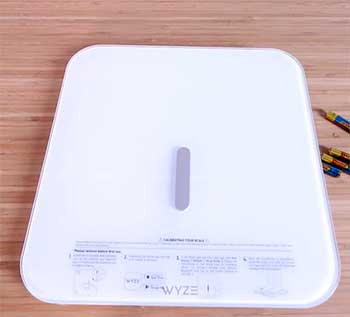
Both scales use bioelectrical impedance analysis (BIA) with ITO-coated glass, sending mild electrical signals through your body to estimate composition.
I’ve tested them side by side for months, and consistency is impressive.
Weight readings match within 0.2 pounds between the two.
Body fat percentage varies slightly day to day (normal for BIA), but trends align perfectly.
Factors like hydration affect readings—I’ve learned to weigh at the same time each morning for best results.
Compared to professional DEXA scans I’ve done occasionally, both are remarkably close for consumer devices. They’re not medical-grade, but for tracking progress, they’re more than sufficient.
Daily Use and Long-Term Reliability
In practice, the Scale X is the quiet workhorse—I step on, get basic info, and move on. The Ultra turns weighing into a mini check-in: I linger to see how yesterday’s workout affected muscle mass or if body water shifted.
Both handle multiple users flawlessly. My partner and I never get mixed up, and guest mode works great for visitors.
The Wyze app ties everything together nicely, with clear graphs and explanations of each metric. I especially like how it calculates protein needs based on lean mass.
Also Read: Comparison of Athlean-X And Body Beast.
Frequently Asked Questions (FAQ)
The Ultra has a large 4.3-inch color display showing multiple metrics and trends, Wi-Fi connectivity for automatic syncing, and more on-scale information. The Scale X uses a smaller LED display and Bluetooth only.
Yes, it shows weight and body fat percentage directly. Full metrics and history require the app.
Both Wyze models are highly accurate for their price range, with consistent readings that track progress reliably. Professional scales cost hundreds more for marginal gains.
400 pounds (180 kg), same as the Scale X.
Wrapping Up
I’ve loved my time with both scales, but if I had to keep just one today, I’d choose the Ultra for that incredible screen and effortless syncing—it keeps me more accountable.
You might prefer the Scale X if budget and battery life matter most; it’s still an outstanding device that changed how I track health. Whichever you pick, you’ll get reliable insights that support real progress.
Your future self will thank you for starting consistent tracking today.