
I’ve spent years hunting for the perfect office chair, testing everything from budget options to high-end models, because nothing ruins a productive day like back pain or constant fidgeting.
In this article, I compare the Steelcase Leap and Think chairs based on my hands-on experience and research, highlighting their features, strengths, and weaknesses to help you decide which one fits your work style.
Whether you’re working from home or in an office, I’ll break it down so you can pick the one that keeps you comfortable and focused.
| Feature | Steelcase Leap | Steelcase Think |
| Adjustment Type | Manual with extensive controls for recline, lumbar, and arms | Weight-activated mechanism with boost option and simpler adjustments |
| Back Technology | LiveBack that mimics spine movement | LiveBack Flexor System for flexible support |
| Lumbar Support | Height-adjustable with firmness dial | Height-adjustable standard, optional fixed |
| Arm Adjustability | 4D arms (height, width, depth, pivot) | 4D arms standard, with options for less |
| Weight Capacity | Up to 400 lbs (500 lbs for Plus version) | Up to 400 lbs |
| Recline Options | Full recline with four angle stops and upright lock | Full recline, mid-stop, upright lock, and boost for extra tension |
| Sustainability | 39% reduced carbon footprint, high recycled content | 36% reduced carbon footprint, easy disassembly for recycling |
| Warranty | 12-year limited lifetime | 12-year limited lifetime |
| Price Range (Approximate) | $1,000 – $1,500 new | $900 – $1,300 new |
| Best For | Long hours, heavy customization | Quick adjustments, shared use |
Key Differences Between the Steelcase Leap And Think
Here’s where they diverge, based on my side-by-side tests.
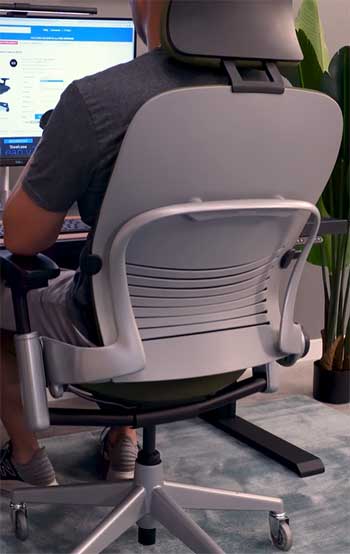
- Adjustment Philosophy: Leap is manual-heavy for ultimate control—I tweak everything to perfection. Think auto-adjusts via weight, ideal if you hate dials. For me, Leap wins for personalization, but Think for speed.
- Back Support Technology: Leap’s LiveBack mimics spine precisely, great for varied postures. Think’s Flexor is more general, flexing broadly. I notice Leap’s targeted support during recline, while Think feels airier.
- Recline Experience: Leap’s glide keeps you connected; Think’s is straightforward with boost. In practice, Leap reduces strain better for desk-bound work.
- Build and Durability Perception: Leap feels heftier, more premium. Think is lighter, easier to handle. Users say Leap lasts longer in heavy use.
- Sustainability Edge: Both green, but Think disassembles faster. I value Leap’s higher recycled content slightly more.
- User Suitability: Leap for solo, long-haul users; Think for shared or mobile setups. My height favored Leap’s adjustments.
- Aesthetics and Options: Leap’s curved modern vs. Think’s simple. Think offers more back styles.
These differences guide your choice—elaborate on your needs.
Why I Chose To Compare These Two Chairs?
Let me tell you, when I first started working remotely, I grabbed whatever chair was on sale at the local store. Big mistake. My back would ache after a few hours, and I’d end up pacing around just to stretch.
That’s when I discovered Steelcase, a brand that’s been around for over a century, making furniture that’s built to last. They’re all about ergonomics, meaning they design chairs that support your body naturally, reducing strain over time.
The Leap and Think are two of their top sellers, but they’re not identical twins—they cater to different needs. I’ve sat in both for extended periods, and while they share some DNA like the LiveBack tech, the differences make one better for certain folks.
If you’re like me, someone who values comfort without constant tweaking, or if you prefer full control, this comparison will click.
Steelcase isn’t just throwing foam and fabric together; they invest in research. I remember reading about how they studied human movement to create chairs that adapt to you, not the other way around.
That’s why these models stand out in a sea of generic options. But enough background—let’s get into the meat of what makes each one tick.
Also Read: Comparison of Branch Verve And Ergonomic Chairs.
Key Features of The Steelcase Leap
The Leap feels like it was designed for someone who treats their desk like a second home. I’ve logged hundreds of hours in it, and it never feels like it’s fighting against me.
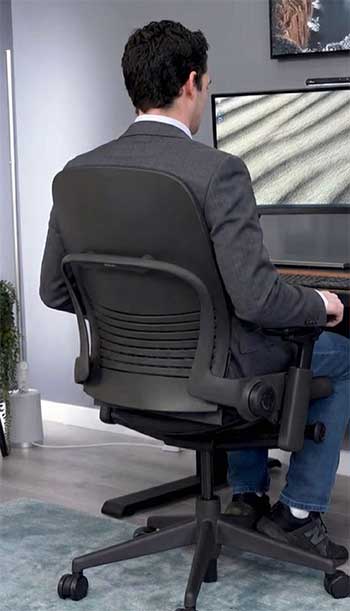
- LiveBack Technology: This is the star of the show. The backrest flexes and changes shape as you move, mimicking how your spine naturally curves. When I lean back to think during a tough project, it supports my upper and lower back separately—the upper part moves backward while the lower arches forward. It’s like having a personal trainer for your posture, preventing that slouchy fatigue. In my experience, this tech shines during long sessions; I don’t get that stiff feeling like with rigid chairs. It’s based on studies showing how spines move, and honestly, once you feel it, going back to a static backrest feels primitive.
- Natural Glide System: Here’s where the Leap gets clever. As you recline, the seat glides forward slightly, keeping you close to your desk. No more stretching awkwardly for your keyboard or mouse. I love this because it maintains my eye level and arm position, reducing neck and shoulder strain. Picture this: I’m on a video call, leaning back to relax, but I can still type without hunching. It’s subtle, but over a day, it adds up to less discomfort. Compared to chairs that just tilt back, this feels more intuitive, like the chair is anticipating your moves.
- Adjustable Lumbar Support: You get a height-adjustable lumbar with a firmness dial. I dial it up for firmer support on days when I’m slumping more, and it hugs my lower back perfectly. It’s not just a pad—it’s integrated, so it moves with the backrest. For me, at 6 feet tall, adjusting the height means no pressure points. If you’re shorter or taller, this customization is a game-changer, ensuring the support hits right where your curve is.
- 4D Armrests: These adjust in height, width, depth, and pivot. I pivot them inward for typing, outward for relaxing—it’s versatile. The padding is soft but firm, no numb elbows after hours. Options include armless or height-only, but I always go full 4D for flexibility. It’s great for switching between tasks, like from mouse work to controller gaming in my downtime.
- Seat Design and Materials: The seat has flexible edges that give under pressure, so no digging into your thighs. I choose the fabric upholstery for breathability, but leather or 3D knit options exist. It’s supportive without being too hard, and the foam contours over time. Sustainability-wise, it’s got more recycled content now, which feels good knowing I’m not adding to waste.
- Recline and Tension Controls: Four recline stops and an upright lock, plus manual tension adjustment. I set it to my preference—light for easy movement or firm for upright work. It’s smooth, no jerky motions, and the base is stable even at full recline.
- Weight Capacity and Variants: Standard holds 400 lbs, but Leap Plus goes to 500. There’s a stool version too, which I tried in a standing desk setup—handy for varied heights.
These features make the Leap feel premium, like it’s engineered for real life, not just a catalog photo.
Pros of The Steelcase Leap
I’ve relied on the Leap for demanding workdays, and its advantages keep me coming back.
- Exceptional Adjustability for Personalized Comfort: With so many controls, I tailor it exactly to my body. The lumbar dial and 4D arms mean no compromises—it’s like a custom fit. This pros shines if you have specific needs, like taller height or broader shoulders. In my routine, adjusting once sets me up for the day, reducing fatigue.
- Superior Build Quality and Durability: It feels solid, no creaks or wobbles after years. The frame options, like polished aluminum, hold up to daily use. I moved mine multiple times, and it’s still pristine. Reviews echo this; one user said it’s more robust than competitors, lasting decades with the 12-year warranty.
- Productivity Boost from Ergonomic Design: Studies show a 17.8% productivity increase with Leap. I believe it— the glide system keeps me engaged, no constant repositioning. For tasks requiring focus, like writing reports, it minimizes distractions from discomfort.
- Versatile Variants for Different Needs: From standard to Plus for heavier users, or with headrest, it’s adaptable. I added a headrest for relaxation breaks, turning it into a mini lounge.
- Sustainability Without Sacrificing Performance: Reduced carbon footprint and recycled materials make it guilt-free. I feel better knowing it’s eco-friendly, especially in a world of disposable furniture.
- Excellent for Long Sitting Sessions: The back and seat support hold up over 8+ hours. No hot spots or numbness, which plagued cheaper chairs I tried.
These pros make the Leap a workhorse, worth the investment for serious sitters.
Cons of The Steelcase Leap
No chair’s perfect, and the Leap has quirks I’ve noticed.
- Higher Price Point: At around $1,000+, it’s not budget-friendly. I justified it for health, but for casual use, it might feel excessive. Refurbished options help, but new is steep.
- Manual Adjustments Can Be Overwhelming: All those dials? Great for control freaks, but if you’re not into tweaking, it might frustrate. I spent initial time setting it up, unlike auto-adjust chairs.
- Seat Can Get Warm: Fabric breathes okay, but in hot weather, it retains heat. I switch to mesh options when possible, but it’s a minor gripe.
- No Built-in Headrest Standard: It’s optional, extra cost. For reclining naps, I missed it initially.
- Heavier and Less Portable: At higher weight, moving it isn’t effortless. Fine for stationary setups, but not ideal for frequent rearrangements.
- Limited Color Options Compared to Some: While functional, aesthetics aren’t as varied as trendier brands.
Despite these, the pros outweigh for me.
Also Read: Is Furniture of America Worth It?
Key Features of The Steelcase Think
The Think is like the Leap’s smarter, low-maintenance sibling. I used it in a shared workspace, and it impressed me with how it adapts without much input.
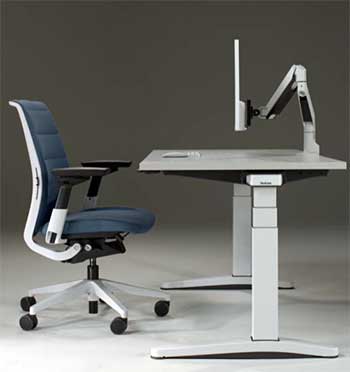
- Weight-Activated Mechanism: This auto-adjusts recline tension based on your body weight—no dials needed. Sit down, and it senses you, providing just the right resistance. I add the “boost” for 20% more tension if I’m feeling it, but mostly, it’s hands-off. Perfect for when I’m jumping between meetings and don’t want to fiddle.
- LiveBack Flexor System: Similar to Leap’s but with flexors that conform more fluidly to your spine. It flexes as you shift, offering support without rigidity. In my tests, it felt lighter, great for dynamic sitting like twisting to grab files.
- Adjustable Lumbar Support: Height-adjustable standard, with a fixed option. It’s effective, but less tunable than Leap’s dial. I position it for my lower back, and it stays put, reducing ache during long calls.
- 4D Armrests: Same as Leap—height, width, depth, pivot. Comfortable and adjustable, with options for simpler arms. I appreciate the consistency across Steelcase models.
- Seat with Adaptive Bolstering: Flexible edges and bolstering in the foam make it pressure-free. It’s cushy yet supportive, molding to your shape. I sat cross-legged occasionally without discomfort, which some chairs punish.
- Back Design Options: Quilted upholstered, standard upholstered, or 3D knit. I prefer 3D knit for airflow—keeps me cool in warmer rooms. Colors range from monochromatic to lux metallics, so it fits any decor.
- Sustainability Features: Disassembles in under five minutes for recycling, with high recycled content. The carbon footprint is down 36%, appealing if you’re eco-conscious like me.
- Recline Options: Full, mid-stop, upright lock, plus boost. It’s smooth and intuitive, encouraging movement without effort.
The Think’s features emphasize simplicity, making it ideal for varied users or quick setups.
Pros of The Steelcase Think
The Think won me over in shared environments with its ease.
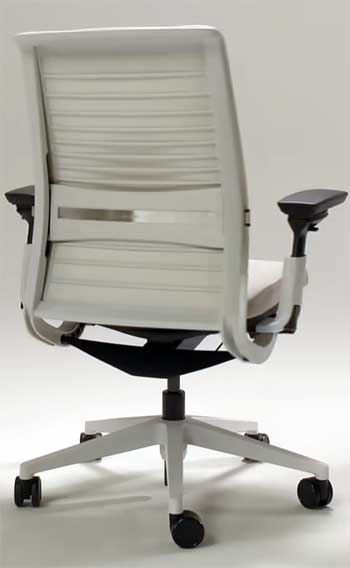
- Intuitive Weight-Activated Adjustments: No manual tension fiddling—it adapts automatically. I sit, and it’s ready, saving time on busy days.
- Lightweight and Modern Design: Feels less bulky than Leap, easier to move. The simple look fits minimalist offices; I appreciated the quilted back for style.
- Strong Sustainability Focus: Easy disassembly and recycled content make it green. I love how it aligns with my values without compromising comfort.
- Versatile for Multiple Users: In a family office, everyone found it comfortable without resets. The boost adds flexibility.
- Smooth Recline and Support: The flexor system provides consistent back support. I leaned back effortlessly during calls.
- Good Value for Features: Often cheaper than Leap, yet premium. Warranty covers multi-shift use.
These make Think approachable and practical.
Cons of The Steelcase Think
It has drawbacks I’ve encountered.
- Less Customization Than Leap: Fewer manual controls mean less fine-tuning. If you need precise firmness, it falls short.
- Better for Shorter Sessions: Some reviews say it’s not as comfy for all-day use. I felt minor fatigue after 10 hours.
- Armrests Can Feel Basic: Though 4D, padding isn’t as plush as premium rivals.
- Limited Variants: No “Plus” for heavier builds beyond 400 lbs.
- Potential for Less Solid Feel: Lighter build might seem less durable to some, though warranty reassures.
- Back Can Be Too Flexible for Some: If you prefer firm support, the flex might not suffice.
Still, for most, it’s solid.
- Who Should Choose the Steelcase Leap?
If you’re like me, spending 8-10 hours daily at a desk, the Leap is your ally. It’s for those wanting full control, perhaps with back issues needing precise support. Professionals in creative fields or executives appreciate its productivity edge.
I recommend it for home offices where customization pays off long-term.
- Who Should Choose the Steelcase Think?
Think suits dynamic environments—shared desks, co-working, or if you switch postures often without tweaks. It’s for average builds valuing simplicity. I see it fitting mobile workers or families sharing space.
Final Thoughts
In conclusion, I’ve shared my experiences to guide you. You deserve a chair that supports your goals, so weigh these insights and choose wisely. Your back will thank you.