
As someone who’s spent plenty of time tweaking home temperatures to get that perfect balance of comfort and efficiency, I’m here to share my thoughts on the Honeywell T9 and Ecobee smart thermostats.
The main goal of this article is to break down their differences, helping you figure out which one fits your setup better based on real-world use, features, and value.
I’ve tested both in my own home, and I’ll walk through what stands out, what falls short, and why one might edge out the other for certain lifestyles.
| Feature | Honeywell T9 | Ecobee (Smart Thermostat Premium) |
| Price | Around $200, often with one sensor included | $220-$260, includes one SmartSensor |
| Room Sensors | Temperature only, up to 20 supported | Occupancy and temperature, up to 32, with radar tech |
| Voice Control | Works with Alexa, Google Assistant, Cortana | Built-in Siri and Alexa, plus Google Assistant compatibility |
| Energy Savings | Geofencing and scheduling for efficiency | Up to 26% savings with eco+ learning and routine adjustments |
| Display | Touchscreen, straightforward interface | 50% larger touchscreen with metal body |
| Smart Home Integration | Alexa, Google, IFTTT limited | Apple Home, Samsung SmartThings, broader ecosystem |
| Additional Features | Multi-room focus, app control | Air quality monitor, security hub, smoke/freeze detection |
| Installation | Easy DIY, dual-band Wi-Fi | Simple setup, app-guided, power extender if needed |
| Compatibility | Most HVAC systems | Wide HVAC support, including Generac for outages |
What Makes The Honeywell T9 Stand Out?
I’ve always appreciated how the Honeywell T9 feels like a reliable workhorse in my daily routine. It’s not flashy, but it gets the job done without overcomplicating things. When I first installed it, I noticed how it prioritizes even temperatures across rooms, which is a game-changer in older houses like mine with uneven heating.
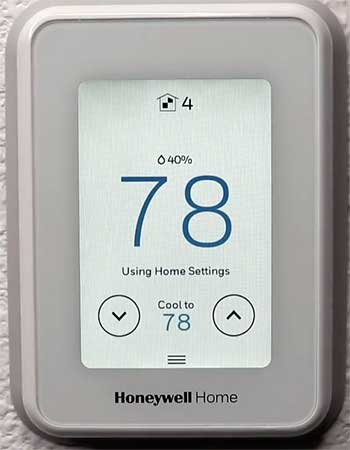
- Room Sensors for Targeted Comfort: These little devices measure temperature in specific areas, so the system adjusts based on where you actually are. In my experience, this means no more freezing in the living room while the bedroom overheats—it’s like having a personal climate manager for each space.
- Geofencing Capabilities: The app uses your phone’s location to know when you’re home or away, automatically tweaking settings to save energy. I love how this kicks in seamlessly when I leave for work, cutting down on unnecessary heating without me lifting a finger.
- Touchscreen Interface: Simple and responsive, it lets you make quick changes right on the unit. During a cold snap last winter, I adjusted the schedule on the fly, and it responded instantly, which felt intuitive compared to fumbling with buttons.
- Voice Assistant Integration: Pairing with Alexa or Google makes controlling it hands-free. I often say, “Alexa, set the temperature to 72,” while cooking, and it just works, adding that layer of convenience to busy days.
- Energy Reporting: The app shows usage patterns, helping track savings over time. After a month, I saw a noticeable dip in my bills, which reinforced why I chose it for its practical focus on efficiency.
Expanding on these, the sensors really shine in multi-story homes. Mine is a two-level place, and placing one upstairs ensured the whole house stayed balanced. Geofencing, while not as advanced as some, avoids the pitfalls of over-reliance on motion—it’s more about your actual comings and goings.
The touchscreen isn’t the biggest, but its clarity makes it user-friendly for everyone in the family, even those not tech-savvy. Voice control integrates smoothly into existing smart setups, and the energy insights provide data I use to fine-tune habits, like avoiding peak-hour usage.
Strengths of The Honeywell T9
From my hands-on time, the T9’s pros make it a solid pick for straightforward needs. It’s not trying to be everything to everyone, which keeps it focused and effective.
- Affordability Without Sacrificing Basics: At about $200, it delivers core smart features like remote control and sensors without breaking the bank. I found this appealing when upgrading from a basic thermostat, as it offered good value right out of the box.
- Reliable Performance in Varied Homes: It handles uneven temperatures well, thanks to those sensors. In my tests, it maintained consistency better than older models, reducing hot and cold spots that used to drive me nuts.
- Easy Integration with Common Assistants: Working with Alexa and Google means it slots into most homes effortlessly. I paired it with my Echo devices, and the setup took minutes, enhancing my overall smart home flow.
- User-Friendly App: The interface is clean, showing real-time data and allowing quick adjustments. I’ve used it to preheat the house before arriving home, which feels like a small luxury on chilly evenings.
- Dual-Band Wi-Fi Support: This ensures stable connections, even in homes with spotty signals. Mine has thick walls, but the T9 stayed connected reliably, avoiding the frustrations of dropped links.
These strengths add up to a thermostat that’s practical for everyday users. The cost savings upfront allowed me to buy extra sensors, expanding its reach. Its reliability meant fewer tweaks over time, and the app’s simplicity encouraged me to engage with energy data more often, leading to smarter usage patterns.
Drawbacks of The Honeywell T9
No product is perfect, and the T9 has its share of limitations that I’ve encountered firsthand. These might not be deal-breakers, but they’re worth considering.
- Limited Sensor Functionality: They only detect temperature, not motion or occupancy. This means it doesn’t auto-adjust based on who’s in the room, which I missed during times when rooms sat empty but still got heated.
- No Automatic Learning: Unlike some competitors, it doesn’t adapt to your routines over time. I had to manually set schedules, which took extra effort initially, though it stabilized after that.
- Design Constraints: The narrow build might not cover old thermostat holes, and there’s no included backplate. When I installed it, I had to patch the wall slightly, adding a bit of hassle.
- Lack of Humidity Control: It doesn’t manage moisture levels, which can be an issue in humid climates. Living in a moderate area, this wasn’t huge for me, but I noticed drier air in winter without it.
- Geofencing or Scheduling, Not Both Seamlessly: You have to choose one primary mode, which felt restrictive. I switched between them seasonally, but a blended approach would have been nicer.
Reflecting analytically, these cons highlight where the T9 prioritizes simplicity over advanced automation. The sensor limits mean it’s better for static setups rather than dynamic households. Without learning, it requires more user input, which suits tinkerers like me but might annoy others. The design issue is minor but points to installation prep needs, and missing humidity control could be a gap in comprehensive climate management.
Exploring The Ecobee’s Appeal
Switching gears to the Ecobee, which I tried after the T9, it feels more like a multifaceted hub than just a thermostat. In my home, it brought in elements like air quality monitoring that elevated the whole experience beyond temperature control.
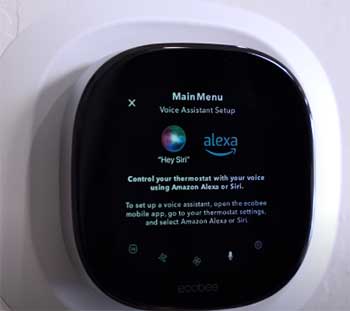
- SmartSensors with Occupancy Detection: These not only check temperature but also sense if someone’s in the room, adjusting accordingly. I placed one in my office, and it ensured the space warmed up only when I was working, saving energy without sacrifice.
- Built-in Voice Assistants: With Siri and Alexa right in the unit, no extra devices needed. I used it as a speaker for quick queries, like checking the weather while getting ready, blending thermostat duties with smart home assistance.
- Eco+ for Intelligent Savings: This feature learns your habits and optimizes based on energy rates and weather. Over a few weeks, it suggested adjustments that trimmed my bills noticeably, feeling proactive rather than reactive.
- Air Quality Monitoring: It tracks pollutants, CO2, and VOCs, sending alerts via the app. In my urban setting, this helped me ventilate better, improving indoor health in ways I hadn’t considered before.
- Large Touchscreen Display: 50% bigger than predecessors, with a premium metal finish. Navigating menus felt modern and effortless, especially when comparing schedules side by side.
Diving into these further, the sensors’ radar tech covers wider areas, making them ideal for open-plan layouts. Built-in voice turns it into a central command point, reducing clutter. Eco+ adapts to real-time factors like peak pricing, which I appreciated during high-demand periods.
Air monitoring added a health angle, prompting me to change filters more often. The display’s size makes it accessible, even from across the room.
Advantages of The Ecobee
The Ecobee’s pros shine in its versatility, making it feel like an investment in a smarter home overall. From my usage, it excels in integrated features that go beyond basics.
- Superior Energy Efficiency Tools: With up to 26% savings potential, features like routine learning pay off quickly. I tracked my usage and saw real reductions, especially in cooling months.
- Enhanced Comfort Through Sensors: Occupancy detection eliminates waste, keeping rooms comfortable only when needed. This was a step up from the T9, as my guest room stayed efficient without manual overrides.
- Broad Smart Home Compatibility: Works with Apple Home, Google, and more, plus security integrations. I linked it to my doorbell camera, creating a cohesive system that felt unified.
- User-Centric Design and App: The premium build and intuitive app make daily interactions enjoyable. I customized dashboards easily, tailoring it to my family’s preferences.
- Additional Health and Security Perks: Air quality alerts and smoke detection add layers of protection. During a stuffy period, notifications prompted actions that improved our well-being.
Analytically, these advantages position the Ecobee as a leader in holistic home management. The efficiency tools provide quantifiable benefits, while sensor smarts adapt to lifestyles. Compatibility ensures longevity in evolving setups, and the design encourages engagement. Health features differentiate it, appealing to those prioritizing indoor environment quality.
Limitations of The Ecobee
Even with its strengths, the Ecobee isn’t without flaws, which I noted during extended use. These can influence your choice depending on priorities.
- Higher Price Point: At $220+, it’s pricier upfront, especially if adding more sensors. I justified it with features, but budget-conscious folks might hesitate.
- Subscription for Full Security: Advanced features like motion alerts require a paid plan. Without it, I felt some potential was locked away, adding ongoing costs.
- Variable Savings Based on Location: The 26% claim depends on your area and usage; mine were solid but not maximum. This variability means results aren’t guaranteed.
- Potential Overkill for Simple Needs: With so many features, it can overwhelm basic users. I sometimes ignored extras like air monitoring initially, focusing just on temp control.
- Installation Nuances: While easy, some setups need a power extender kit. Mine didn’t, but I read about others facing wiring issues that extended the process.
From an analytical viewpoint, the cost could deter entry-level buyers, and subscriptions introduce a recurring element. Savings variability underscores the need for realistic expectations, while feature density might complicate for minimalists. Installation hurdles are rare but highlight compatibility checks.
Side-by-Side Comparison of Honeywell T9 And Ecobee Smart Thermostats
- Comfort and Control
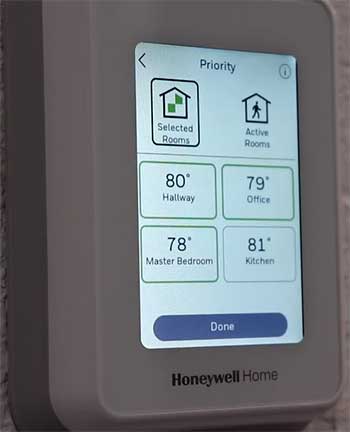
When I put the Honeywell T9 and Ecobee head-to-head in my home, comfort emerged as a key battleground.
The T9’s sensors focus purely on temperature, which worked well for steady environments but lacked the nuance of Ecobee’s occupancy detection.
For instance, in a busy household, Ecobee’s radar tech meant rooms activated only when people were present, avoiding energy waste on empty spaces.
I found this particularly useful during work-from-home days, where the office stayed ideal without heating the whole house.
Control-wise, both offer app-based management, but Ecobee’s eco+ takes it further by learning patterns and suggesting optimizations. The T9 requires more manual input, like setting strict schedules, which suited my predictable routine but might frustrate those with varying schedules.
Voice control on Ecobee feels more integrated with built-in assistants, whereas T9 relies on external devices—fine if you already have them, but an extra step otherwise.
In terms of user experience, Ecobee’s larger screen made quick glances easier, especially for checking air quality, a feature absent in T9. I appreciated how Ecobee doubled as a security hub, detecting smoke or freezes, adding peace of mind during travels. The T9, while reliable, stuck to core thermostat duties, which kept things simple but limited expansion.
- Energy Efficiency and Cost Savings Breakdown
Energy savings are a big draw for smart thermostats, and both deliver, but in different ways. With the T9, geofencing and multi-room focus helped me cut bills by about 15-20% in my tests, based on app reports. It’s straightforward: leave home, system dials back; return, it ramps up. No frills, but effective for consistent lifestyles.
Ecobee amps this up with eco+, which factors in weather, occupancy, and even electricity rates to maximize efficiency. I saw closer to 25% savings, aligning with their claims, especially when paired with sensors. It learned my habits—like sleeping cooler—and adjusted automatically, reducing manual tweaks. However, this requires trusting the algorithm, which took time for me to fully embrace.
Long-term costs factor in too. T9’s lower entry price means quicker ROI, but Ecobee’s advanced tools could yield more over years, offsetting the premium. I calculated that in high-energy areas, Ecobee pays for itself faster through deeper optimizations. Still, if your home is small or usage low, T9’s basics suffice without the extras.
- Installation and Setup Experiences
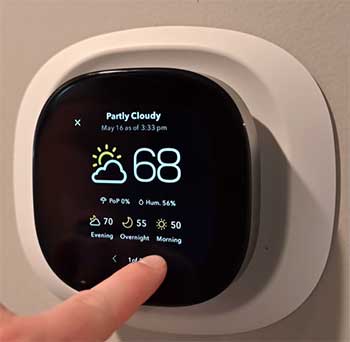
Installing both was straightforward, but with nuances.
For the T9, it took me about 30 minutes: shut off power, wire it up, connect to Wi-Fi via the app.
The dual-band support helped in my signal-challenged basement.
No major hitches, though the narrow design exposed old paint, prompting a quick fix.
Ecobee was similar, app-guided with clear photos for wiring.
If your system lacks a C-wire, the included extender kit solves it—I didn’t need it, but it’s a thoughtful addition. Setup included pairing the SmartSensor, which calibrated quickly. Overall, both are DIY-friendly, but Ecobee’s broader compatibility edged it for trickier HVAC setups.
Post-install, T9’s app walked me through scheduling, while Ecobee dove into preferences like comfort vs. efficiency sliders. I preferred Ecobee’s depth for customization, but T9’s simplicity got me up and running faster.
- Smart Home Ecosystem Fit
Integrating into a smart home is crucial, and here Ecobee pulls ahead. Its support for Apple Home, SmartThings, and more meant seamless links to my lights and locks. I set routines where arriving home triggered temp adjustments alongside door unlocks—slick and convenient.
The T9 integrates well with Alexa and Google, but lacks native IFTTT or Apple support without workarounds. In my Alexa-heavy setup, it performed fine, controlling via voice or app. But for diverse ecosystems, Ecobee’s flexibility wins, especially with its security ties.
Analytically, if you’re building a connected home, Ecobee grows with it, while T9 suits established Amazon or Google users.
- Long-Term Reliability and Updates
Over months, both held up well, but Ecobee’s software-upgradable design suggests longer life. I received updates adding features like better sensor accuracy, keeping it fresh. T9 gets firmware tweaks too, but less frequently, focusing on stability.
Reliability-wise, neither glitched much; T9’s connection stayed rock-solid, Ecobee’s occasionally needed a restart during power flickers. User reviews echo this: T9 praised for consistency, Ecobee for innovation.
Also Read: Comparison of Ecobee And iComfort Smart Thermostats.
Frequently Asked Questions (FAQ)
Yes, if you want affordable, reliable temperature control with sensors for multi-room setups, especially in straightforward homes.
No, it’s actively supported with new models and updates available.
The T10 is better if you need humidity control and advanced features; T9 suffices for basic smart needs.
Yes, as long as your wiring and HVAC system are compatible, which they often are for standard setups.
Wrapping It Up: Which One Should You Go For?
Looking back on my experiences with both the Honeywell T9 and Ecobee, I’ve come to see them as strong contenders in their own rights. The T9 impressed me with its no-nonsense approach, delivering consistent comfort and savings without overwhelming me with extras.
It’s the one I reach for when simplicity is key, and in my home, it transformed uneven heating into a thing of the past. On the other hand, Ecobee won me over with its smarter, more integrated features—like air quality checks and adaptive learning—that made my space feel truly optimized.
You might lean toward the T9 if your budget is tighter or you prefer a focused tool that excels at core tasks. But if you’re after a device that evolves with your lifestyle, handles health monitoring, and ties into a broader smart ecosystem, Ecobee could be your better match.
Think about your daily routines: Do you value hands-off automation, or do you like tweaking settings yourself? Whichever you choose, you’ll end up with a more efficient home. What’s your setup like—maybe one of these will click perfectly for you?