
I’ve logged thousands of hours in premium office chairs while working remotely, and two stand out: the Herman Miller Embody and the Steelcase Gesture. Both deliver top-tier ergonomics, but they approach comfort differently.
In this article, I share my hands-on experience to help you choose the one that fits your body, work style, and budget best.
| Aspect | Herman Miller Embody | Steelcase Gesture |
| Approximate Price (2026) | $1,800–$2,045 | $1,100–$1,400 (often discounted) |
| Warranty | 12 years | 12 years (lifetime on some parts) |
| Weight Capacity | 300 lbs | 400 lbs |
| Seat Depth Adjustment | Yes (limited) | Yes (full slide) |
| Arm Adjustments | Height, width, depth, pivot | Full 360° movement (height, width, depth, pivot) |
| Back Support Tech | Pixelated dynamic matrix + Backfit adjustment | 3D LiveBack + core equalizer |
| Best For | Long, focused sitting with natural movement | Varied postures, multi-device use |
| Headrest Option | No (not needed due to design) | Yes (optional) |
| Overall Feel | Floating, adaptive support | Versatile, posture-mimicking |
Key Differences Between Herman Miller Embody And Steelcase Gesture
These distinctions became crystal clear during my months of switching between them, and they ultimately shaped which one I reached for depending on the day’s demands:
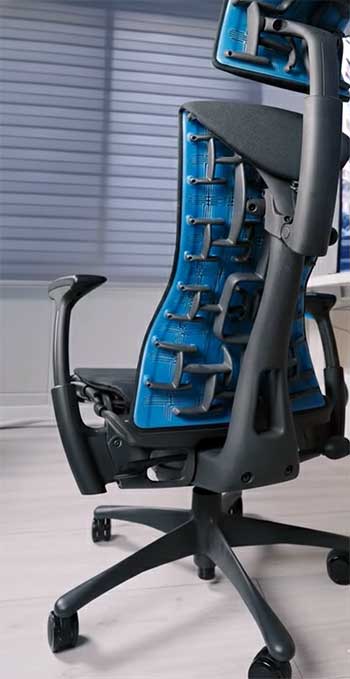
- Philosophy of Support — The Embody is built around active sitting: its pixelated system and flexible spine-like structure constantly invite small, healthy shifts in position, which kept my energy higher and reduced end-of-day fatigue. The Gesture takes a more accommodating approach—it observes how we actually sit with modern devices (slouched over phones, perched with tablets) and supports those postures without judgment or correction.
- Arm Adjustability — The Gesture’s 360° arms are in a league of their own; I could swing them forward for phone scrolling, rotate them outward for laptop-on-lap moments, or pull them tight for typing—all without ever leaving the chair. The Embody’s arms adjust well in four directions, but the restricted range meant occasional shoulder tweaks when I reached sideways or held devices at odd angles.
- Back Support Approach — Embody spreads support across a broad, adaptive pixel matrix that feels like an even, pressure-free embrace over my entire back. Gesture’s 3D LiveBack instead changes contour dynamically, flexing in multiple planes to follow my spine’s exact motion—great for big leans or twists, but sometimes less encompassing than Embody’s all-over distribution.
- Seat Experience — The Embody’s layered, pixelated seat creates a floating sensation with virtually zero pressure points; I could sit for 12 hours and stand up without the usual thigh numbness. Gesture’s seat is more traditionally cushioned with flexible waterfall edges that invite cross-legged or perched positions, but over time the foam softened in a way that felt less precise to some users (including me on heavier days).
- Recline and Tilt — Embody’s recline has a lively, almost springy quality that encourages constant micro-movements and keeps circulation going. Gesture’s recline is smoother, more controlled, and lockable—perfect for leaning back stably during calls or reading, but it doesn’t nudge you to shift as actively.
- Head and Neck Support — Gesture wins for deep recliners with its optional curved headrest that cradles the head perfectly during thinking breaks or video calls. Embody forgoes a headrest entirely, relying instead on its tall, curved back to naturally support the upper spine and neck in most positions—a design choice that works surprisingly well unless you’re 6’4″ or love fully reclining.
- Build and Capacity — Gesture feels tank-like and confidently handles up to 400 lbs with heavier-duty components. Embody is lighter, more agile in its construction, and capped at 300 lbs, prioritizing flexibility and responsiveness over sheer robustness.
- Aesthetics — Embody has a bold, almost sci-fi medical look with visible mechanics that make a statement in a home office. Gesture leans sleek and professional, blending effortlessly into corporate or minimalist spaces without drawing attention.
Also Read: Differences Between Herman Miller Mirra And Aeron.
Key Features of The Herman Miller Embody
The Embody feels alive under you—like it’s responding to every small shift. Here’s what sets it apart in daily use:
- Pixelated Support System — The seat and back are built from hundreds of independent “pixels” that flex separately. When I lean or twist, they redistribute pressure instantly, eliminating hot spots and keeping circulation strong even after 10-hour days.
- Backfit Adjustment — One intuitive dial fine-tunes the backrest curve to match my exact spinal shape. It locks in a neutral posture that’s supportive yet never restrictive—my lower back feels held without the aggressive push some chairs force.
- Central Spine and Flexible Ribs — The backrest has a central flexible spine with rib-like extensions on the sides. This setup allows natural twisting and side leans while maintaining core alignment, making reaching for notes or turning to grab something feel effortless.
- Layered Seat Design — Multiple engineered layers combine firm support, breathability, and airflow channels. The Logitech gaming edition adds copper-infused cooling foam that actively draws heat away—perfect for intense sessions without breaking a sweat.
- Tilt Mechanism — The recline tension is precisely tuned to resist just enough while encouraging subtle rocking and micro-movements. It keeps me active without thinking about it, boosting focus over long stretches.
- Armrests — Fully adjustable for height, width, depth, and angle pivot. They’re reliable for standard desk work, though they don’t reach the Gesture’s extreme range for unconventional positions.
The whole chair promotes constant, healthy micro-adjustments. I stand up feeling energized rather than stiff.
Pros of The Herman Miller Embody
After months of daily use, these strengths stand out even more:
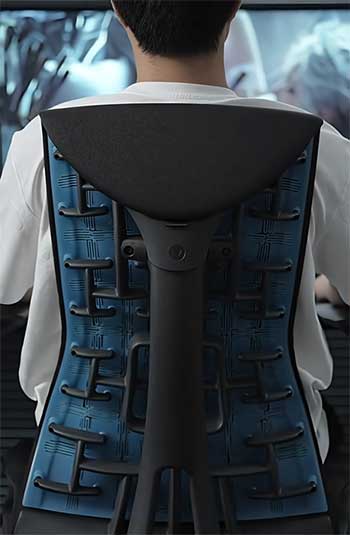
- Unmatched Back Health Support — The pixelated back and spine-like structure kept my posture neutral for hours on end. Chronic lower back tension and occasional headaches from poor alignment completely disappeared after a couple of weeks.
- Superior Pressure Distribution — Weight spreads so evenly across the pixelated surfaces that I never felt numbness or hot spots, even during 12-hour coding marathons. Standing up felt effortless, with no stiff legs.
- Active Movement Encouragement — The flexible design gently nudges you into small shifts, improving circulation and mental sharpness. I noticed I stayed more focused and less fidgety compared to traditional chairs.
- Exceptional Breathability and Cooling — Air circulates freely through the matrix layers, and the cooling foam upgrade kept me comfortable even in summer heat or during intense work sessions.
- Premium, Long-Lasting Build — Every component feels precision-engineered with high-end materials that show no wear after heavy use. The chair still looks and performs like new.
- Integrated Upper Back Support — The tall, curved back naturally cradles the thoracic area in reclines, eliminating any need for a separate headrest for most users.
- Striking Modern Aesthetic — Its futuristic, almost medical-grade design became a conversation piece in my home office and motivated me to keep the space organized.
It truly shines for deep, prolonged focus work.
Cons of The Herman Miller Embody
No chair is perfect, and these limitations became apparent over time:
- Steep Price Tag — Starting north of $1,800, it requires serious commitment and daily heavy use to feel justified compared to cheaper alternatives.
- Armrest Versatility Gap — While adjustable, the arms lack the full range of motion needed for unconventional postures, leading to occasional shoulder or neck tweaks when reaching sideways.
- Initial Seat Firmness — The flexible pixelated seat can feel unusually firm or “bouncy” at first, requiring a break-in period of a week or two before it feels truly comfortable.
- No Headrest Availability — Taller users or those who love deep reclines often wish for added neck support, which simply isn’t an option.
- Moderate Assembly Effort — Putting it together takes 30-45 minutes and some strength, unlike fully assembled competitors.
- Lower Weight Capacity — Rated to 300 lbs, it excludes heavier users who might prefer the Gesture’s more robust limit.
- Less Forgiving for Varied Postures — It rewards good posture but can feel restrictive if you’re constantly switching between devices or slouching intentionally.
Also Read: Differences Between Branch Verve And Ergonomic Chair.
Key Features of The Steelcase Gesture
The Gesture was designed around how we actually use technology today, and it shows in every adjustment:
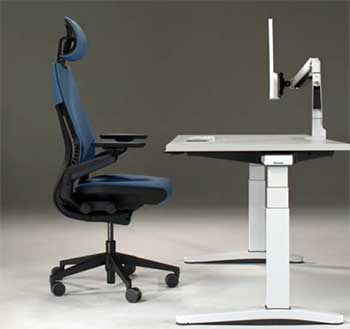
- 360-Degree Arms — These arms move like actual human arms—up/down, in/out, forward/back, and full rotation. I can position them perfectly for typing, then swing them forward for phone scrolling or wide for tablet holding, all without strain or repositioning the chair.
- 3D LiveBack Technology — The backrest flexes in three dimensions, changing shape to mirror my spine’s movement as I recline, lean sideways, or shift forward. It adapts on the fly rather than forcing me into one “correct” position.
- Core Equalizer — The lumbar zone automatically adjusts support level—firmer when I’m upright and focused, softer when I recline. It gently engages my core muscles without overwhelming pressure.
- Adjustable Seat Depth — A full-range slider lets the seat extend or retract significantly, ensuring perfect thigh support whether I’m 5’4″ or 6’4″. This prevents edge pressure on shorter users or dangling legs on taller ones.
- Contoured Seat — Cushioned with flexible waterfall edges that bend downward, it comfortably accommodates cross-legged sitting, perched forward positions, or even one-leg-tucked styles without cutting off circulation.
- Optional Headrest — The add-on headrest curves gently to cradle the head and neck in deep reclines. It’s a game-changer for video calls or moments when I lean back to think.
- Recline Limiter — Easy-to-reach controls let me set exact recline range and tension. The motion is buttery smooth and lockable at any angle for stable support during reading or calls.
It seamlessly handles constant posture changes—keyboard to mouse to phone to tablet—without ever fighting my body.
Pros of The Steelcase Gesture
Its real-world versatility grew on me the longer I used it:
- Revolutionary Arm Support → The fully 360° adjustable arms mimic natural limb movement so perfectly that switching between keyboard, mouse, tablet, and phone felt completely strain-free.
- Broad Posture Accommodation → Designed around nine common modern postures, it comfortably supports everything from upright typing to side-leaning or cross-legged lounging without fighting your body.
- Higher Weight Capacity → The 400-lb rating and sturdier construction make it more inclusive and confidence-inspiring for larger or heavier users.
- Optional Headrest Excellence → When added, the curved headrest provides perfect neck cradling during long reclines or video calls—something I missed on the Embody.
- Customizable Seat Comfort → Generous depth adjustment plus flexible edges and cushioning create a supportive yet forgiving seat that adapts to different leg lengths and sitting styles.
- Intuitive, Accessible Controls → Every adjustment lever and dial is logically placed and easy to reach without looking, making fine-tuning second nature.
- Rock-Solid Durability → Built like a tank with premium materials, it handled daily abuse without creaks, wobbles, or wear over months.
- Cleaner Professional Look → Its sleek, understated design blends seamlessly into any office environment without dominating the room.
Perfect for dynamic, multi-tasking workdays.
Cons of The Steelcase Gesture
Some shortcomings surfaced with extended testing:
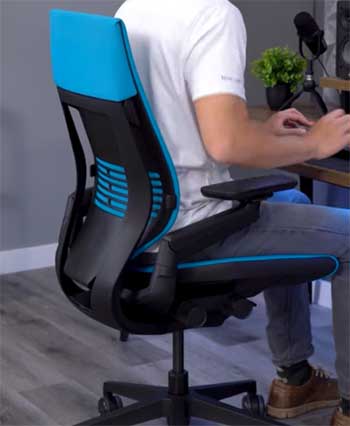
- Inconsistent Lumbar Support — The core equalizer provides decent variable support, but it can feel too subtle or insufficient for users needing aggressive lumbar push, especially during long upright sessions.
- Seat Cushion Breakdown Over Time — While initially plush, the foam compressed noticeably after several months, leading to a slightly saggy or less precise feel for some.
- Less Dynamic Recline — The recline is smooth and controllable but lacks the lively, movement-encouraging bounce of the Embody, feeling more static in comparison.
- Upper Back Support Limitations — Without the headrest, taller users may find the backrest height inadequate for full thoracic and neck support in reclines.
- Still Premium Pricing — Even with frequent discounts, it hovers around $1,200+, which remains a significant investment.
- Less Active Sitting Promotion — It accommodates whatever posture you choose but doesn’t actively encourage healthier micro-movements like the Embody does.
- Slightly Heavier and Bulkier — At around 78 lbs assembled, it’s less easy to move around compared to lighter designs.
Also Read: Alternatives To ARTIFOX Desk.
My Personal Experience Testing Both
I tested them side by side over months.
With the Embody, mornings started energized—the pixelated seat cradled me without pressure. By afternoon, easy shifts kept me alert. Twisting for files felt natural.
Switching to the Gesture highlighted arm freedom. Tablet work became effortless as arms followed my hands. Recline with headrest felt luxurious for breaks.
For deep focus, Embody reduced fatigue better. For calls and multitasking, Gesture’s versatility won.
Body type matters: at 6’1″ and 190 lbs, both fit well, but shorter users praise Gesture’s seat slide, taller ones love Embody’s back.
Which One Should You Choose?
If you sit long in one posture, prioritize back health, and want adaptive feel, choose Embody. It’s an investment in wellness.
If you switch postures often, use multiple devices, or need arm/headrest options, pick Gesture. It offers practical versatility.
Both transform workdays. Try them if possible—your body will decide.
Final Thoughts
After living with both, I lean toward the Embody for its energizing support that leaves me fresh after long hours. Yet I admire the Gesture’s adaptability. You deserve a chair that fits your unique movement, posture shifts, and daily demands.
Whichever you choose, you’ll gain comfort and productivity that makes the cost worthwhile. Here’s to better sitting—you’ve earned it.