
You know those moments when you pull a beautiful roast from the oven, only to cut into it and find it’s dry or still pink in the middle? I’ve been there too many times. The Yummly Smart Thermometer changed that for me completely.
Even in 2026, with a quick switch to a compatible app, it gives you reliable wireless monitoring that makes perfect results almost effortless. If you love cooking meat without the constant worry, this is one tool you should absolutely pick up.
My Experience With The Yummly Smart Thermometer
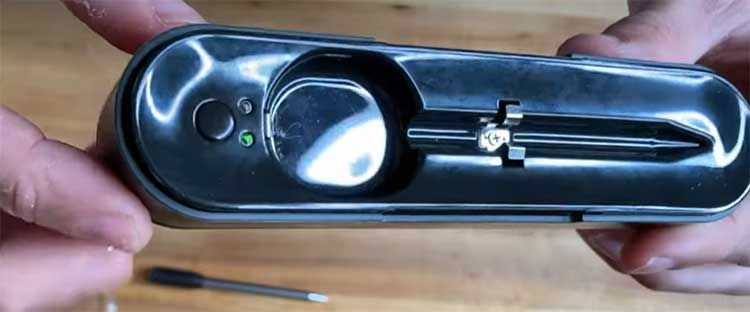
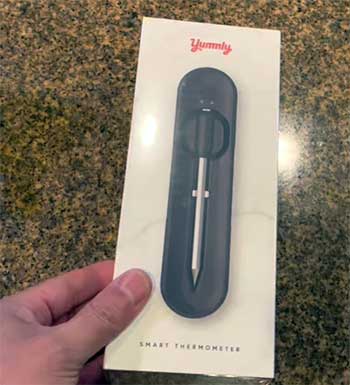
I remember unboxing my Yummly Smart Thermometer a few years back and feeling excited right away. The design felt premium—the probe is sleek, the charging dock sturdy, and everything paired smoothly with my phone at the time.
I started simple: a Sunday roast chicken. I inserted the probe, selected chicken in the original app, chose medium doneness, and walked away. My phone buzzed when it hit the target temperature, and I pulled out the juiciest bird I’d ever made at home.
What hooked me was the freedom. No more hovering over the oven or grill, opening the door every few minutes and letting heat escape. You set it, forget it, and get on with sides or relaxing with family. I took it to the grill for ribs next.
The dual sensors—one for internal meat temp, one for ambient—let me track pit temperature too. When the app alerted me to a temp drop, I adjusted the vents without guessing. Those ribs came off fall-apart tender.
Over time, I used it for everything: steaks on cast iron, smoked brisket, even Thanksgiving turkey. The presets for different meats and doneness levels took the guesswork out. You just pick beef, ribeye, medium-rare, and it guides you.
Notifications were reliable, and the estimated time remaining feature helped me plan dinner perfectly.
Of course, things shifted when the original Yummly app shut down. I panicked at first, thinking my thermometer was done for. But then I discovered the Meat°it 3 app, and it connected seamlessly.
The functionality stayed mostly the same—real-time graphs, alerts, custom settings. If anything, the new app feels snappier on my current phone. I’ve cooked dozens of meals since the switch, and it performs just as well.
One standout cook was a prime rib last holiday. I left the probe in overnight in the low oven, monitored from bed, and woke to perfect medium-rare edge to edge.
You can’t beat that peace of mind. Sure, there were minor hiccups—like occasional Bluetooth reconnects if I wandered too far—but overall, this thermometer turned me from an anxious cook into a confident one. If you’re grilling, roasting, or smoking regularly, you’ll wonder how you managed without it.
The Pros of Using The Yummly Smart Thermometer

- Complete Wireless Convenience
Picture this: you prep a massive brisket, slide in the probe, set the dock on your counter, and then lounge on the couch or play with the kids while it cooks for hours. That’s everyday reality with this thermometer. It’s 100% wireless—no cords dangling from the grill, no transmitter clipped to your belt.
The charging dock not only juices up the probe quickly but also acts as a Bluetooth extender, giving you solid range around the house. I’ve hosted barbecues where I monitored ribs from the patio furniture 100 feet away, sipping a drink without worry.
- Dual Sensors for Smarter Monitoring
Those two built-in sensors are pure genius. One reads the meat’s core temperature while the other tracks the ambient heat in your oven, smoker, or grill. You get a complete picture without buying extra probes.
During long smokes, I’ve watched the ambient temp dip when wind hit my smoker and adjusted fuel right away. It catches the stall perfectly, telling you exactly when to wrap or push through. This feature alone has saved countless cooks from drying out or staying raw in the middle.
- Intuitive App Guidance—Even After the Switch
Yes, the original Yummly app is gone, but the Meat°it 3 app picked up right where it left off for me. Pairing took minutes, and now you choose your meat, cut, and doneness level just like before.
It estimates remaining time based on current trends, shows beautiful temperature graphs, and lets you set custom alerts. If you’re new to smoking or grilling, it feels like a patient teacher guiding you.
For seasoned cooks, the data confirms what your gut says. I’ve tweaked settings mid-cook and nailed restaurant-quality results every time.
- Reliable Notifications and Presets
Your phone lights up with timely alerts—when to flip, when it’s nearing done, when to rest. I’ve pulled steaks off at the exact second for perfect medium-rare sear without overcooking.
The built-in USDA guidelines keep things safe, but you easily customize for rarer preferences. It even handles high-heat searing without flinching. After the app switch, notifications stayed just as dependable, buzzing me across the house reliably.
- Great Value When You Find One
With the original app shutdown, these thermometers pop up used or discounted everywhere, often half the price of newer WiFi models. You still get premium build quality—sturdy probe, magnetic dock, fast charging—and core features that rival $200+ competitors.
Mine has survived drops, rain splashes, and hundreds of cooks. Pair it with the free Meat°it 3 app, and you’ve got a steal that performs like new.
The Cons of Yummly Smart Thermometer
- App Transition Hassles
The shutdown of the official Yummly app hit hard for everyone—it wasn’t just me scrambling.
You lose the integrated recipes and some polished features, and switching to Meat°it 3 means re-pairing from scratch.
The new app works great overall, but it’s not identical; some menus feel less intuitive, and you might miss the old guided cooking ties.
Setup can take a few tries if your phone’s Bluetooth acts up.
That initial frustration is real, especially if you’re mid-holiday prep and suddenly need a new app.
- Occasional Connectivity Quirks
Bluetooth isn’t perfect. Thick walls, too much distance, or interference from other devices can cause dropouts. I’ve had moments during long cooks where the signal weakened when I went to the basement or far backyard—you reconnect manually, but it breaks the “set it and forget it” flow.
The dock helps extend range, but it’s not foolproof like WiFi models. After switching apps, I noticed similar quirks, though force-closing and reopening usually fixes it fast.
- Probe Durability Concerns
The probe is tough, but it’s not indestructible. Extreme high heat over time or accidental bending when inserting into thick cuts can wear it down. I’ve read stories of probes failing after a year or two of heavy use, especially if not cleaned meticulously.
The tip is delicate—rough handling or dropping it straight on the sensor end spells trouble. Mine’s held up great with careful use, but you definitely baby it more than a cheap wired thermometer.
- Limited Range Compared to WiFi Models
This is purely Bluetooth, so you’re capped at around 150 feet line-of-sight with the dock’s help. Step too far—like to a neighbor’s house or deep into the yard—and you lose monitoring. Newer competitors with WiFi/Bluetooth combos let you check temps from anywhere with internet.
If you have a huge property or like monitoring while running errands, that limitation stings. It’s plenty for most home setups, but you feel the constraint on big outdoor days.
- Missing Some Original Features
With Meat°it 3, you lose the seamless recipe integration and multi-probe labeling that felt custom in the Yummly app. Graphs are solid but less colorful, and advanced timers or rest alerts aren’t quite as refined. It’s functional—don’t get me wrong—but you notice the step down in polish.
For power users who loved the full ecosystem, that gap adds quiet annoyance over time.
Maintenance Tips For Yummly Smart Thermometer
- Proper Cleaning After Every Use: You keep this thermometer performing like new by cleaning right. Never submerge the probe—wipe the metal part with warm soapy water and a soft cloth immediately after cooling. Food residue bakes on and affects readings if left. I use a gentle scrub for stuck bits, then rinse and dry thoroughly. The ceramic handle stays cool, so no worries there.
- Smart Charging Habits: The dock charges the probe magnetically—super convenient. You avoid overcharging by removing it once full; the light turns green when done. I charge after each cook, and the battery lasts multiple sessions. Store the probe in the dock to keep it ready. Dust the contacts occasionally with a dry cloth for solid connection.
- Safe Storage Practices: Keep everything in a dry drawer or the original box. Extreme cold or heat warps components. I clip the probe in the dock and store upright—prevents bending. If inactive for weeks, charge fully first to maintain battery health.
- Regular Calibration Checks: Accuracy matters most. You calibrate easily in ice water (32°F) or boiling water (212°F adjusted for altitude). The app guides adjustments if off. I check every few months, especially after high-heat cooks. Small offsets happen over time, but calibration keeps it spot-on.
- Avoiding Common Damage: Never insert into frozen meat—thaw first to prevent bending. For grilling, position away from direct flames. If it overheats, the app warns, but pull early if needed. Gentle insertion at the thickest part avoids sensor damage.
These habits make mine last years with zero issues. You protect your investment and ensure every cook stays precise.
How Yummly Smart Thermometer Stacks Up Against Other Brands?
- Yummly Vs. Chef iQ Smart Thermometer

The Chef iQ feels like the premium upgrade you consider when you’re ready to go all-in.
It uses WiFi for truly unlimited range—you monitor your brisket from the office or even on vacation if your home internet stays up.
The probes are ultra-thin with multiple sensors (often quad setup: several internal plus ambient), giving hyper-accurate readings from any insertion angle.
The dedicated app is polished, packed with guided recipes, step-by-step instructions, and even calculates rest times perfectly. You feel like a pro chef following along.
My Yummly can’t match that anywhere-anytime access since it’s Bluetooth-only with the dock extender—great around the house or yard, but it drops if you wander too far. The Meat°it 3 app works reliably but lacks the deep recipe integration and hand-holding of Chef iQ’s ecosystem.
On the flip side, Yummly setup is dead simple—no hub required—and you often find them cheaper now, especially used. If you cook big holiday meals with lots of sides and need to step away completely, Chef iQ wins hands down.
For everyday grilling where you’re nearby, I still reach for my Yummly—it’s less fuss and gets the job done without the higher price tag.
- Yummly Vs. MeatStick
MeatStick, especially the newer V models, pushes the envelope on durability and heat resistance. These probes handle insane temperatures—up to 1200°F in some configs—making them ideal for deep frying, rotisserie, or screaming-hot sear sessions without worry.
True wireless design means no dock; the probe connects directly, and WiFi versions give you cloud access from anywhere. The app supports multiple probes seamlessly, with strong battery life for marathon smokes. You insert it deep, and the quad-sensor tech tracks gradients across thick cuts better than most.
Compared to that, my Yummly feels a bit more traditional. Its dual sensors (one meat, one ambient) are solid for monitoring cooker temp alongside the food, but it tops out at lower heat thresholds and needs the charging dock for best range.
Bluetooth dropouts happen occasionally indoors, while MeatStick’s connectivity feels more robust. That said, I appreciate Yummly’s magnetic dock for easy charging and storage—MeatStick charges differently and can feel fiddly. MeatStick costs more upfront, especially for WiFi models, while you snag Yummly deals easily.
If you’re into extreme cooking or need multi-probe setups without wires everywhere, MeatStick pulls ahead. For single-probe reliability on standard grills and ovens, Yummly keeps things straightforward and budget-friendly.
- Yummly Vs. ThermoPro TempSpike

This matchup feels closest—both are Bluetooth-focused with a booster/ extender for extended range, making them direct rivals in the affordable wireless category.
The TempSpike (and its Plus dual-probe versions) boasts impressive 500-foot range claims, accurate dual readings, and a clean app with presets and graphs.
Battery life is strong, and you often get more probes for the money, perfect if you’re cooking multiple steaks or zones.
It’s rugged, dishwasher-safe in parts, and users rave about consistency on long cooks.
My Yummly mirrors a lot of this: similar dock booster, reliable notifications, and spot-on temps after calibration. The build feels equally sturdy, and the Meat°it 3 app delivers comparable graphs and alerts. Where TempSpike edges out is raw range and availability of multi-probe kits at low prices—great if you scale up.
Some report TempSpike’s ambient readings as slightly more stable. But I find Yummly’s probe insertion easier and the overall feel a touch more premium. Price-wise, they’re neck-and-neck now, with Yummly sometimes cheaper on the secondary market.
If you want out-of-the-box multi-probe capability without spending big, TempSpike might suit you better. For simple, single-probe excellence that survived an app shutdown, my Yummly still feels like the dependable old friend.
At the end of the day, Yummly punches above its weight for the price and simplicity, especially if you’re not chasing WiFi or extreme features. You decide based on your cooking style—if unlimited range or advanced apps call to you, look at Chef iQ or MeatStick.
For solid, no-nonsense performance without breaking the bank, Yummly remains tough to beat.
Also Read: Comparison of CHEF iQ And Instant Pot.
Frequently Asked Questions (FAQ)
Yes, generally within 2-3 degrees when calibrated properly.
No, it works fully with the Meat°it 3 app.
Whirlpool decided to discontinue due to market competition and shifting priorities.
On Hell’s Kitchen, he bans them to force contestants to develop touch and timing skills, though he recommends them for home cooking safety.
Final Thoughts
After years of using the Yummly Smart Thermometer, I still reach for it constantly. The switch to a compatible app kept it relevant, delivering stress-free, perfect results every time.
You get professional-level precision without the fuss or high cost. If flawless meats matter to you, grab one—you won’t regret it.