
I’ve been through the wringer with home security options, and let me tell you, if you’re already in the Xfinity ecosystem or looking for seamless integration with your internet and TV setup, Xfinity Home Security is a smart buy. I
t combines reliable monitoring with smart features that make protecting your place feel effortless. You get customizable gear without long-term contracts tying you down, and it could save you money bundling services.
Trust me, it’s worth grabbing now for that peace of mind.
My Hands-On Time With Xfinity Home Security
When I first decided to amp up security at my house, I was tired of feeling vulnerable every time I left for work or a weekend trip. I’d heard about Xfinity Home through friends who bundled it with their cable, so I figured, why not?
I’m already paying for Xfinity internet, might as well see if this fits. Signing up was straightforward—I called their support line, and within a week, a technician showed up to install everything. No DIY hassle for me; I wanted it done right from the start.
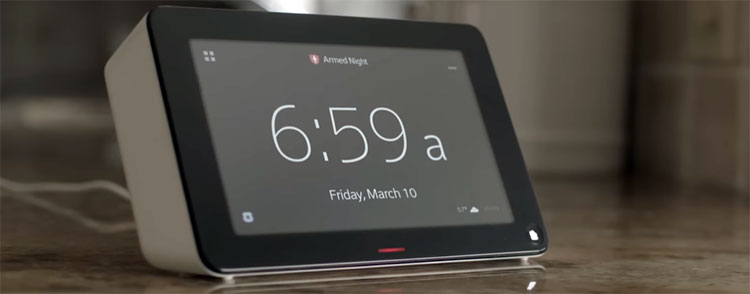
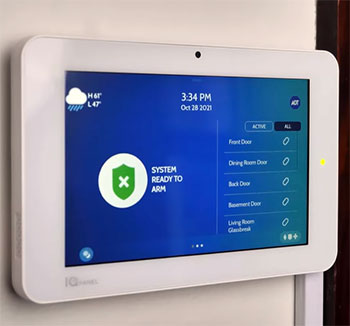
The base setup included a touchscreen hub, door sensors, a motion detector, and an indoor camera. I added an outdoor camera later because my backyard felt too exposed. The hub is this sleek panel that sits on my kitchen counter, and it controls everything.
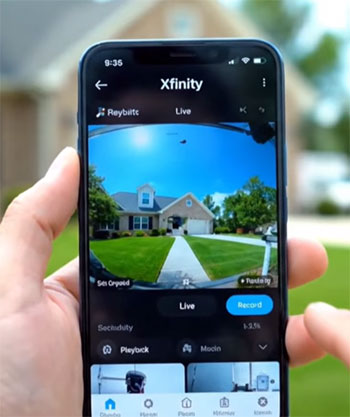
You arm the system with a tap, and it integrates with the Xfinity app on my phone. That app became my go-to; I check live feeds while at the grocery store or set automation rules like turning on lights when motion is detected after dark.
One evening, I got a notification about movement in the garage. My heart raced, but pulling up the app showed it was just the neighbor’s cat knocking over a trash bin. False alarm, but it proved the system’s responsiveness.
The video quality is sharp, even at night with infrared, and recordings store for up to a week without extra fees on the basic plan. I love how it ties into my smart thermostat—when I arm the system in away mode, it adjusts the temperature to save energy.
But it’s not all smooth. Early on, I had connectivity glitches where the app lagged, probably because my Wi-Fi signal was weak in spots. A quick router reboot fixed it, but it made me appreciate the cellular backup option.
Customer service was hit-or-miss; one call got me a helpful rep who walked me through resetting sensors, but another time I waited forever on hold. Still, over six months, it’s become second nature.
You set schedules for arming, and it learns your patterns, like disarming when my phone’s GPS shows I’m pulling into the driveway.
I tested the professional monitoring by triggering the alarm on purpose once. The response was quick—a call came in under a minute asking if everything was okay. No police showed up unnecessarily, which is good because I hate false dispatches.
Compared to my old basic doorbell cam, this feels comprehensive. It’s not perfect, but for someone like me who values integration over standalone gadgets, it’s been a game-changer. You might find yourself checking the app obsessively at first, but that fades into confidence.
Overall, my experience has solidified why I stick with it—it’s reliable when it counts.
Pros of Xfinity Home Security
Let me share what I really appreciate about Xfinity Home Security after using it daily. From an analytical standpoint, these features make it stand out in ways that fit real-life needs.
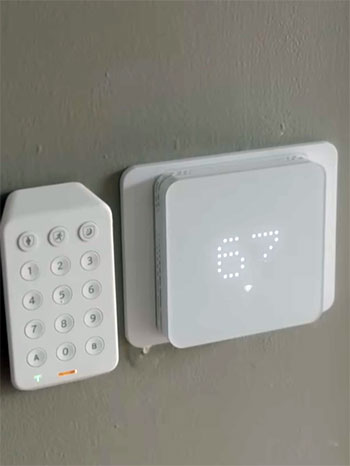
- Customization Options: You can pick exactly what you need—whether it’s just a few sensors or a full suite with cameras and smart locks. I started small and expanded, and it didn’t feel overwhelming. The equipment quality is solid; those sensors are durable, sticking firmly to doors and windows without peeling off like cheaper ones I’ve tried before.
- Seamless Integration: If you’re like me and have their internet or TV, everything syncs up beautifully. I control my lights, thermostat, and even some plugs through the same app. No juggling multiple accounts or apps—it’s all in one place, making your home feel smarter without extra effort.
- Flexible Monitoring Plans: The no-contract option for monitoring? That’s freedom. I went with the self-monitoring at $10 a month initially, which lets you handle alerts yourself, but I upgraded to professional for $55 when I traveled more. No penalties if you change your mind.
- Intuitive App Features: It’s intuitive, with real-time notifications that ping your phone instantly. I get clips of activity, and the two-way audio on cameras lets me talk to delivery folks from work. Video storage is generous, and playback is smooth. Plus, the system’s compatibility with voice commands through their own setup means I can arm it hands-free while cooking dinner.
- Bundling Value and Reliability: My overall bill dropped because of discounts, and the 24/7 monitoring includes rapid response from certified centers. They’ve got cellular backup, so even if Wi-Fi drops, you’re covered—crucial during storms in my area. Equipment warranties cover up to a year, and returns are easy within 30 days if it doesn’t click.
- Scalability and Smart Automations: As my needs grew, adding devices was plug-and-play. The motion detectors are pet-friendly, ignoring my dog’s wanderings but catching anything bigger. Night vision on cameras is clear up to 30 feet, and the hub’s battery lasts hours during outages. When the system detects no motion for hours, it dims lights or adjusts HVAC, which shaved a bit off my utility bills. I analyzed my usage pre- and post-install, and the difference was noticeable.
- Durability and Uptime: The outdoor cameras withstand weather well; mine’s been through rain and wind without issues. And for families, the geofencing reminds you to arm if you forget when leaving—peace of mind for forgetful folks like me. Sensors rarely false trigger, and when they do, tweaking sensitivity in the app fixes it. The professional installation ensured everything was placed optimally, avoiding blind spots. If you’re bundling, the cost-effectiveness is hard to beat; I saved more than with standalone systems.
These positives add up to a system that’s practical and user-focused. If you’re weighing options, think about how this fits your routine—it’s made mine safer without complication.
Also Read: Comparison of SimpliSafe And Smith Thompson Home Security.
Cons of Xfinity Home Security
On the flip side, Xfinity Home isn’t flawless, and I’ve run into frustrations that might make you pause. Analytically, these issues could sway your decision depending on your setup.
- Dependency on Xfinity Services: If you’re not already a customer or plan to switch providers, this locks you in. I considered changing ISPs once for better speeds elsewhere, but ditching the security integration stopped me. It’s convenient if you’re committed, but limiting otherwise.
- Inconsistent Customer Service: Some reps are knowledgeable, fixing issues quickly, but others transfer you around or give scripted answers. When my camera feed glitched, it took two calls to resolve what should have been simple. Reviews from others echo this—long hold times and unresolved complaints are common.
- Pricing Add-Ons: While base monitoring is affordable, adding equipment racks up costs. My outdoor camera was $120 extra, and if you finance, interest might apply. Professional monitoring at $55 monthly feels steep compared to competitors offering similar for less. Hidden fees, like activation or early termination if you cancel bundles, add up.
- Limited Smart Home Compatibility: No native support for Alexa or Google Assistant means I can’t control it through my Echo dots. It’s their ecosystem or nothing, which feels outdated when everything else plays nice together. If you have a mixed smart home, this could frustrate you.
- Installation Challenges: While pros handle it well, if you want to add devices later, some require tech visits, costing extra. My sensor relocation needed a $50 fee. And availability—it’s not everywhere; check your area first.
- Missing Advanced Features: The lack of advanced AI features lags behind. No facial recognition or package detection like some rivals, so alerts can be generic. Battery life on wireless devices needs checking every few months, and if you forget, coverage drops.
Overall, these cons make it less ideal for tech-savvy users wanting flexibility.
Maintenance Tips For Keeping Your Xfinity Home Security Running Smoothly
Now, let’s talk about keeping your Xfinity Home setup in top shape—I’ve learned the hard way that a little upkeep goes far. Regular maintenance ensures reliability, and I’ll break it down so you can follow along easily.
- Battery Replacements: Those door and window sensors run on CR123A batteries, and they last about a year depending on usage. I check mine every six months via the app—it notifies low levels, but proactively swapping prevents downtime. Unscrew the cover, pop in new ones, and test by opening the door; the hub should chime. For motion detectors, it’s similar—aim for annual changes to avoid false negatives.
- Camera Cleaning: Dust and spiderwebs blur lenses, especially outdoors. I use a soft cloth with mild soap water monthly, wiping gently without scratching. For night vision, clear any debris from IR lights. Position them away from direct sunlight to prevent overheating; mine faced east and got too warm until I adjusted.
- Weekly System Tests: Arm it in test mode through the app, then trigger each sensor—walk past motion ones, open doors. Listen for alarms and check notifications. This caught a faulty sensor early for me. Also, simulate power outages by unplugging the hub; the backup battery should kick in seamlessly.
- Firmware Updates: The app pushes notifications for updates—do them immediately to patch vulnerabilities. I schedule mine during off-hours to avoid interruptions. Restart the hub monthly by powering off for 30 seconds; it refreshes connections and fixes minor glitches.
- Wi-Fi Signal Checks: Weak signals cause lags, so use the app’s signal tester for each device. If low, add Xfinity pods or move the router closer. Tighten all coaxial cables to outlets—loose ones disrupt everything. I inspect mine quarterly, hand-tightening to prevent signal loss.
- Weatherproofing Outdoor Gear: Seal any exposed wires with silicone, and ensure mounts are secure against wind. In winter, clear ice from cameras to maintain view. Indoor hubs need dust-free vents for cooling—vacuum gently around them.
- Storage Management: The app fills up with recordings; archive important ones and clear the rest to free space. Set custom rules for motion zones to reduce unnecessary alerts, saving battery and storage. If issues arise, use the app’s troubleshooting first— it guides resets and diagnostics. For example, if a sensor offline, re-pair by holding the button until it beeps. I’ve avoided service calls this way multiple times.
- Additional Routines: Tracking usage logs in the app helps spot patterns, like frequent false triggers from trees—adjust sensitivity accordingly. Professional cleanings yearly for hard-to-reach spots keep performance peak. Extend this to smart integrations—test automations monthly, like light triggers. If linked to thermostats, calibrate for accurate readings. Replace air filters in HVAC if connected, as dust affects sensors indirectly. Security-wise, change your app password quarterly and enable two-factor authentication. Review access logs for unauthorized logins. For physical security, ensure hub placement is hidden but accessible. In humid areas like mine, dehumidify rooms with electronics to prevent corrosion. Use surge protectors for all plugged devices against power spikes.
These routines build habits that make maintenance second nature. You’ll catch problems early, extending equipment life and ensuring protection when needed.
Also Read: Comparison of Wyze Floodlight V2 And Pro Home Security.
Comparing Xfinity Home Security To Other Brands
When I stacked Xfinity Home against competitors, I looked at features, costs, and usability from my user lens. Here’s how it measures up analytically.
- Xfinity Vs. ADT
You might wonder if ADT’s legacy trumps Xfinity’s convenience.
ADT offers more equipment variety, like advanced locks and environmental sensors, with nationwide coverage that Xfinity lacks in some spots.
Their monitoring is top-tier, with faster response times in tests, but it comes with contracts—up to three years—that lock you in, unlike Xfinity’s flexibility.
I found ADT’s app clunkier, less integrated if you’re not all-in on their ecosystem.
Cost-wise, ADT starts higher, around $60 monthly for basics, while Xfinity’s $55 pro plan bundles better with internet savings. If you value experience over price, ADT edges out, but for bundled users like me, Xfinity feels more practical without the commitment.
- Xfinity Vs. Ring
Ring’s DIY appeal draws many, and it’s cheaper upfront—no pro install needed, unlike Xfinity’s potential fees. Their cameras have better AI, detecting people versus animals more accurately, and integrate seamlessly with Alexa, which Xfinity skips.
I appreciated Ring’s neighborhood alerts feature, sharing local incidents, something Xfinity doesn’t match. Monitoring is $10 monthly for basics, matching Xfinity’s self-plan, but Ring’s video storage is unlimited with subscription.
However, Ring requires strong Wi-Fi without cellular backup, and privacy concerns from data sharing bug me. Analytically, Ring suits budget-conscious DIYers, but Xfinity’s professional monitoring and Xfinity tie-ins make it sturdier for full-home coverage.
- Xfinity Vs. SimpliSafe
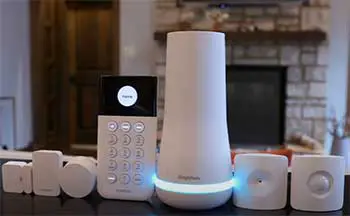
SimpliSafe shines in simplicity—no contracts, easy DIY setup, and monitoring from $18 monthly, undercutting Xfinity’s pro tier.
Their equipment is modular, adding pieces without tech visits, and app controls are straightforward.
I like how SimpliSafe works with Alexa and Google, filling Xfinity’s gap. Battery life lasts longer in their devices, and they offer indoor/outdoor cams with crisp video. But integration lacks if you’re in Xfinity’s world; no bundling perks.
From my view, SimpliSafe’s affordability and flexibility win for standalone needs, yet Xfinity’s smart home automations feel more robust for connected households.
- Xfinity Vs. Vivint
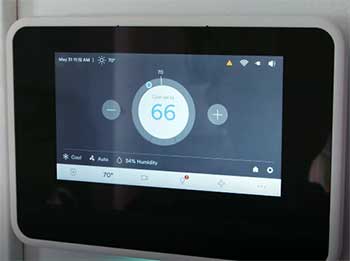
Vivint takes smart home to another level with AI-driven features like car detection and voice control via multiple assistants—Alexa, Google, even Siri—outpacing Xfinity’s limited options.
Their pro installation is mandatory, similar to Xfinity, but monitoring starts at $40, with contracts.
I found Vivint’s app more polished, with better energy management ties.
Equipment quality is premium, with longer warranties. However, costs escalate quickly, and it’s pricier without bundles.
Analytically, Vivint suits tech enthusiasts wanting cutting-edge, while Xfinity appeals to those seeking value through existing services without overcomplicating.
Also Read: Is Schlage Encode Plus Worth It?
Frequently Asked Questions (FAQ)
It’s reliable for bundled users with solid equipment, but customer service varies.
Self-monitoring is $10/month; professional is $55/month, plus equipment from $360.
ADT offers more features and coverage, but Xfinity is cheaper with no contracts.
SimpliSafe often tops lists for affordability and ease.
Wrapping Up: Make Xfinity Home Security Yours Today
After all this, I stand by Xfinity Home as a solid choice for integrated protection. It delivers where it counts—reliable gear and easy control. If you’re ready for hassle-free security that fits your life, go for it now.
You’ll sleep better knowing your home’s guarded smartly.