
I remember the days when setting up a home security system meant drilling massive holes, running expensive cables, and signing a contract that cost more than my car payment. Then Wyze came along and flipped the script.
Now, we are spoiled for choice, but that choice brings confusion.
I am writing this comparison to settle the debate between the Wyze Cam OG and the legendary Wyze Cam v3 once and for all. By the end, you will know exactly which white cube belongs on your wall.
| Feature | Wyze Cam OG | Wyze Cam v3 |
| Release Date | January 2023 | October 2020 |
| Price | ~$20 – $25 | ~$35 |
| Resolution | 1080p HD | 1080p HD |
| Field of View (FOV) | 120° Diagonal | 130° Diagonal |
| Night Vision | Color Night Vision (Standard) | Color Night Vision (Superior Starlight) |
| Integrated Spotlight | Yes (Built-in 40 lumens) | No (Sold separately) |
| Mounting | Screw mount (Non-magnetic) | Magnetic base + Screw mount |
| Weather Resistance | IP65 Indoor/Outdoor | IP65 Indoor/Outdoor |
| Load Speed | Fast (approx. 50% faster) | Standard |
| Two-Way Audio | Improved Clarity | Standard |
| Picture-in-Picture | Yes | No |
Design & Build Quality of Wyze Cam OG And v3
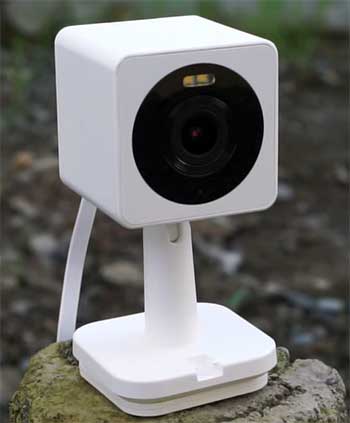
When I first pulled the Wyze Cam OG out of its box, I noticed immediately that it felt different from the v3 I had been using for years.
The v3 is that iconic, perfect little cube that sits on a flexible, folding stand. It feels dense, robust, and familiar.
The OG, on the other hand, feels a bit more like a tiny spotlight.
It has a slightly more “face-forward” design, likely to accommodate the built-in LED lights right above the lens.
The plastic on both feels durable enough to withstand the elements, which makes sense given their IP65 weather resistance ratings.
I have left both of these cameras out in rainstorms, and they survived without a hitch.
However, the biggest physical change—and frankly, a bit of a downgrade in my opinion—is the stand.
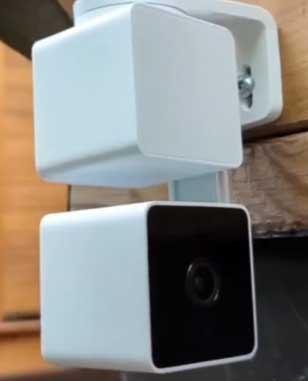
The Wyze Cam v3 features this incredible magnetic base. I cannot overstate how useful this is. I have stuck v3s to the side of my fridge, to metal support beams in the basement, and even to the gutter outside. It just snaps on.
The Wyze Cam OG abandoned the magnet. It uses a standard screw mount system. While this is secure, it removed the “slap it anywhere” convenience I loved. If you plan to mount the OG, you are getting the drill out.
Video Quality and Day Time Performance
In broad daylight, the differences between these two are subtle but noticeable if you look closely. Both push out 1080p HD video.
When I review footage from a sunny afternoon, both cameras give me crisp, clear images where I can easily identify faces, package labels (if they are close enough), and license plates.
However, the field of view is where the v3 flexes its muscles. The v3 offers a 130-degree diagonal field of view, whereas the OG restricts you to 120 degrees.
You might think 10 degrees is negligible, but when you are monitoring a wide driveway or a backyard, that extra slice of peripheral vision can be the difference between seeing a delivery driver approach and missing them entirely until they are at the door.
The OG, however, seems to handle high-contrast scenes slightly differently. I noticed the OG tends to have a “punchier” contrast right out of the box, while the v3 is a bit flatter, which actually helps in post-processing or trying to pull detail from shadows. But for the average user just checking the app, both look great during the day.
The Night Vision Battle of Wyze Cam OG And v3
This is where things get interesting, and where the “legendary” status of the v3 comes into play.
The Wyze Cam v3 became famous because of its Starlight Sensor.
I remember the first time I turned it on in a pitch-black room; it looked like daytime. It was practically magic.
The Wyze Cam OG also claims to have Color Night Vision, but in my testing, it is simply not in the same league as the v3.
When I placed both cameras in my backyard with only faint ambient light from the street, the v3 pulled in an incredible amount of light, turning a dark, grainy scene into a vibrant, colorful image without needing a spotlight.
The OG struggled to do the same. The OG’s image was darker and muddier in purely ambient light.
However, the OG has a trick up its sleeve: the built-in spotlight. If you enable the spotlight on the OG, it blasts the area with light, forcing the camera into color mode. This works, but it is not “stealthy.”
If you want to see what is happening without alerting the whole neighborhood, the v3’s ability to see in the dark without a visible beam is superior. If you want to deter an intruder by blinding them with photons, the OG wins.
App Experience And User Interface
Wyze made some significant changes to the user interface with the release of the OG. When I open the Wyze app and tap on the OG, the interface looks cleaner. The most significant change is how it handles the timeline.
On the v3, scrolling through playback requires navigating a timeline bar that can sometimes feel a bit clunky. On the OG, Wyze introduced a cleaner menu structure where “Events” and “Playback” are more accessible.
Furthermore, the OG loads faster. This was a major selling point Wyze pushed, and I can confirm it is true. When I get a notification and tap it, the OG’s live stream pulls up in about half the time it takes the v3 to buffer and connect. Those few seconds matter immensely when you are trying to catch something in real-time.
Another exclusive feature for the OG is Picture-in-Picture. You can actually stack two OG cameras (or an OG and an OG Telephoto) in the app and view one in a small window while watching the other. This is fantastic if you have them monitoring the same area from different angles—for example, one wide shot of the porch and one zoomed-in shot of the package drop-off point. The v3 cannot do this natively in the same way.
Also Read: Is Zosi Security Camera Worth It?
Key Differences Between Wyze Cam OG And v3
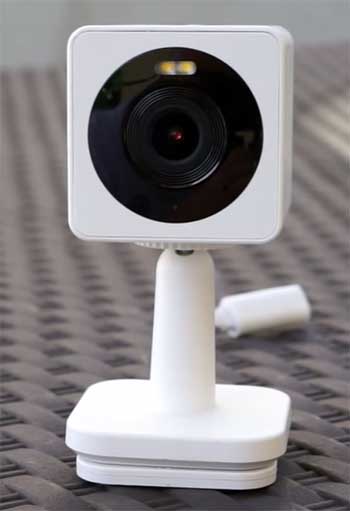
- The Lighting Approach: The Wyze Cam OG comes with a built-in spotlight. This is integrated directly into the face of the camera. It is not the brightest floodlight in the world—it is only about 40 lumens—but it is sufficient to light up a porch or a walkway. The v3 does not have a built-in light. You can buy a “Spotlight Kit” accessory that clips onto the top of the v3, but that adds bulk and cost. With the OG, the light is just there, ready to use for color night vision or deterrence.
- The Magnetic Stand Omission: I mentioned this earlier, but it deserves to be a key difference. The v3’s stand is a masterpiece of utility. It folds, it twists, and it sticks to metal. The OG’s stand is rigid and relies on screws. This fundamentally changes where you can place the camera. If you are a renter who cannot drill holes, the v3 is infinitely more friendly because you can often find a corner bead or a metal window frame to stick it to. With the OG, you will be relying on double-sided tape (which might fail) or you will have to damage the wall.
- Connection Speed and Chipset: The OG is built on a newer chipset. This results in the faster load times I described. But it also affects notifications. I found that the “motion detected” alert arrived on my phone slightly faster from the OG than the v3. In security, speed is everything. The v3 is not “slow” by 2020 standards, but in 2026, the OG feels snappier.
- Accessory Compatibility: The v3 is the “Swiss Army Knife” of the Wyze ecosystem. It works with the Wyze Lamp Socket (which allows you to power the camera from a light bulb socket) and the Wyze Floodlight. The OG, at launch, had limited compatibility with these older accessories because it uses a different power connector and shape. While adapters exist or are being developed, the v3 is undeniably more versatile if you are trying to plug it into existing Wyze infrastructure.
- Field of View: The 130-degree FOV on the v3 vs the 120-degree FOV on the OG. It sounds small, but it changes the geometry of your security. In a small room, the v3 sees the corners. The OG might cut them off.
Key Features of Wyze Cam OG
- Built-in Spotlight: Having a light integrated into the camera body simplifies the setup. You do not need to wire an external motion light. You can set the OG to automatically turn on the spotlight when it detects motion. This serves a dual purpose: it illuminates the subject for better video quality and it startles the person (or raccoon) lurking in your yard.
- Faster Live Streaming: Wyze optimized the connection protocol for the OG. If you have ever stared at a “Connecting… 1/3” screen while your delivery driver walks away, you know the pain. The OG minimizes this wait time. It feels more like a modern instant-on device.
- Picture-in-Picture (PiP): This feature allows you to pair the OG with another OG (or the Telephoto version). You can see a wide angle of your driveway and a zoomed-in view of your mailbox simultaneously on the same screen. It creates a professional-grade monitoring experience without needing a dedicated NVR monitor.
- Telephoto Compatibility: While I am comparing the standard OG here, its sibling, the OG Telephoto, is designed to work in tandem with it. You can physically stack them on top of each other using a special mount. The v3 does not have a native “stacking” ecosystem.
- Improved 2-Way Audio: Audio on security cameras is notoriously garbage. The v3 sounded like a walkie-talkie dropped in a bucket of water. The OG is not studio quality, but it is louder and clearer. You can actually have a conversation with someone at the door rather than just shouting distorted noise at them.
Pros And Cons of Wyze Cam OG
- Pros
- Price: It is generally cheaper than the v3.
- Speed: Loads feeds and notifications faster.
- Audio: Louder and clearer speakers.
- Spotlight: Integrated light is great for deterrence.
- Interface: New app features like PiP are excellent.
- Cons
- Night Vision: Inferior to the v3 in extreme darkness (without spotlight).
- Mounting: No magnetic base; screw mount only.
- FOV: Narrower field of view (120°) than the v3.
- Cord Design: The USB cable setup is slightly different and can be less weather-sealed if not used with the specific OG adapter.
Also Read: Comparison of Arlo Essential And Pro 4 Security Cameras.
Key Features of Wyze Cam v3
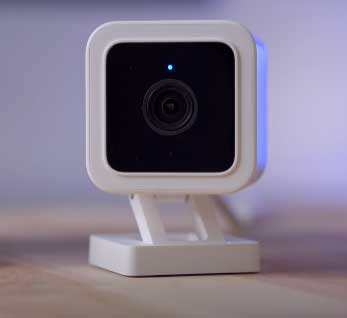
- Starlight Sensor: The aperture and sensor combination on the v3 lets in a massive amount of light. It can turn moonlight into daylight. This feature is the primary reason the v3 is still relevant years after its release. It does not need a spotlight to see clearly at night.
- Magnetic Mounting Base: I will keep bringing this up because it is that good. The ability to mount the camera without tools is a massive feature for usability. It allows for creative placement—under the hood of a car while working, on a metal fence post, or on the fridge to watch the dog.
- Wider 130° Field of View: Capturing more of the scene reduces blind spots. If you have a wide front yard, the v3 covers more of it than the OG.
- Accessory Ecosystem: The v3 fits into the Window Mount (to look through glass without glare), the Lamp Socket, and the Floodlight controller. It is the core module of a larger system.
Pros And Cons of Wyze Cam v3
- Pros
- Night Vision: Best-in-class low light performance without additional light.
- Mounting: Magnetic base is incredibly versatile.
- FOV: Wider 130° view captures more action.
- Versatility: Works with a huge range of Wyze accessories.
- Cons
- Price: More expensive than the OG.
- Speed: Slower to connect to live stream.
- Audio: Two-way audio is quiet and often muffled.
- No Integrated Light: You have to buy an add-on if you want a spotlight.
Which One Fits Your Life?
When I look at these two cameras, I see two different philosophies. The Wyze Cam v3 was an over-engineered marvel for its price. Wyze put a premium sensor in a budget body, and it paid off.
It is the camera for the enthusiast, the person who wants to see what kind of bug is crawling on their lawn at 3 AM in perfect color.
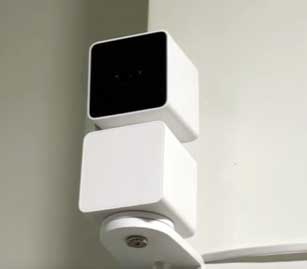
The Wyze Cam OG is the camera for the masses.
It cuts back on the expensive sensor (replacing it with a spotlight to compensate) and focuses on user experience speed.
It is designed for the person who just wants to know “Is someone at the door?” and wants to know now.
If I am securing a large, pitch-black backyard where I don’t want to annoy the neighbors with a spotlight turning on and off all night, I am choosing the Wyze Cam v3.
The Starlight sensor is non-negotiable for dark, ambient monitoring.
However, if I am monitoring a front porch, a well-lit driveway, or an indoor room, I am choosing the Wyze Cam OG. The faster load times reduce friction. The integrated spotlight is perfect for a porch where you actually want a light to turn on to help you find your keys or scare off a porch pirate.
And the cheaper price point means I can buy more of them to cover more angles.
Another factor is installation. If I am placing a camera in a rental property or a temporary spot, the v3 wins because of the magnet. I can slap it on a corner bead or a curtain rod. The OG requires me to commit to a location with screws or adhesive.
Also Read: Comparison of eufy And Reolink Security Cameras.
Frequently Asked Questions (FAQ)
The Wyze Cam OG is a budget-friendly smart security camera released by Wyze in 2023, featuring 1080p video, a built-in spotlight, and faster load times.
Its best features are the built-in spotlight, Picture-in-Picture (PiP) capability, improved two-way audio, and faster live stream loading speeds compared to older models.
No, you do not strictly need a subscription. It works with a microSD card for local recording. However, a Cam Plus subscription is required for cloud storage and AI detection (like person detection).
The Wyze Cam OG was released on January 17, 2023.
Final Thoughts
Comparing the Wyze Cam OG and the Wyze Cam v3 feels like comparing a reliable sedan to a rally car. The v3 is the rally car—it can handle the roughest conditions (darkness) with style and performance that defies its size. It is the “pro” choice in a tiny package.
The OG is the reliable sedan. It is newer, it starts up faster, it has some nice modern features like the integrated headlights (spotlight), and it is more affordable.
If you are building your system from scratch today, I recommend mixing them. Use the Wyze Cam v3 for your dark corners and backyards where night vision is king. Use the Wyze Cam OG for your high-traffic areas like the front door or garage where the spotlight and speed are most beneficial.
You do not have to pick just one team; you can have the best of both worlds.