
Wyze cameras have basically taken over my home. I started with the cheap v2s, upgraded to the v3s, and when the OG and v4 dropped, I had to figure out if the “upgrade” was actually worth the extra cash or if I should just stick to the budget-friendly options.
If you are standing in the aisle (or staring at your Amazon cart) wondering whether to save ten bucks on the Wyze Cam OG or spring for the newer, shinier Wyze Cam v4, you are in the right place.
My intent here is to walk you through the real-world differences—not just the spec sheet numbers—so you can decide which plastic eyeball belongs on your wall.
| Feature | Wyze Cam OG | Wyze Cam v4 |
| Resolution | 1080p HD | 2.5K QHD (2560×1440) |
| Field of View | 120° Diagonal | 115.8° Diagonal |
| Night Vision | Color Night Vision + Spotlight | Enhanced Color Night Vision + WDR |
| Audio | Standard 2-Way Audio | Audio Boost + Echo Cancellation |
| Connectivity | Wi-Fi (2.4 GHz only) | Wi-Fi 6 (2.4 GHz) |
| Weather Rating | IP65 Indoor/Outdoor | IP65 Indoor/Outdoor |
| Mounting | Fixed Stand (Limited adjustment) | Magnetic, Flexible 3-Axis Stand |
| Local Storage | MicroSD (up to 256GB) | MicroSD (up to 512GB) |
| Release Year | 2023 | 2024 |
| Price (Approx) | ~$20 – $25 | ~$35 |
The “Feel” And Build Quality
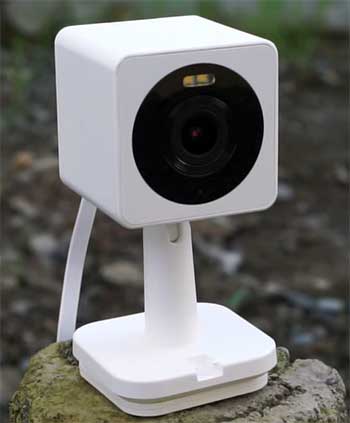
When I first unboxed the Wyze Cam OG, it felt different—and not necessarily in a good way compared to the classic v3.
It’s incredibly lightweight, almost to the point of feeling like a toy.
The biggest shock was the stand.
If you are used to the incredible flexibility of the v3 or v4 stand, the OG will frustrate you.
It is a fixed, rigid hinge.
You can tilt it, but you cannot twist it or magnetically stick it to a weird angle on a gutter easily without the mount base.
The v4, on the other hand, returns to that premium “little brick” feel. It retains the magnetic, three-axis folding stand that made Wyze famous. I found I could stick the v4 sideways on my fridge or upside down on a metal beam in my garage, and then just twist the camera lens to face the right way.
You cannot do that easily with the OG. If you plan on mounting your camera in a tricky corner, the v4 wins purely on physical versatility.
Key Differences Between Wyze Cam OG And v4
- Resolution and Image Clarity
The most obvious difference on paper is the pixel count, but in practice, it is a nuanced story. The OG shoots in 1080p. For a $20 camera, it is surprisingly crisp, but if you try to zoom in on a license plate at the end of the driveway, you are going to see a lot of digital mush.
The v4 bumps this up to 2.5K QHD. When I view the live feed on my phone, the v4 looks noticeably sharper, especially with text or distinct facial features from 15 feet away. However, the v4 seems to have higher compression, so while the resolution is higher, sometimes the video files are smaller than you’d expect, which can occasionally smear details in high-motion scenes.
- Dynamic Range (WDR)
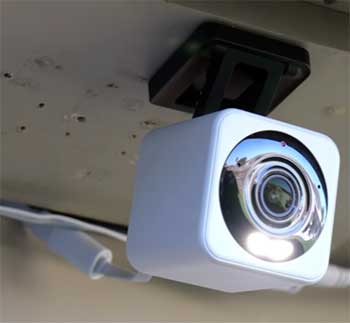
This is where the v4 actually flexes its muscles.
Wide Dynamic Range (WDR) is a feature usually reserved for more expensive pro cameras.
I have a camera pointing at my front porch where the sun hits hard in the afternoon, creating deep shadows in the corners.
The OG struggles here—the sunny parts get blown out to pure white, or the shadows become pitch black.
The v4 balances this exposure much better.
You can actually see who is standing in the shadow of the porch roof even if the sun is blazing behind them.
- Wi-Fi Performance and Loading Speeds
I live in a house with a lot of walls and a lot of interference. The OG runs on older Wi-Fi standards. It connects fine, but I noticed it sometimes lags when pulling up the live stream, taking 3 to 5 seconds to buffer.
The v4 supports Wi-Fi 6. You need a Wi-Fi 6 router to really see the benefit, but even on my standard mesh network, the v4 loads the live stream almost instantly. It feels snappier. If you are the type of person who checks your cameras 50 times a day, those saved seconds add up.
- The Stand and Mounting Experience
I cannot stress this enough: the OG stand is limited. It is designed to be simple and stackable (if you buy the specific stacking kit to put a Telephoto OG on top of a standard OG), but it lacks the “gymnastics” ability of the v4.
The v4 stand folds flat, twists 360 degrees, and has a strong magnet in the base. I have stuck my v4 to a corner bead on a wall and a metal shelving unit without using a single screw. With the OG, I almost always have to use the wall mounting plate and screws to get the angle I want.
- Field of View Nuances
Here is a weird one: The OG actually has a wider Field of View (120°) compared to the v4 (115.8°). It sounds like a downgrade for the newer model, and technically it is.
When I swapped an OG out for a v4 in my living room, I lost a few inches of view on the far left and right walls. It isn’t a dealbreaker, but if you need to cover a very wide backyard with a single camera, the OG sees just a tiny bit more of the periphery.
Key Features of Wyze Cam OG And v4
- Picture-in-Picture on the OG
This is the OG’s party trick. If you have the OG Telephoto (the 3x zoom version), you can pair it with the standard OG in the app. When you look at the standard view, you can tap to see a zoomed-in view from the Telephoto camera overlaying the main feed.
It mimics a professional security system setup. This is fantastic if you want to monitor a wide gate while also keeping a tight zoom on the keypad to see who is typing in a code.
- Integrated Spotlight on the OG
Even though it is the budget option, Wyze kept the spotlight. It isn’t blindingly bright, but it is enough to startle a raccoon or light up the path to your front door so you don’t trip over a package.
The implementation here is practical; it can trigger on motion, providing a “surprise” factor that infrared lights just don’t offer. It essentially turns a passive observer into an active deterrent.
- Faster Notifications on the OG
Wyze touted a “notification speed upgrade” with the OG compared to the v3. In my testing, alerts do hit my phone pretty fast, usually within a second or two of the motion event. This reduced latency is critical if you are trying to catch a delivery driver before they walk away.
While the v4 is also fast, the OG was the first in their lineup to really push this “instant alert” architecture.
- Audio Boost on the v4
The audio on previous Wyze cams was… potato quality. You could hear noise, but understanding speech was hard. The v4 has a significantly better microphone and speaker amplifier. When I use the two-way talk to yell at my dog to get off the couch, he actually hears me clearly now.
The voice comes through with more bass and volume, making two-way communication a viable feature rather than a gimmick you never use.
- Magic Focus / Smart Focus on the v4
Because of the higher resolution, the v4 digital zoom is much more usable. It retains clarity when you pinch-to-zoom on the app, whereas the OG falls apart into pixels pretty quickly.
Wyze utilizes this via “Smart Focus,” which tracks subjects and keeps them in frame or zoomed in. It’s like having a cameraman inside the device. While not perfect, it’s a massive step up from the static digital zoom of the OG.
- Color Night Vision with Starlight Sensor on the v4
The v4 uses a newer iteration of the Starlight sensor. In pitch black, if there is even a tiny bit of ambient light (like a streetlamp down the block), the v4 can see in full color without turning on its spotlight.
The OG can do this too, but the v4 image looks less grainy and “muddy” in low light. It pulls detail out of the darkness in a way that makes you wonder if the sun is actually up.
Also Read: Comparison of Wyze Cam v4 And v3 Spotlight Cam.
Pros of The Wyze Cam OG
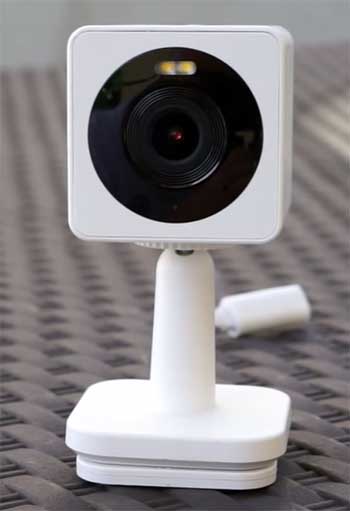
- Incredible Price-to-Performance Ratio: It is arguably the best value security camera on the market. For the price of a decent lunch, you get a fully functional IP65 smart camera. This allows you to blanket your home in coverage without breaking the bank. You can buy three of these for the price of one high-end competitor camera, covering your front door, back door, and garage simultaneously.
- Wider Field of View: That 120-degree view covers a significant amount of ground, making it great for large open spaces like backyards or garages. When you are trying to monitor a wide driveway or a double-car garage, those extra degrees matter. It effectively reduces the blind spots at the edges of the frame, which is often where the action happens.
- Snappy Wake-Up Times: The hardware is optimized for speed, and despite the older Wi-Fi, the initial “wake up” from sleep to record an event is very snappy. This means you are less likely to miss the first few seconds of an event—like the delivery person walking up—compared to older cameras that might wake up just as they are walking away.
- Included Spotlight Feature: Getting a built-in spotlight at this price bracket is a steal. Usually, manufacturers reserve active lighting for their “Pro” or “Plus” models. Having it on the entry-level OG adds a layer of safety and utility that goes beyond just video recording. It turns the camera into a utility light for late-night trash runs.
Cons of The Wyze Cam OG
- The Frustrating Fixed Stand: It really limits where you can place the camera unless you are drilling holes. It feels cheaper and less versatile than the v4. If you want to place it on a bookshelf and angle it down slightly, you might find the center of gravity tips it over, or the hinge doesn’t go quite far enough. It lacks the “stick and twist” magic of the other models.
- Lower Resolution Limitations: 1080p is “fine,” but in 2026, it is starting to look a bit soft, especially for identifying faces at a distance. If you need to read a license plate that is more than 20 feet away, the OG will likely just show you a white rectangle. The lack of pixel density limits your ability to crop in and investigate details after the fact.
- No Wi-Fi 6 Capability: If you have a crowded network, the OG might struggle more with interference than the v4. In modern homes with dozens of smart devices fighting for bandwidth, older Wi-Fi chips can get pushed to the back of the line, resulting in choppy streams or delayed notifications during peak usage times.
Pros of The Wyze Cam v4
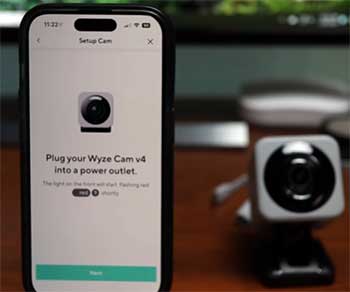
- Superior Image Quality and Dynamic Range: The 2.5K resolution paired with WDR makes for a beautiful image. Highlights are tamed, and shadows are lifted. This is critical for outdoor use where lighting conditions are uncontrolled. You get a balanced image where you can see the sky without it being white, and the porch without it being black.
- Best-in-Class Mounting System: The magnetic, folding stand is legendary for a reason. It is the gold standard for DIY camera installation. The ability to mount it magnetically to a gutter, a fridge, or a metal beam, and then articulate the camera to any angle, makes installation a ten-second job rather than a ten-minute drill session.
- Greatly Improved Audio Quality: Finally, a Wyze cam where two-way audio is actually usable for a conversation rather than just garbled noise. Whether you are talking to a delivery driver or telling your kids to stop fighting, the clarity ensures your message is received. It also means recorded audio—like voices or breaking glass—is much clearer for evidence.
- Future-Proof Connectivity with Wi-Fi 6: Wi-Fi 6 support helps future-proof your setup. It handles network congestion much better and streams smoother. Even if you don’t have a Wi-Fi 6 router yet, having a device that supports it means it will perform better when you eventually upgrade your network infrastructure.
Cons of The Wyze Cam v4
- Significant Price Increase: It costs roughly 50% more than the OG. If you are buying 10 cameras for a whole-home setup, that cost difference adds up fast. You have to ask yourself if the extra pixels are worth an extra $100+ across a whole-house installation. For many users, the “good enough” OG makes the v4 feel like a luxury tax.
- Narrower Field of View: You lose about 5 degrees of vision compared to the OG. It’s minor, but it is a regression. In tight spaces like a small porch, this might not matter, but if you are trying to cover a fence line, that missing 5 degrees could be the difference between seeing where the intruder entered or just seeing them once they are already in.
- Compression Artifacts: To handle the 2.5K video over Wi-Fi, Wyze uses heavy compression. Sometimes, a flat wall or a grassy lawn can look a bit “smudgy” because the camera is trying to save bandwidth. While the static image is sharp, high-motion scenes like swaying trees or running dogs can sometimes look a bit blocky, negating some of the resolution benefits.
Also Read: Is Wyze Battery Cam Pro Worth It?
Frequently Asked Questions (FAQ)
The Wyze Cam OG is a budget-focused, 1080p smart security camera released by Wyze in 2023 that features a fixed stand, built-in spotlight, and faster notification speeds, designed to offer essential features at the lowest possible price point.
Yes, the Wyze Cam v4 is excellent and considered the “flagship” upgrade; it offers 2.5K resolution, Wide Dynamic Range (WDR), improved audio, and a versatile magnetic stand, making it superior to the OG for users who want higher quality video.
Yes, you can use it without a subscription for live streaming and recording video to a local microSD card (sold separately), but you will not get cloud recordings or advanced AI detection (like distinguishing between people and pets) without the Cam Plus subscription.
The Wyze Cam OG was officially released on January 17, 2023.
Final Verdict
If I had to buy just one camera today, I would buy the Wyze Cam v4. The frustration of the OG’s fixed stand is enough to make me pay the extra money for the v4’s flexible magnetic mount. Plus, the WDR and audio upgrades make it feel like a thoroughly modern device.
However, if you are on a strict budget or you need to cover four corners of a garage where lighting is static and you don’t need to read a nametag from 20 feet away, the Wyze Cam OG is unbeatable. It does 90% of the job for significantly less money. Just be prepared to fiddle with that stand.
Would you like me to create a checklist for setting up your new Wyze camera to ensure you get the best Wi-Fi signal?