
If your pool maintenance feels like a never-ending chore that eats up your weekends and leaves you second-guessing every chemical addition, then you should buy the WaterGuru Sense 2 today.
I did exactly that for my backyard setup, and it turned my cloudy headaches into effortless clear water days. You get automatic testing right in your skimmer, smart alerts on your phone, and advice that actually works without any monthly fees.
Stop wasting time and money – grab one and watch your pool stay balanced while you relax and enjoy the swim season like never before.
My Hands-On Experience With The WaterGuru Sense 2
I still smile thinking back to the afternoon my WaterGuru Sense 2 arrived in a simple box.
My pool had been giving me fits all spring with inconsistent chlorine levels and surprise algae spots after every rainstorm.
I was done dipping test strips and driving to the store for refills.
The unboxing felt straightforward – the device itself, a starter cassette, four C batteries, and quick start instructions.
No fancy tools needed.
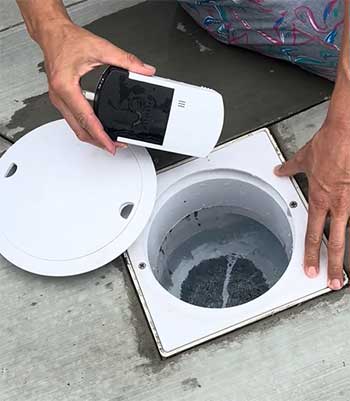
Installation took me under ten minutes. I pulled out my skimmer basket, dropped the Sense 2 inside, snapped on the special lid they include, and powered it up with the batteries. The app walked me through connecting everything on my phone.
Within seconds it started its first cycle, and I watched live as it pulled water samples and spit out numbers for free chlorine, pH, total alkalinity, calcium hardness, cyanuric acid, and even temperature.
You can imagine my relief seeing actual data pop up instead of guessing shades on a strip.
The first week I checked the app obsessively. Every morning around the same time it ran its daily test and pushed a clean summary to my phone.
I loved the graphs that showed how my water trended over days – I could literally see the spike in pH after the kids splashed around all weekend or the drop in chlorine when the sun beat down hard.
One afternoon I got an alert about low flow, which tipped me off that my filter needed a backwash. Fixed it in minutes and avoided bigger issues later.
You know those vacation worries where you wonder if the pool guy is actually checking things?
I left for a two-week trip and still got daily updates. When alkalinity crept up a bit from some heavy rain back home, the app told me exactly how much baking soda to skip and what to add instead.
My neighbor popped over once just to confirm, and sure enough the water stayed perfect. On-demand tests became my new habit too – press a button in the app, wait about twenty minutes, and you have fresh readings anytime you want.
Six months in and my chemical bills dropped noticeably because I stopped over-dosing everything. The water feels softer on my skin, stays clear longer, and I actually look forward to pool time instead of dreading the upkeep. You will feel the same shift once you start using it.
No more weekend wars with test kits or surprise green water. Just reliable balance that lets you focus on barbecues and cannonballs with the family. I honestly cannot picture going back to the old way.
Pros of The WaterGuru Sense 2
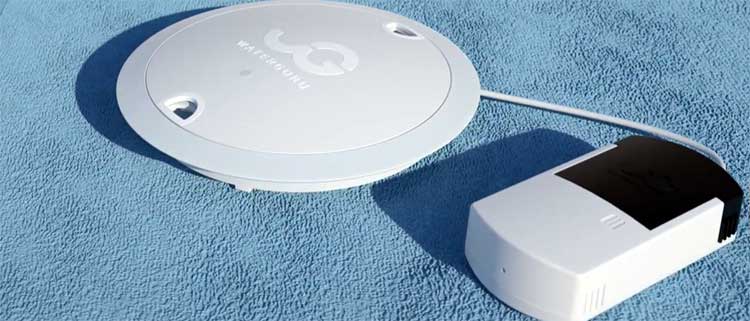
- You Wake Up To Fresh Daily Readings Without Lifting A Finger: This feature alone changed my routine completely. Every single day the device runs its cycle right from the skimmer and sends results straight to my phone before I even finish my coffee. I no longer drag out the test kit or squint at color charts. Instead I open the app and see precise numbers for free chlorine, pH, alkalinity, and the rest. You get that peace of mind knowing your water is tracked constantly, and the historical graphs help you spot patterns fast. Last summer I noticed how quickly cyanuric acid climbed during a heat wave and adjusted sunscreen use in the pool accordingly. You save hours every week and never miss a problem because the system never sleeps.
- The App Gives You Clear Advice Tailored Exactly To Your Pool: I cannot overstate how helpful the personalized guidance feels. You tell the app your pool size and type once, and every reading comes with simple steps like “add two cups of shock tonight” or “run the pump longer tomorrow.” I followed those tips and cut my chemical use by a solid chunk. No more guessing if I added too much or too little. The alerts ping me only when something actually needs fixing, so I stay calm instead of constantly worrying. You will love opening the app and seeing a green “safe zone” most days because the advice keeps everything balanced without you becoming a chemist overnight.
- Your Pool Equipment Lasts Longer And Runs More Efficiently: When the Sense 2 flagged low flow early one month, I cleaned the basket and saved myself from a clogged pump later. You get temperature monitoring too, which helped me dial in heater settings and drop energy bills. Over time those small wins add up to fewer repairs and a longer life for filters and heaters. I feel like I am protecting my whole investment now instead of crossing my fingers every season. You notice the difference when your pump runs smoother and your water stays comfortable without extra effort.
- No Subscription Ever Means You Control The Cost Completely: After the initial purchase you only replace the cassette when the app reminds you. No hidden monthly charges sneaking up on your credit card. I compared this to other options and realized how much money I keep in my pocket each year. You buy it once, use it forever, and just stock a few refills. That freedom feels fantastic when you are already spending on pool supplies. I tell every friend who complains about their bill to check this route because it keeps things simple and predictable.
- You Enjoy Safer And Clearer Water With Way Less Stress: My kids stopped complaining about itchy eyes because the pH stayed locked in the sweet spot. Algae never got a foothold once I started catching low chlorine early. You get that crisp blue look all summer without the usual drama. I swim more often now because I trust the numbers and know the water is balanced. The whole family notices how inviting the pool stays, and I get credit for finally making maintenance easy.
Cons of The WaterGuru Sense 2
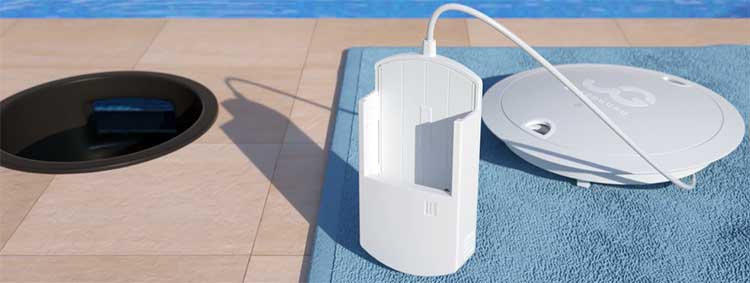
- Cassette Replacements Become A Regular Part of Your Budget: Every four weeks or so the app reminds you to swap the C5 cassette, and while they are not crazy expensive each one adds to the yearly total. I budgeted for it and still come out ahead overall, but you need to remember it is an ongoing consumable. Some months I stretch the life a little by skipping extra on-demand tests, yet you cannot ignore the schedule completely or accuracy slips. It feels like the price of convenience, but I wish they lasted a bit longer for heavier users.
- Readings Can Vary Enough That You Still Keep A Manual Kit Handy: I compare the Sense 2 numbers to my old Taylor kit every couple of weeks just to stay confident. Most days they line up closely, especially on trends, yet chlorine sometimes reads a touch lower and alkalinity can drift. You learn to trust the device for daily decisions but double-check before big adjustments. It is not perfect lab accuracy every single time, so I treat it as a fantastic guide rather than the final word.
- On-Demand Tests Take Patience While You Wait: When I want an immediate check during a party or after heavy use, the twenty-minute cycle feels slow. You cannot rush it, and the device hums away quietly in the skimmer the whole time. Daily automatic tests work great for routine, but you plan ahead if you need instant results. I got used to it, yet first-time users might find that lag annoying at first.
- Battery Swaps And Occasional Cleaning Add Small Chores: The four C batteries last around six months, but you have to fish the device out and replace them when the app warns you. Cleaning buildup from debris in the skimmer is quick but necessary every few months. You cannot set it and forget it completely, so those little tasks sneak into your schedule even though they beat full manual testing.
Also Read: Is Aiper Scuba N1 Worth It?
Maintenance And Tips For The WaterGuru Sense 2
- Swap The Cassette On Schedule To Keep Every Reading Sharp The app flashes a clear message when it is time, usually after twenty-nine daily tests for the C5 version. I keep two spares on the shelf so I never miss a beat. You simply pull the device, pop out the old cartridge, slide in the new one, and drop it back into the skimmer. Takes two minutes tops. I do this on the first of every month now like clockwork and notice accuracy stays consistent. You avoid drift by staying ahead of the schedule, and the app even tracks how many tests remain so you never guess.
- Monitor Battery Life And Replace Them Before They Die Completely Every six months or so the app gives you a heads-up that the four C batteries are getting low. I buy Energizer packs in bulk and swap them on a sunny afternoon. You lift the device out, unscrew the bottom, slide in fresh ones, and reconnect. I learned to do it before the warning turns red because low power can slow tests. You get six solid months of worry-free operation when you stay proactive, and the whole process feels no harder than changing flashlight batteries.
- Give The Device A Gentle Clean Every Month Or After Storms Leaves and debris love to collect around the sensor area. I rinse the whole unit under the hose once a month and wipe the contacts with a soft cloth. You avoid false readings this way and keep the flow channels clear. After heavy rain I do an extra check because silt can sneak in. The cleaning keeps everything running smoothly and extends the life of the cassette pads too. You will see steadier numbers once you make this habit.
- Use The App Alerts And Graphs To Fine-Tune Your Habits I set notifications for chlorine below 3 ppm and pH outside 7.2-7.6 so my phone pings only when it matters. The graphs help me see how rain or heavy swimming affects balance, so I adjust pump runtime accordingly. You learn your pool’s personality fast and catch small issues before they grow. I also run an on-demand test after adding chemicals to confirm the app advice worked. Those small checks make the whole system feel even smarter.
- Store Extra Cassettes Properly And Plan For The Off-Season I keep spares in a cool, dry cabinet away from direct sun. When I close the pool for winter I remove the device, dry it thoroughly, and store the cassette separately so it does not degrade. You start spring with fresh supplies and avoid surprises. I also test the batteries before reinstalling each year. These little habits keep everything ready and save you from mid-season scrambling.
- Combine It With Occasional Manual Tests For Total Confidence Even though I rely on the Sense 2 daily, I still dip my Taylor kit once a month for a full cross-check. You catch any slow drift early and adjust the app settings if needed. I treat the device as my daily eyes and the kit as my monthly referee. The combo gives me the best of both worlds without doubling my workload.
Comparing WaterGuru Sense 2 With Other Brands
- How WaterGuru Sense 2 Stands Against The Sutro Smart Monitor?
When I researched options the Sutro looked tempting with its floating design and extra measurements, yet I chose the Sense 2 because I hated the idea of a monthly subscription fee.
Sutro needs a separate hub and ongoing payments that add hundreds over a few years, while my WaterGuru works straight out of the box with Wi-Fi and no extra costs. The Sense 2 hides neatly in the skimmer so you never see wires or floats cluttering the water line.
I also found the cassette system simpler than Sutro’s larger canister that needs more frequent handling. Accuracy felt comparable in daily use, but the Sense 2 gave me faster setup and lower long-term spending, which mattered most for my budget.
- Why WaterGuru Sense 2 Beats Traditional Test Kits Like Taylor?
Before this device I lived by my Taylor kit, and while it delivers lab-level precision I spent every weekend mixing reagents and counting drops. The Sense 2 gives me daily automatic results without that hassle, plus graphs and advice I never got from drops alone.
You still keep the kit for occasional verification, but the daily work disappears. I cut my chemical waste dramatically because the app tells me exact amounts instead of guessing. The time savings alone make the switch worth it, and I no longer dread maintenance weekends.
- Where WaterGuru Sense 2 Wins Over pHin for Everyday Owners?
pHin offers solid monitoring but locks you into a yearly subscription that quickly exceeds the Sense 2’s one-time price plus refills. I liked that the Sense 2 sits hidden in the skimmer instead of floating visibly like pHin.
The app on WaterGuru feels more straightforward with clearer dosing instructions tailored to my exact pool volume. Battery life and cassette changes are predictable, while pHin users I know complain about connectivity drops.
Overall I get similar alerts and trends without the extra fees, which keeps my wallet happier year after year.
Also Read: Differences Between Aiper Scuba S1 And S1 Pro Robotic Cleaner.
Frequently Asked Questions (FAQ)
Yes for daily trends and close enough to manual kits that I trust it for routine care, though I still verify monthly.
No, you pay once for the device and only buy replacement cassettes as needed.
Manual test kits like Taylor or other monitors such as Sutro if you want different features.
A smart skimmer-based pool monitor that tests water chemistry daily and sends results plus advice straight to your phone.
Final Thoughts
After six months with the WaterGuru Sense 2 I can honestly say my pool has never been easier or more enjoyable to maintain. The daily peace of mind, lower chemical costs, and crystal-clear water make every swim better.
You deserve that same freedom from guesswork and weekend chores. Go ahead and pick one up – your future self will thank you when the alerts keep everything perfect and you finally get to relax by the water instead of working on it.