
As someone who’s spent countless hours hunched over a desk, I’ve come to realize that the right chair can make or break your workday. In this article, I want to share my thoughts on two standout options from Steelcase: the Gesture and the Leap.
My main goal here is to break down their features, strengths, and weaknesses through my own lens as a user, so you can figure out which one might suit your setup best. Whether you’re upgrading your home office or outfitting a team, I’ll walk you through what makes each chair tick.
| Feature | Steelcase Leap | Steelcase Gesture |
| Price (starting) | Around $1,128 | Around $1,353 |
| Weight | 48 lbs | 78 lbs |
| Weight Capacity | 400 lbs (500 lbs for Plus version) | 400 lbs |
| Seat Depth | 19 inches | 18.25 inches |
| Seat Width | 19.25 inches | 20 inches |
| Seat Height Range | 15.5 to 20.5 inches | 16 to 21 inches |
| Backrest Technology | LiveBack® with adjustable lumbar firmness | 3D LiveBack® with Core Equalizer |
| Arm Adjustments | 4D (height, width, depth, pivot) | 360-degree full rotation |
| Recline | Full recline with 4 stop settings | Full recline with 3 stop settings |
| Lumbar Support | Height-adjustable with firmness dial | Built-in, adaptive in recline |
| Warranty | 12 years, multi-shift | 12 years, multi-shift |
| Sustainability | High recycled content, reduced carbon footprint | High recycled content, reduced carbon footprint |
Key Differences Between the Steelcase Leap And Gesture
Now, let’s get into what really sets them apart. I’ve broken it down into specifics, drawing from my side-by-side tests.
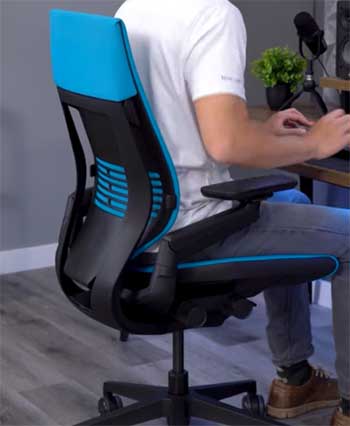
- Armrest Design and Adjustability: The Leap’s 4D arms are solid for basic needs, adjusting in four ways. But the Gesture’s 360-degree arms blow them away—they rotate fully to match human arm motions. I’ve reached for my coffee or phone in odd positions, and the Gesture supported it effortlessly, while the Leap felt limited.
- Lumbar Support Mechanisms: Leap offers a height-adjustable pad with a firmness dial, letting me customize intensity. It’s hands-on, and I’ve tweaked it daily. Gesture’s Core Equalizer is more passive, adapting automatically during recline. For me, the Leap wins for precision, but Gesture excels in seamless transitions.
- Recline Functionality and Range: Leap reclines to 120 degrees with four stops, giving more control points. I’ve locked it at various angles for tasks. Gesture goes to 125 degrees but with only three stops—deeper but less granular. In practice, Gesture felt more indulgent for lounging.
- Seat Dimensions and Comfort: Leap’s seat is deeper at 19 inches and narrower at 19.25 inches, with a firmer cushion. It’s supportive for upright work, but I’ve found it less forgiving over time. Gesture’s 18.25-inch depth and 20-inch width, plus softer bolstering, accommodates more positions. I’ve preferred Gesture for casual sitting.
- Weight and Portability: Leap is lighter at 48 pounds, making it easier to move. I’ve shifted it between rooms without sweat. Gesture’s 78 pounds make it a beast—great for stability but not for frequent relocates.
- Price and Value Proposition: Leap starts lower, around $1,128, feeling like better bang for buck if you want core ergonomics. Gesture at $1,353 adds premium features like advanced arms, which I’ve valued for tech-heavy days but might be overkill for some.
- Targeted User Postures: Leap suits traditional desk work, encouraging upright focus. I’ve used it for writing without distractions. Gesture is built for multi-device use, supporting side postures or reclined scrolling. It’s transformed how I handle hybrid tasks.
- Build and Aesthetics: Both are durable, but Leap feels compact and classic. Gesture has a modern, bulkier look that stands out. In my space, Leap blended in, while Gesture made a statement.
These differences boiled down to my needs: Leap for steady work, Gesture for variety.
Key Features of The Steelcase Leap
When I first sat in the Steelcase Leap, it struck me as a chair built for endurance. It’s not flashy, but every part seems thoughtful. Let me walk you through what stands out to me about its features, based on my time using it.
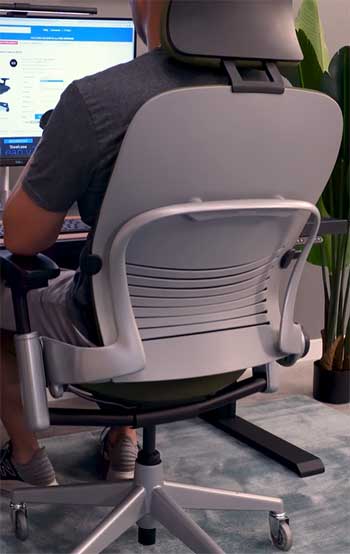
- LiveBack Technology: This is the heart of the Leap for me. The backrest flexes and changes shape as you move, mimicking your spine’s natural curve. I’ve leaned back during calls and felt it adjust seamlessly, providing support without stiffness. It’s like the chair anticipates your shifts, which is huge for someone like me who fidgets a lot. Over hours, this tech kept my back from aching, unlike rigid chairs I’ve tried before.
- Adjustable Lumbar Support with Firmness Dial: I love how customizable this is. You can slide the lumbar pad up or down and twist a dial to make it firmer or softer. In my experience, cranking it up during intense work sessions gave me that extra lower back hug I needed. It’s precise, and I’ve dialed it in to match my 6-foot frame perfectly, reducing the slouch I used to fall into.
- 4D Armrests: These adjust in height, width, depth, and pivot. They’re padded well, and I’ve positioned them to cradle my elbows while typing, easing shoulder tension. Though not as wild as the Gesture’s, they’ve been reliable for standard desk tasks.
- Natural Glide System: When you recline, the seat slides forward slightly, keeping your eyes level with your screen. I’ve appreciated this during relaxed moments—it prevents that awkward reach-forward feeling. It’s subtle but makes a difference in maintaining focus.
- Flexible Seat Edges: The seat cushion has give at the edges, so it doesn’t dig into your thighs. I’ve crossed my legs or shifted positions without pressure points building up, which is a relief for long sits.
- Recline with Multiple Stops: You get full recline with four lock positions. I’ve used the upright lock for focused work and the deeper recline for thinking breaks. The tension adjusts manually, so I can make it easier or harder to lean back based on my mood.
- Sustainability Aspects: Made with recycled materials and designed for remanufacturing, it appeals to my eco-conscious side. Knowing it has a lower carbon footprint makes me feel better about the investment.
I’ve spent weeks in the Leap, and these features combine to create a supportive, no-nonsense experience. It’s like it was designed for people who want reliability without overcomplicating things.
Pros of The Steelcase Leap
The Leap has won me over in several ways. Here’s a rundown of its strengths, from my perspective as a daily user.
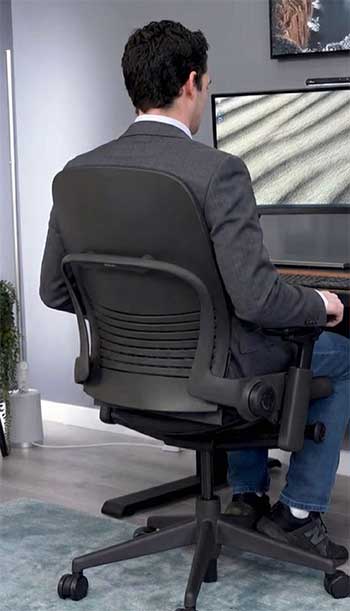
- Exceptional Back Support: That LiveBack tech is unbeatable for long hours. I’ve gone through full workdays without the usual twinges, thanks to how it conforms. It’s like having a personal back coach.
- Highly Customizable Lumbar: The firmness dial lets me tweak it on the fly. If my back feels tight, I soften it; for support, I firm it up. This flexibility has prevented soreness I used to get from less adjustable chairs.
- Lightweight and Maneuverable: At 48 pounds, it’s easier to move around my space. I’ve rearranged my office multiple times without hassle, unlike heavier options.
- Value for Money: Starting cheaper than the Gesture, it delivers premium features without the premium price tag. I’ve felt like I got a steal, especially with the lifetime warranty.
- Proven Productivity Boost: From what I’ve experienced and read, it increases focus. I noticed myself getting more done, likely due to less discomfort distracting me.
- Durable Build: It holds up to 400 pounds (or 500 in Plus), and the materials feel solid. I’ve used it daily for months, and it shows no wear.
- Eco-Friendly Design: The recycled content and remanufacturing options make it a smart choice. I appreciate not contributing to waste.
These pros make the Leap a solid pick for straightforward, reliable comfort.
Cons of The Steelcase Leap
No chair is perfect, and the Leap has a few drawbacks I’ve encountered.
- Firmer Seat Cushion: Some days, the seat feels hard after hours. I’ve added a cushion at times, though it’s not ideal for everyone.
- Limited Arm Mobility: The 4D arms are good but don’t rotate fully like the Gesture’s. If I reach for my phone oddly, they don’t always follow.
- Narrower Frame: At 19.25 inches wide, it might feel snug for broader builds. I’ve been fine, but friends with larger frames mentioned it.
- Less Recline Angle: It goes to 120 degrees, which is solid, but I’ve wished for more during relaxed moments.
- No Built-In Headrest: If you like neck support, you’ll need to add one separately. I’ve missed it during reclines.
- Basic Design Aesthetics: It’s functional but not as sleek as some modern chairs. In my stylish home office, it blends in rather than stands out.
These aren’t deal-breakers for me, but they’re worth noting depending on your needs.
Also Read: Is Just Chair Mat Worth It?
Key Features of The Steelcase Gesture
Switching to the Gesture felt like stepping into the future. It’s designed around how we use tech now, and that shows in its features. Here’s what I’ve noticed from my hands-on time.
- 3D LiveBack Technology: Similar to the Leap but with a contoured back that encourages more movement. I’ve twisted and turned while on video calls, and it supported my spine’s s-shape without protest. It’s flexible, promoting dynamic sitting that keeps me alert.
- Core Equalizer Lumbar Support: This adapts automatically as you recline, providing consistent lower back support. I didn’t have to fiddle with dials much; it just worked. For me, this was handy during multitasking, as it maintained firmness without manual tweaks.
- 360-Degree Armrests: These are a game-changer. They rotate fully, mimicking arm movements, so I could hold my phone or tablet in various positions without strain. I’ve adjusted them wide for relaxed postures or narrow for typing—versatile for my gadget-filled days.
- Adaptive Bolstering in Seat: The foam has flexible edges and bolstering that cradles you without pressure. I’ve sat cross-legged or leaned forward, and it felt accommodating, reducing fatigue in my legs.
- Recline with Angle Stops: Full recline with three stops and an upright lock. The tension knob is intuitive, and I’ve used it to find that sweet spot for casual browsing. It reclines a bit further than the Leap, which I enjoyed for brief rests.
- Optional Headrest: Though not standard, adding one lets it tilt and rotate. I’ve tried it for reclined reading, and it eased neck strain—great if you spend time looking up or back.
- Intuitive Controls: Two knobs handle most adjustments: one for seat height and depth, another for tension. It’s straightforward, and I’ve switched settings quickly without breaking my workflow.
- Sustainability Focus: Like the Leap, it uses recycled content and is built for longevity, with options for carbon-neutral certification. This aligns with my values, knowing it’s not just comfortable but responsible.
The Gesture’s features make it feel innovative, tailored for modern work where you’re not always facing straight ahead. I’ve used it for creative sessions, and it adapted effortlessly.
Pros of The Steelcase Gesture
The Gesture shines in adaptability. Let me share what I love about it.
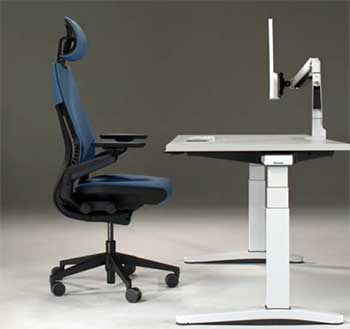
- Versatile Arm Adjustments: The 360-degree arms support any posture. I’ve held devices in weird angles, and they kept up, reducing neck strain.
- Adaptive Lumbar in Recline: The Core Equalizer maintains support as you lean back. I’ve reclined while working, and my lower back stayed happy.
- Pressure-Free Seating: The flexible edges and bolstering make it comfy for varied positions. I’ve shifted around without hotspots.
- Modern Design for Tech Users: Inspired by device use, it’s perfect for multitasking. I juggle screens, and it accommodates that seamlessly.
- Deeper Recline: At 125 degrees, it offers more relaxation. I’ve used it for quick breaks, feeling more rested.
- Optional Headrest Integration: When added, it tilts and rotates, enhancing comfort. I’ve found it great for video watching.
- Robust Warranty and Durability: Like the Leap, it’s built to last with 400-pound capacity. I’ve trusted it for heavy use.
- Sustainable Materials: The focus on recycling and low emissions fits my lifestyle.
These advantages make the Gesture ideal for dynamic work environments.
Cons of The Steelcase Gesture
Even with its innovations, the Gesture has some downsides I’ve noticed.
- Higher Price Point: It’s pricier, which might sting if you’re on a budget. I weighed if the extras justified the cost.
- Heavier Weight: At 78 pounds, moving it is a chore. I’ve struggled rearranging my room.
- Less Lumbar Customization: No firmness dial; it’s adaptive but not as tunable. I’ve missed the Leap’s precision at times.
- Fewer Recline Stops: Only three positions versus four. I’ve wanted more options for fine-tuning.
- Bulkier Frame: It’s wider, which is great for some but might overwhelm smaller spaces. In my compact setup, it felt dominant.
- Learning Curve for Arms: The full rotation is cool but took me time to master. Initially, I fumbled adjustments.
These cons are minor if the features align with your habits.
Also Read: Comparison of AndaSeat And Secretlab Gaming Chairs.
Why I Chose To Compare These Two Chairs?
Let me start by saying that picking an office chair isn’t just about plopping down in something comfortable for a few minutes. It’s about how it holds up over long days, supports your body through different tasks, and fits into your life. I’ve tested both the Steelcase Leap and Gesture in real scenarios—working from home, handling calls, even sneaking in a quick nap during breaks.
The Leap feels like that reliable friend who’s always there, while the Gesture is more like the adaptable companion ready for whatever tech curveball you throw at it. I remember my first encounter with the Leap; it was at a friend’s office, and I immediately noticed how it seemed to mold to my back without much fuss.
The Gesture, on the other hand, caught my eye in a showroom because of those wild arm movements—it felt futuristic. Over time, I’ve gathered insights from sitting in them for hours, adjusting every knob, and even comparing notes with colleagues who swear by one or the other.
This comparison comes from that hands-on time, plus what I’ve learned about their designs. Both chairs aim to keep you productive and pain-free, but they approach it differently. The Leap emphasizes traditional ergonomics with precise back support, making it great for focused desk work.
The Gesture, inspired by how we use gadgets today, shines when you’re multitasking with phones or tablets. If you’re like me and switch between typing reports and scrolling on your device, these details matter.
I’ve found that understanding the nuances helps avoid buyer’s remorse, especially since these aren’t cheap investments. In the sections ahead, I’ll unpack the key elements that set them apart, drawing from my experiences to make it relatable.
The Importance of Ergonomics In Daily Life
Before I get into the specifics, let’s talk about why ergonomics matters to me—and probably to you too. I’ve had my share of backaches from cheap chairs that promised the world but delivered discomfort.
A good ergonomic chair like the Leap or Gesture isn’t just furniture; it’s a tool that keeps your posture in check, reduces strain, and lets you focus on what you’re doing. From my perspective, the Leap’s design feels rooted in classic office needs, while the Gesture adapts to our device-heavy routines.
I’ve noticed that after switching to better seating, my energy lasts longer through the day. Think about it: if your chair fights against you, every fidget or adjustment pulls you out of your flow. Both these chairs minimize that, but in ways that reflect different priorities.
For instance, I’ve used the Leap during marathon writing sessions and appreciated how it encourages an upright position without feeling restrictive. With the Gesture, I could lean back while holding my phone, and it still supported me.
This isn’t just hype; studies I’ve come across show that proper support can boost productivity, something I’ve felt firsthand. As I compare them, keep in mind your own habits—do you stay glued to one screen, or juggle multiple? That insight shaped how I evaluated each one.
Final Thoughts
As I wrap this up, I want you to think about your daily routine. If steady support calls to you, go with the Leap—it’s served me well for focused work. But if variety in postures is key, the Gesture has transformed my setup.
Whichever you pick, you’ll gain from better ergonomics. Trust your needs; I’ve shared mine to guide you.