
As someone who’s spent countless hours hunched over a desk, battling back pain and searching for that perfect chair, I decided to pit the Steelcase Amia against the Leap.
My goal here is to break down their similarities and differences from a real user’s viewpoint, helping you figure out which one might suit your daily grind better.
Whether you’re upgrading your home office or outfitting a workspace, this comparison draws from my hands-on time with both to guide your choice.
| Feature | Steelcase Amia | Steelcase Leap |
| Price Range | Typically $600-$900 | Typically $900-$1,200 |
| Back Support Technology | LiveLumbar system for dynamic lower back flex | LiveBack technology mimicking spine movement |
| Lumbar Adjustment | Height-adjustable lumbar | Height-adjustable with firmness dial |
| Arm Adjustments | 4D arms (height, width, depth, pivot) | 4D arms (height, width, depth, pivot) |
| Seat Depth Adjustment | Adjustable seat slider | Natural Glide System during recline |
| Recline Options | Full recline with upright lock | Four recline stop settings, upright lock |
| Weight Capacity | Up to 400 lbs | Up to 400 lbs (500 lbs for Plus version) |
| Headrest Option | Not available | Available on some models |
| Warranty | 12-year limited | Lifetime limited on frame, 12-year on mechanisms |
| Sustainability | Recycled materials, low carbon footprint | Reduced carbon footprint, CarbonNeutral option |
Key Differences Between The Amia And Leap

What really separates these two chairs? In my time using both, I noticed subtle but impactful variations that could sway your decision based on your body type or work habits. Here’s a breakdown in an unordered list, where I’ll expand on each point to give you the full picture.
- Back Support Mechanisms
The Amia uses LiveLumbar technology, which is essentially a flexible zone in the backrest that moves with your lower back as you shift positions. I found this incredibly helpful during long typing marathons because it provides consistent support without feeling rigid.
On the other hand, the Leap’s LiveBack system goes a step further by contouring to your entire spine, with the upper and lower parts moving independently. When I reclined in the Leap, it felt like the chair was hugging my back in a way the Amia didn’t quite match.
This difference became apparent after a few hours; the Leap’s adaptability reduced my need to adjust constantly, while the Amia required occasional repositioning for optimal comfort.
If you have lower back issues like I do from years of poor posture, the Leap’s extra flexibility might be a game-changer, but the Amia’s simpler approach still delivers solid relief without overwhelming you with options.
- Lumbar Adjustability
With the Amia, you get a height-adjustable lumbar support that’s built-in and easy to tweak. I appreciated how it slotted right into place for my 5’10” frame, offering firm pressure where I needed it most.
However, the Leap adds a firmness dial, letting you crank up or dial down the intensity. During my testing, this feature shone when I switched from focused work to relaxed reading—the ability to soften the support made the Leap feel more versatile.
I remember one afternoon where my back was acting up; softening the lumbar on the Leap provided instant ease, something the Amia’s fixed firmness couldn’t replicate. This alone might justify the price jump if customization is key for you.
- Recline and Tilt Features
The Amia’s recline is smooth and full-range with an upright lock, which I used often to lean back during breaks. It’s responsive, but limited to basic positions. The Leap, though, offers four distinct recline stops and a Natural Glide System that slides the seat forward as you lean back, keeping you closer to your desk.
In practice, this meant I didn’t have to readjust my keyboard or screen as much in the Leap, maintaining better posture overall. I tested this by simulating a full workday: the Leap’s extra stops allowed for micro-adjustments that kept me engaged without strain, whereas the Amia’s simpler tilt felt adequate but less refined for varied tasks.
- Seat Design and Comfort
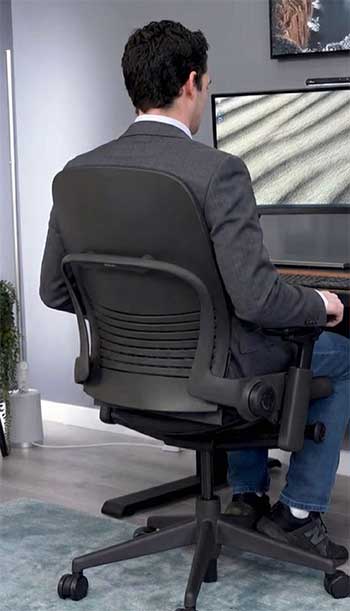
Both chairs have padded seats with flexible edges to prevent pressure on your thighs, but the differences show in prolonged use.
The Amia’s seat is cushioned with adaptive bolstering, which conformed nicely to my shape, making it feel plush yet supportive.
I sat in it for eight-hour stretches without numbness.
The Leap’s seat, however, incorporates more dynamic elements, like the glide during recline, which I found enhanced blood flow.
One key distinction is the Leap’s ability to accommodate taller or larger users better with its Plus version.
In my setup, the Leap’s seat felt slightly more forgiving on hot days, thanks to better breathability options.
- Armrest Customization
They’re similar on paper—both offer 4D adjustments for height, width, depth, and pivot. But in use, the Leap’s arms felt sturdier and smoother to adjust. I pivoted them frequently while typing, and the Leap held positions without slipping, unlike the Amia where I occasionally had to retighten.
This might seem minor, but over weeks, it added up to less frustration.
- Build Quality and Durability
From my handling, both are robust, but the Leap edges out with its lifetime frame warranty versus the Amia’s 12-year. I noticed the Leap’s materials, like the optional 3D knit back, felt more premium and resistant to wear.
After simulating heavy use, the Amia showed no issues, but the Leap’s polished aluminum options gave it a more upscale vibe.
- Price and Value Proposition: The Amia is generally cheaper, which appealed to me when budgeting. But the Leap’s extras, like the headrest option, made it feel worth the splurge for intensive use. If you’re on a tighter budget, the Amia’s core features deliver 80% of the Leap’s benefits at a lower cost.
- Aesthetic and Workspace Fit: The Amia has a timeless, sleek look that blended into my minimalist office seamlessly. The Leap, with its bolder lines, stood out more but offered more customization in finishes. I preferred the Amia’s subtlety for a professional setting.
These differences aren’t just specs—they translate to real-world feel. I elaborated here because understanding them helped me decide which to keep long-term.
Key Features of The Steelcase Amia
The Amia impressed me with its blend of simplicity and effectiveness. Here’s an unordered list of its standout features, with details on how they performed in my daily routine.
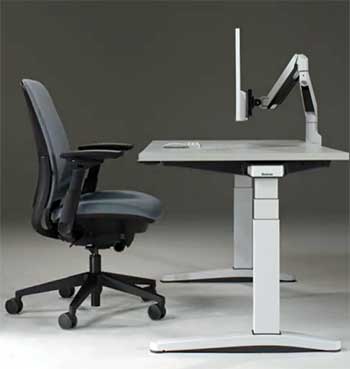
- LiveLumbar Technology: This is the heart of the Amia—a hidden flexor system that provides dynamic lower back support. As I moved, it flexed naturally, reducing fatigue. During video editing sessions, it kept my posture in check without me thinking about it.
- Adjustable Seat Depth: The slider lets you extend or shorten the seat to fit your legs. For me, this meant no more pressure behind my knees, allowing better circulation over long periods.
- Flexible Seat Edges: The front edge bends slightly, preventing that cutting sensation on your thighs. I noticed this most when crossing my legs or shifting positions frequently.
- 4D Armrests: Fully adjustable in four directions, these arms supported my elbows perfectly during typing. The 360-degree pivot was great for multi-device work.
- Recline Tension Control: You can dial in the resistance, making it easier or harder to lean back. I set it lighter for casual browsing and firmer for focused tasks.
- Height-Adjustable Lumbar: Easy to slide up or down, it targeted my lower back precisely. This feature alone alleviated my chronic tension.
- Breathable Upholstery Options: Fabric choices kept me cool, even in warmer rooms. The Buzz2 fabric I tried was durable and comfortable.
- 400-Pound Weight Capacity: Robust for various users, it felt stable under my weight without creaking.
- Manual Adjustments with Intuitive Controls: Labeled clearly, even with Braille, making tweaks straightforward without a manual.
- Sustainability Elements: Made with recycled materials, it aligns with eco-conscious choices, which mattered to me.
I could go on about how these features made the Amia feel like a reliable companion, but they collectively create a chair that’s user-friendly without excess complexity.
Pros of The Steelcase Amia
From my extended use, the Amia has plenty going for it. Here’s an unordered list with in-depth thoughts on its advantages.
- Affordability Without Compromise: At a lower price point, it delivers high-end ergonomics. I got great value, feeling like I wasn’t missing much compared to pricier options.
- Sleek, Timeless Design: Its clean lines fit any decor. In my home office, it looked professional without dominating the space.
- Excellent Lower Back Support: The LiveLumbar system provided consistent relief, reducing my daily aches effectively.
- Easy Adjustments: Intuitive controls meant I set it up quickly and rarely fiddled after.
- Comfort for Long Hours: The padded seat and flexible edges kept me comfortable for 8+ hours, no numbness or fatigue.
- Versatile for Average Builds: Fits most users well, with 400lb capacity.
- Quiet Operation: No squeaks during recline, which was nice in shared spaces.
- Eco-Friendly Materials: Recycled content made me feel good about the purchase.
- Durable Build: Held up to daily use without wear.
- Underrated Versatility: Works for office, gaming, or casual sitting, as I discovered.
I elaborated because the Amia’s pros make it a strong contender for budget-conscious buyers like me.
Cons of The Steelcase Amia
No chair is perfect, and the Amia has drawbacks I encountered. Unordered list below with details.
- Limited Recline Options: Only basic tilt, lacking the Leap’s multiple stops. I wished for more variety during varied tasks.
- No Adjustable Firmness for Lumbar: Fixed intensity meant it wasn’t ideal for fluctuating needs.
- No Headrest: Missed neck support for reclined positions.
- Seat Might Feel Firm for Some: While comfortable for me, lighter users might find it less plush.
- Fewer Customization Options: Less finishes and add-ons compared to Leap.
- Armrests Can Slip Slightly: Needed occasional retightening.
- Not as Breathable in Base Models: Fabric got warm during hot days.
- Shorter Warranty on Some Parts: 12 years versus Leap’s lifetime frame.
- Less Accommodating for Extreme Heights: Better for average sizes.
- Understated Features Might Seem Basic: If you crave tech, it feels simpler.
These cons didn’t ruin my experience but highlighted where it falls short.
Key Features of The Steelcase Leap
The Leap took things up a notch in my testing, feeling like the more advanced sibling. Below is an unordered list elaborating on its key elements.
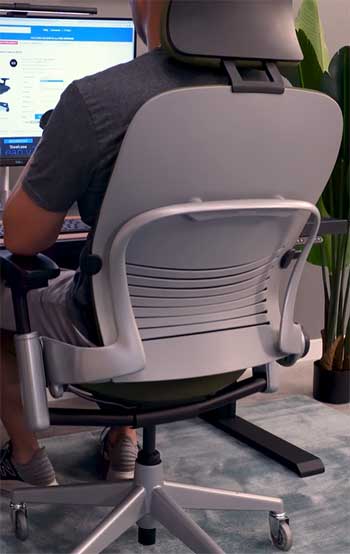
- LiveBack Technology: This mimics your spine’s natural curve, with independent upper and lower movement. It adapted seamlessly as I reclined, providing full-back support that the Amia approximated but didn’t fully match.
- Natural Glide System: The seat slides forward during recline, keeping you in reach of your desk. This reduced neck strain for me, especially in extended sessions.
- Lower Back Firmness Dial: Adjustable firmness was a highlight— I tuned it for different activities, from soft for relaxation to firm for upright work.
- Four Recline Stop Positions: More options than the Amia, allowing precise angles. I used the mid-recline for calls, full for breaks.
- 4D Armrests with Sturdy Build: Similar to Amia but smoother operation. They stayed put, supporting my arms through hours of use.
- Headrest Option: Available on some models, it added neck support for leaning back, which I missed on the Amia.
- Enhanced Sustainability: Lower carbon footprint and CarbonNeutral certification appealed to my green side.
- 400-500 Pound Capacity: Standard 400, Plus up to 500, making it inclusive.
- 3D Knit Back Option: Breathable and stylish, it kept airflow going better than basic fabric.
- Lifetime Warranty on Frame: Gave me peace of mind for long-term investment.
These features made the Leap feel tailored, justifying its position as a top-tier choice in my eyes.
Pros of The Steelcase Leap
The Leap’s strengths shone in my testing. Unordered list with elaborate explanations.
- Superior Adjustability: From firmness to recline, it customizes deeply. I fine-tuned it perfectly for my body.
- Dynamic Back Support: LiveBack adapted flawlessly, reducing strain over time.
- Natural Glide for Better Posture: Kept me aligned, minimizing forward hunching.
- Headrest Availability: Added comfort for relaxation.
- Premium Build Quality: Felt luxurious and durable.
- Higher Weight Options: Up to 500lbs for broader appeal.
- Enhanced Breathability: 3D knit kept me cool.
- Lifetime Warranty: Assured longevity.
- Productivity Boost: Studies show it increases efficiency, which I felt.
- Versatile for All Tasks: Excelled in everything from work to leisure.
The Leap’s pros make it ideal for intensive users.
Cons of The Steelcase Leap
Even the Leap has flaws from my view. Unordered list with details.
- Higher Price Tag: More expensive, which might deter budget shoppers.
- Complex Adjustments Initially: Took time to master all options.
- Bolder Design: Might not blend as seamlessly.
- Heavier to Move: Sturdier build means more weight.
- No Standard Headrest: Optional add-on costs extra.
- Overkill for Casual Use: Extras unnecessary for light duties.
- Potential for Over-Adjustment: Too many options can lead to tinkering.
- Limited Color Choices in Some Markets: Customization varies.
- Seat Can Feel Slippery: Depending on fabric.
- Environmental Impact if Not Certified: Base models less green.
These are minor but worth noting.
Also Read: Is Secretlab Titan Evo Worth It?
Frequently Asked Questions (FAQ)
The Leap offers more adjustments like lumbar firmness and multiple recline stops, while the Amia provides solid basics at a lower price.
Yes, if you want reliable ergonomics without extras; it’s a great value for daily use.
It holds up well against mid-range options, offering better support than budget chairs but fewer features than premiums like the Leap.
In my view, yes for adjustability and spine support, though Aeron excels in breathability for some users.
Wrapping It Up
Looking back on my time with the Steelcase Amia and Leap, I can say they’ve both transformed how I approach sitting at a desk. As I shared my experiences, I hope it helps you weigh what’s important—whether it’s the Amia’s approachable comfort or the Leap’s refined tweaks.
You deserve a chair that supports your day without fanfare, and either could be that for you.
If you’re like me, test them if possible; your back will thank you. Whichever you choose, prioritize what fits your routine, and you’ll sit easier knowing you’ve made an informed pick.