
If you are tired of coming home to a freezing or stuffy house and watching your energy bills climb every month, you need to grab the Sensi Lite Smart Thermostat right now. I switched to this little device a few months back and it has completely changed how I control my home comfort.
You get reliable WiFi control, automatic adjustments when you leave or return, and real savings on heating and cooling without any complicated setup. It just works, keeps your family comfortable, and pays for itself faster than you think.
Trust me, once you experience perfect temperature every day, you will wonder why you waited so long to upgrade.
My Experience With The Sensi Lite Smart Thermostat
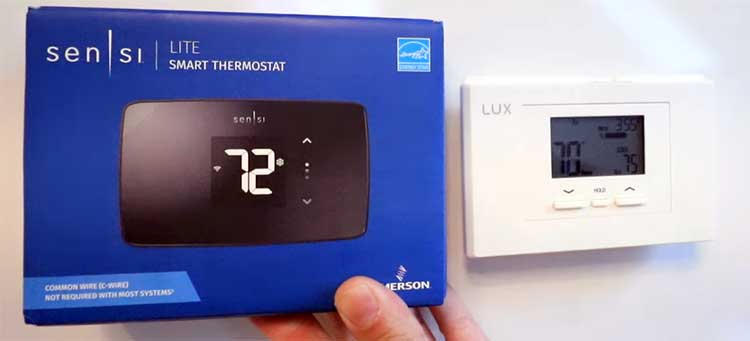
I still remember the day my old mechanical thermostat finally gave out. The house felt either like a sauna or an icebox, and I was constantly adjusting it by hand before rushing out the door for work.
That is when I started looking for something smarter that would not break the bank. I picked the Sensi Lite because it promised easy installation and no need for extra wiring in most homes, and boy did it deliver exactly what I hoped for.
The box arrived quickly, and inside I found the thermostat itself, a clean black unit with a bright display, two AAA batteries, clear instructions, and mounting hardware. I turned off the power at the breaker, pulled off my old thermostat, and matched the wires exactly as the guide showed.
Since my system did not need a C-wire, I just popped in the batteries, snapped the new unit onto the wall, and powered everything back on. The whole process took me less than twenty minutes, and I did it all by myself without calling any electrician. You can do this too, even if you have never touched wiring before.
Next came connecting it to my WiFi. I downloaded the Sensi app on my phone, followed the on-screen steps, and within five minutes the thermostat was online. The app walked me through creating my first schedule for weekdays and weekends.
I set it to drop the temperature when I head to the office and warm things up right before I get home. That geofencing feature is pure magic. My phone knows when I am pulling into the driveway and the house is already at the perfect temperature. No more walking into a cold living room after a long day.
The first week I kept checking the app from work just to see what it was doing. I could raise or lower the temp with one tap while sitting at my desk. When my kids had friends over after school, I bumped the cooling up remotely so everyone stayed comfortable.
On weekends I love how I can switch to a vacation mode if we head out for the day and it automatically saves energy. The display on the wall is super clear with big numbers that light up nicely at night. I never have to squint or hunt for buttons.
After a couple of months I started noticing the real difference. My energy bill dropped noticeably because the thermostat only runs the system when it needs to. The usage reports in the app show exactly how much heating or cooling I used each day, and those little reminders about filter changes keep my HVAC running smoothly.
I have not had a single comfort complaint from my family since switching. If you want a thermostat that feels like an upgrade without the headache or high cost, this one fits perfectly into daily life. I genuinely look forward to tweaking schedules because it makes me feel in control of my home in a way my old one never did.
Also Read: Comparison of Honeywell T9 And T10 Smart Thermostats.
Pros of The Sensi Lite Smart Thermostat
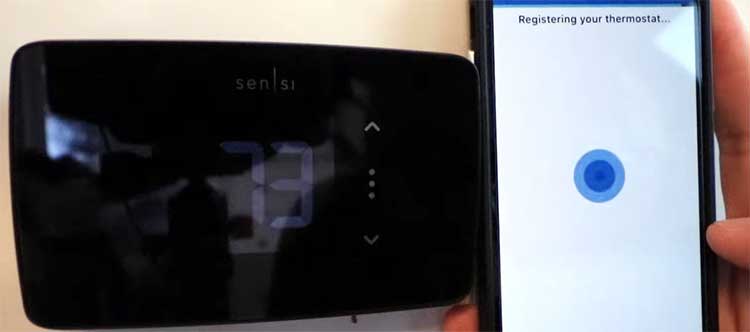
- It installs faster than you expect and works with almost any system you already have I cannot stress enough how simple the process felt the first time I did it. You match a few colored wires, add the batteries, and snap it on the wall. No special tools, no drilling new holes if your old plate fits, and no waiting for a professional. Because it runs on batteries when your HVAC is not powering it, you skip the whole C-wire upgrade that other models force on you. I saved at least a couple hundred dollars right there. You will love standing back after twenty minutes and seeing everything working. The built-in level on the back even helps you hang it straight on the first try. Once it is up, the app takes over and guides you through the rest so you never feel lost.
- You save real money on bills while keeping every room comfortable The geofencing and flexible scheduling features are what make the difference for me. I set my weekday routine once and now the house cools down automatically when I leave for work and warms up before I return. Last winter my heating costs dropped enough that the thermostat basically paid for itself in the first two months. The app shows daily and weekly usage graphs so you can spot patterns and tweak things for even more savings. ENERGY STAR certification means it is built to be efficient from the start. You will notice lower numbers on your utility statement without ever feeling cold or hot because the system runs smarter, not harder. I even use the vacation mode when we travel and come home to a perfectly balanced house instead of wasting energy the whole time we were gone.
- The app puts full control in your pocket and feels incredibly intuitive Whether I am at the grocery store or relaxing on the couch, I open the app and change the temperature in seconds. It connects reliably to both 2.4 and 5 GHz networks and works with Alexa, Google Assistant, and SmartThings so I can just speak commands when my hands are full. The interface is clean with big buttons and clear labels. I set up different schedules for every day of the week without any confusion. Humidity monitoring inside the app helps me understand why certain rooms feel stuffy sometimes. You will check it more than you expect at first because it is actually fun to see the system respond instantly. Plus the data privacy focus means your usage history stays yours, which gave me peace of mind from day one.
- Maintenance alerts and usage reports keep your whole HVAC system healthy I get push notifications when it is time to change the air filter or when the system has run longer than usual. Those reminders have already saved me from bigger repairs because I caught a dirty filter early. The reports break down exactly how much energy I used for heating versus cooling each month. I can see trends and adjust my schedule accordingly. You will feel like you have a personal HVAC assistant watching over everything. The alerts even suggest when to schedule professional service so nothing sneaks up on you. This level of insight turns a simple thermostat into something that protects your investment in your home comfort system.
Cons of The Sensi Lite Smart Thermostat
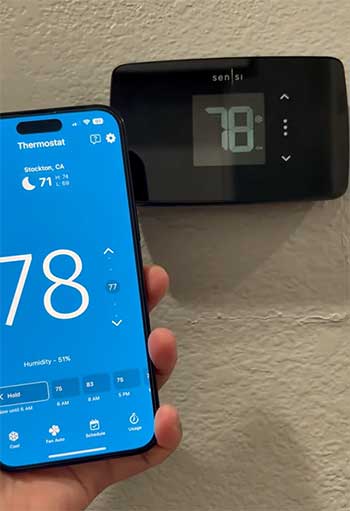
- It stays basic and skips some fancy extras that premium models offer You will not find automatic learning that watches your habits over weeks and adjusts on its own. Everything relies on the schedule you create in the app. I sometimes wish it could sense occupancy in different rooms like higher-end options do, but for my small house that extra step never felt necessary. If you want bells and whistles such as built-in voice control directly on the unit or multiple remote sensors, you might feel a little limited. Still, I remind myself that I chose this model precisely because I wanted simple and reliable rather than overwhelming features I would never use.
- The batteries need occasional replacement and can feel like a small chore Since the unit uses two AAA batteries to keep the WiFi alive when your system is off, you will swap them every six to twelve months depending on usage. I have not found it annoying yet because the app warns me well in advance, but it is one extra step compared to models that run entirely off a C-wire. You have to pop the thermostat off the wall, slide in fresh batteries, and reconnect if the WiFi drops temporarily. It takes two minutes total, but if you hate any maintenance at all this could bug you over time.
- Scheduling happens only through the app and not on the wall unit itself You cannot stand in front of the thermostat and program your week like some older models let you. Everything routes through your phone, which works great when you have the app handy but feels slightly inconvenient if your phone dies or you just want to make a quick change without unlocking it. I got used to it fast, but the first couple of weeks I caught myself reaching for buttons that were not there. The bright display still lets you raise or lower the temperature manually in seconds, so daily tweaks are easy.
- Occasional WiFi hiccups can happen during heavy system use In my experience the connection stays solid most of the time, but when the air conditioner runs nonstop on hot days I have seen brief offline moments in the app. The thermostat itself keeps controlling temperature perfectly, but you lose remote access until it reconnects. A quick router restart usually fixes it. If your WiFi signal near the thermostat is already weak you might notice this more often than I did.
Also Read: Comparison of ecobee Premium And Nest 4th Gen Smart Thermostats.
Maintenance Tips To Keep Your Sensi Lite Running Smoothly
- Replace the batteries on schedule and never get caught without power I set a recurring reminder in my phone calendar every nine months because the app alerts me when voltage drops. Grab two fresh AAA alkaline batteries, pop the thermostat off the wall by pulling gently from the bottom, slide the old ones out, and click the new ones in with the correct orientation. The display will reboot for a few seconds and reconnect to WiFi automatically in most cases. I always keep spare batteries in the junk drawer so I never scramble. Doing this keeps the smart features alive and prevents any unexpected offline periods during extreme weather.
- Clean the screen and body regularly to maintain clear visibility Dust and fingerprints build up surprisingly fast on the sleek surface. I wipe mine every couple of weeks with a soft microfiber cloth lightly dampened with water or a tiny bit of screen cleaner. Never spray liquid directly onto the unit. This keeps the big temperature numbers easy to read at night and stops any grime from affecting the touch response. You will notice the display looks brand new again and the buttons feel crisp every time.
- Use the app reminders to change air filters and schedule HVAC tune-ups The built-in service reminders are my favorite feature for long-term care. I set mine for every three months for the filter and every year for a professional check. When the notification pops up I order the right size filter online and swap it in ten minutes. The app even logs the date so I never lose track. These simple actions keep airflow strong, reduce strain on the system, and help the Sensi Lite maintain accurate temperature readings. You will extend the life of your entire HVAC setup without extra effort.
- Monitor weekly usage reports and adjust schedules as seasons change Every Sunday I open the app and glance at the past week’s graphs. If I see the system running longer than usual I tweak the temperature set points by a degree or two. In spring and fall I widen the deadband so the unit does not switch between heat and cool too often. This habit has shaved even more off my bills. You can export the data if you like spreadsheets, but just eyeballing the charts works fine for most people.
- Keep your WiFi strong around the thermostat location I placed mine on an interior wall away from metal ducts and microwaves. If you notice frequent disconnects, move your router closer or add a mesh extender. The app shows WiFi signal strength so you can test spots before final mounting. A solid connection means smoother geofencing and instant remote control whenever you need it. I also restart my router once a month as part of routine home maintenance and the thermostat reconnects without any fuss.
Comparison of Sensi Lite Smart Thermostat
- Sensi Lite Compared To The Google Nest Learning Thermostat
I actually owned a Nest before switching to the Sensi Lite and the biggest difference hit me immediately with price and installation. The Nest costs quite a bit more and often needs a C-wire adapter kit if your system is older, while the Sensi Lite handled my wiring with just the included batteries.
The Nest learns your schedule over time without any input from you, which sounds convenient until you realize it sometimes gets it wrong during holidays or sick days. I prefer setting my own schedule in the Sensi app because I stay in full control instead of guessing what the thermostat thinks I want.
Both units work with voice assistants, but the Sensi Lite gives clearer usage reports and filter reminders right away, whereas the Nest focuses more on energy leaf rewards that felt gimmicky to me. If you like hands-off automation the Nest might win, but for straightforward reliability and lower upfront cost I reach for the Sensi Lite every time now.
The display on the Sensi Lite is also easier to read from across the room with its bold numbers compared to the Nest’s smaller icons.
- Sensi Lite Versus the Ecobee Smart Thermostat Premium
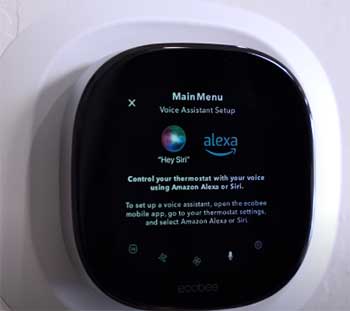
The Ecobee impressed me with its room sensors that average temperatures across the house, something the Sensi Lite does not offer.
If you have multiple floors or rooms that heat unevenly you might lean toward the Ecobee for that reason alone.
However, those extra sensors add to the total price and the Ecobee almost always requires a C-wire or power extender.
My Sensi Lite installed in minutes without any extra purchases and still keeps my single-story home perfectly even.
The Ecobee app feels more premium with weather forecasts and air quality tips, but I found the Sensi interface faster for quick daily changes. Both save energy well, yet the Sensi Lite edges out on simplicity and cost while still delivering geofencing and scheduling that match my lifestyle.
If you want the absolute most data and sensors the Ecobee wins, but if you want a set-it-and-forget-it unit that does not complicate your life the Sensi Lite delivers everything I actually use day to day.
- Sensi Lite Versus Honeywell WiFi Smart Thermostats
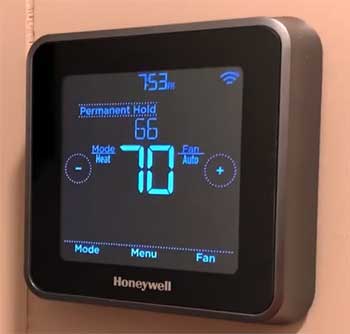
Honeywell models often come with color touchscreens that look flashy on the wall, but I found their apps clunkier and slower to load compared to the Sensi experience.
Many Honeywell units still push for a C-wire and charge more for similar features like remote access.
The Sensi Lite feels more modern in the hand with its responsive touch controls and gives me the same Alexa and Google compatibility without extra monthly fees.
Honeywell sometimes includes more scheduling options directly on the device, but I rarely stand at the wall long enough to care.
The real winner for me is how the Sensi Lite monitors my HVAC health with alerts while staying under one hundred dollars. Honeywell works fine for basic needs, yet the Sensi Lite combination of price, battery backup, and clean app makes it the smarter daily driver in my house. You get reliable performance without paying for screen real estate you will not use.
Also Read: Comparison of Ecobee Premium And Enhanced Smart Thermostats.
Frequently Asked Questions (FAQ)
For most heating and cooling systems, no. Heat-only, cool-only, or heat pump systems do require one.
Yes, especially if you want simple, affordable features and reliable performance.
Yes, it uses two AAA batteries for backup power.
Yes, you can still adjust temperature manually on the device.
Final Thoughts
After living with the Sensi Lite every single day I can say it has earned a permanent spot in my home. The comfort, savings, and ease of use far outweigh any small limitations. If you are ready for smarter temperature control that actually fits your budget and your routine, this thermostat will not disappoint you.