
As a long-time 3D printing enthusiast who’s owned several machines over the years, I’ve spent months testing both the QIDI Plus 4 and Bambu Lab P1S. My goal here is to help you decide between these two enclosed CoreXY printers by sharing my real experiences with their strengths, weaknesses, and everyday performance.
Whether you’re printing functional parts, prototypes, or fun models, this comparison will guide you toward the right choice for your needs.
| Feature | QIDI Plus 4 | Bambu Lab P1S |
| Build Volume | 305 x 305 x 280 mm (larger for big projects) | 256 x 256 x 256 mm (compact but sufficient) |
| Max Nozzle Temperature | 370°C (excellent for engineering filaments) | Up to 300°C (solid for most materials) |
| Chamber Heating | Active up to 65°C (prevents warping reliably) | Passive (relies on hotend/bed heat) |
| Max Speed | 600 mm/s | 500 mm/s |
| Multi-Color Support | Future QIDI Box (expected soon) | AMS ready (up to 16 colors now) |
| Price (approx. Dec 2025) | Around $799 | Around $699 (often discounted) |
| Best For | High-temp materials like Nylon/PC/CF | Speed, ease, and multi-color printing |
| Setup & Reliability | Solid but occasional tweaks needed | Plug-and-play perfection |
Head-to-Head Comparison of QIDI Plus 4 And Bambu Lab P1S
I’ve put these two printers through their paces side by side for months now, running the same models, the same filaments, and pushing them in real-world scenarios. Here’s how they stack up in the areas that matter most to me as a daily user.
- Speed and Print Quality
Both machines scream thanks to their CoreXY setups, but they feel different in practice.
The QIDI Plus 4 claims 600 mm/s max, and I’ve pushed it there on simple PLA benches with solid results—acceleration up to 20,000 mm/s² makes it snappy on infill.
But for everyday prints, I run it at 350-450 mm/s to keep surfaces smooth and avoid ghosting on curves.
The Bambu Lab P1S tops out at 500 mm/s, yet its out-of-the-box tuning with vibration compensation and pressure advance often gives cleaner high-speed outcomes.
I printed a detailed figurine at 400 mm/s on both: the P1S had sharper eyes and finer hair strands, while the QIDI needed a slight profile tweak for the same crispness.
On large flat parts, the QIDI’s bigger bed and stable dual Z-motors shine—no ringing even at higher speeds. For vase-mode or quick prototypes, the P1S edges ahead because it just nails consistency without me fiddling.
Layer bonding feels equal on PLA and PETG, but the QIDI pulls stronger on filled materials thanks to better heat retention.
In the end, if raw throughput on big jobs matters, the QIDI finishes faster. For “set it and walk away” quality at speed, the P1S spoils you.
- Material Versatility and Chamber Performance
This is where the gap widens for me. The QIDI Plus 4’s active 65°C chamber heating changes everything for warp-prone stuff. I printed a massive ABS enclosure—over 280mm tall—with zero lifting corners, even on the edges. Carbon-fiber Nylon parts for RC cars came out tough and dimensionally accurate, no delamination.
The 370°C hotend handles exotics like PA-CF or PC without breaking a sweat. I ran PPS-CF prototypes that withstood boiling water tests—something I wouldn’t attempt on most printers.
The P1S relies on passive heating, topping around 50-55°C with bed and hotend cranked. It manages ASA and basic ABS fine if I slow to 150 mm/s and add brim, but larger Nylon prints still curl unless I babysit drafts. Nozzle maxes at 300°C, so high-temp filled filaments need careful profiles or upgrades.
Early QIDI units had SSR overheating drama on tall prints, but my later batch (with firmware updates) runs reliably—I preheat and monitor, no shutdowns. The P1S carbon filter keeps smells down better for indoor use.
If your queue includes engineering parts that need heat resistance or strength, the QIDI dominates. For standard PLA/PETG/ASA fun, the P1S holds its own.
- Ease of Use and Software Ecosystem
Bambu Lab crushes this category. From unboxing to first print: 15 minutes, app-connected, slice in Bambu Studio, hit send—done.
The Handy app lets me pause, adjust temps, or watch the camera from anywhere. Failure detection resumes seamlessly after clogs or power flickers.
Profiles are spot-on; I rarely touch settings beyond layer height.
Multi-color with AMS?
Slice once, load spools, minimal purge waste.
QIDI’s setup took longer—manual Z-offset tweaks initially, though auto-leveling improved with updates. QIDI Studio is a solid Orca fork, but I prefer vanilla Orca for advanced controls. Wi-Fi works, but the app feels basic; I mostly use the touchscreen or Fluidd web interface.
Filament loading on QIDI is direct but manual—push until it grabs. No lidar or AI failure detection, so occasional clogs need intervention.
The P1S feels like a consumer gadget—polished and forgiving. QIDI rewards tinkerers with open Klipper access for custom macros.
- Multi-Color and Multi-Material Capabilities
As of late 2025, Bambu still owns this. The AMS (or upgraded AMS 2 Pro) stacks effortlessly for 16 colors, dry storage included. I printed full-color articulated dragons with perfect registration and low waste—poop chute handles purges cleanly.
The QIDI Box launched mid-2025 and integrates well now: active 65°C drying per box, NFC recognition for QIDI filaments, hardened gears for abrasives. Daisy-chain four for 16 spools, auto-reload, tangle detection. Waste is comparable, and drying during print helps moisture-sensitive supports like PVA.
Early Box adopters reported jam fixes via updates, but my setup runs smooth for four-color models. It excels with mixed materials—print PA-CF body with soluble supports.
Bambu ecosystem matured first, so more community profiles. QIDI catches up fast if multi-material engineering is your goal.
- Build Volume and Physical Footprint
QIDI’s 305x305x280mm lets me print helmets, cosplay armor, or drone bodies in one piece—no splitting and gluing.
That extra height and width saved hours on big functional parts.
P1S’s 256x256x256mm (250mm practical) forces splits on anything oversized.
Fine for most toys or prototypes, but limiting for larger ambitions.
Trade-off: QIDI is bulkier (505x487x550mm) and heavier—needs a sturdy table. P1S fits tighter spaces easier.
If scale matters, QIDI wins. For desk-friendly, P1S.
- Noise, Reliability, and Long-Term Ownership
Both quieter than older printers, but P1S runs stealthier—better fans and enclosure dampening. QIDI’s chamber fan adds hum during heat-up.
Reliability: P1S “just works”—hundreds of hours unattended, rare failures. QIDI needed early firmware flashes for stability, but post-updates, it’s rock-solid. Community Klipper mods fix quirks fast.
Parts: Bambu proprietary, quick ship. QIDI more standard—easy swaps, cheaper spares.
Support: Both responsive, but Bambu wiki/community vast; QIDI improving rapidly.
- Value and Who Wins What
At current street prices—the P1S often dipping under $500 standalone, QIDI holding around $750-800—the Bambu feels like a steal for hassle-free speed and colors.
But factor the active chamber and volume: QIDI delivers pro-level material performance without $2000+ pricing.
After all my prints, the P1S is my go-to for quick, colorful, reliable jobs. The QIDI Plus 4 handles the tough stuff—big, strong, advanced—that justifies its spot on my bench.
Also Read: Comparison of Flashforge Adventurer 5M And 5M Pro.
My Experience With The QIDI Plus 4
I’ve spent countless hours with the QIDI Plus 4, pushing it through everything from quick prototypes to demanding engineering parts.
It’s become my reliable choice for projects that need real strength and precision. The active chamber and high-temp capabilities opened up materials I couldn’t touch reliably before.
Strengths of The QIDI Plus 4
- The active chamber heating up to 65°C makes a world of difference for warp-prone materials—I printed a 300mm-wide ABS bracket with perfectly flat edges, no lifting at all, even after cooling. It holds temperature steadily, and preheating takes just minutes for consistent results on long runs.
- That 370°C hotend lets me run exotic filaments like PA12-CF or PPS-CF without issues. I made heat-resistant drone mounts that survived 150°C oven tests, with strong layer adhesion and no stringing thanks to the direct drive setup.
- The 305x305x280mm build volume is a game-changer for bigger projects. I printed a full cosplay chest piece in one go, avoiding glue lines and weak joints that come from splitting models on smaller beds.
- Speed up to 600mm/s feels real on lighter infill—I clocked a large functional part finishing in hours instead of days, and the sturdy frame with dual Z-motors keeps everything stable without ringing.
- The textured PEI plate grips aggressively during prints but releases cleanly once cooled. I’ve reused it hundreds of times with just occasional cleaning, no warping or adhesion failures.
- Running on Klipper gives me tons of customization. I added community macros for pause-at-layer and filament runout sensors, tweaking things exactly how I want without locked-down restrictions.
- With the QIDI Box now available (as of mid-2025), I chain multiple units for up to 16 materials/colors. The active drying in each box keeps Nylon moisture-free during prints, and the hardened gears handle abrasives smoothly with low waste.
- Dual independent Z-motors and robust linear rails mean rock-solid leveling—I rarely readjust, and tall prints stay perfectly aligned top to bottom.
Drawbacks of The QIDI Plus 4
- Early batches had SSR issues causing chamber heater failures on long prints, but QIDI sent free upgraded boards quickly, and newer units (like mine now) run flawlessly after firmware updates.
- The touchscreen interface can lag when browsing large file lists or adjusting settings mid-print—it’s usable, but I end up using the web interface more for speed.
- Loading filament is fully manual—you push it through until the extruder grabs. It’s not hard, but compared to automated systems, it adds a small step each time.
- The printer’s size and weight make it a desk hog; moving it requires planning, and it needs a dedicated sturdy surface to avoid vibrations.
- The built-in camera is basic, with low refresh rates—good for quick checks on progress or failures, but not great for detailed timelapses or remote fine-monitoring.
- Chamber fan noise ramps up during heating and sustained runs, making it noticeable in quiet rooms compared to stealthier machines.
- QIDI Studio is capable as an Orca fork, but it lacks some polish in the UI and profile variety—I often switch to standard Orca Slicer for better third-party filament presets.
Also Read: Comparison of Bambu Lab P1S And X1 Carbon.
My Experience With The Bambu Lab P1S
The Bambu Lab P1S hooked me with its effortless operation. It turns ideas into prints faster than any machine I’ve tried, and the ecosystem makes everything feel seamless.
Strengths of The Bambu Lab P1S
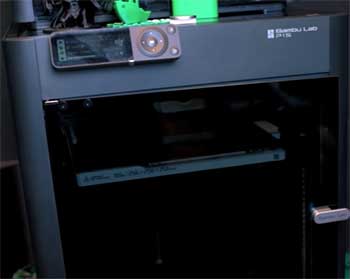
- Setup is unbelievably quick—I had it assembled, leveled, and printing a perfect Benchy in under 20 minutes, with no manual adjustments needed thanks to full auto-calibration.
- The AMS (or stacked AMS 2 Pro) handles up to 16 colors effortlessly. I printed intricate multi-color keycaps and figures with sharp transitions, dry storage, and minimal purge waste—it’s addictive for creative projects.
- Bambu Studio and the Handy app are top-notch; I slice on my computer, send wirelessly, adjust temps on the fly, and watch live feeds from my phone without missing a beat.
- At 500mm/s, it delivers smooth, detailed prints consistently. Vibration compensation shines on fast PLA runs, giving clean surfaces and fine features without post-processing.
- Auto-leveling, flow calibration, and pressure advance mean first layers are flawless every single time—I load filament and hit print with total confidence.
- The full enclosure with active carbon filter traps fumes effectively; I run ASA indoors without smells lingering, perfect for apartment setups.
- It’s one of the quietest enclosed printers I’ve used—fans and motors stay subdued, letting it run overnight without disturbing sleep.
- Built-in failure detection pauses and resumes after clogs or power interruptions, saving tons of filament and time on unattended multi-day prints.
Drawbacks of The Bambu Lab P1S
- Passive chamber heating tops out around 55°C realistically, so extreme materials like heavily filled Nylon warp on larger parts unless I add brims, slow speeds, or draft shields.
- The 300°C nozzle limit means some ultra-high-temp filaments require careful tuning or aren’t viable without third-party hotend swaps.
- The 256x256x256mm volume feels restrictive for ambitious builds—I often split models or compromise designs to fit, adding assembly steps later.
- Most parts are proprietary, so fixes or upgrades come directly from Bambu, which can mean waiting on stock or higher costs.
- AMS units occasionally jam with abrasive or off-brand filaments, requiring cleaning or gear replacements more often than expected.
- The small monochrome screen is basic and clunky—I rely almost entirely on the app for control, as touchscreen navigation feels outdated.
- The closed ecosystem limits deep modifications; while reliable, it doesn’t offer the same open tweaking freedom for advanced users.
These experiences shaped how I use each printer daily—one for tough, single-piece engineering work, the other for quick, colorful, reliable output. Both excel in their lanes.
Wrapping It Up: Which One Should You Choose?
After hundreds of hours on both, I can say neither disappoints—they’re top-tier enclosed printers that transformed my workflow. If you prioritize multi-color fun, blazing everyday speed, and zero-fuss operation, go with the Bambu Lab P1S. It makes printing addictive and joyful.
But if your projects demand tough, warp-resistant parts from advanced filaments—or you need that extra build space—the QIDI Plus 4 delivers where it counts most. It’s the one I reach for when strength and durability matter.
Ultimately, you can’t go wrong. Think about your typical prints, and pick the one that matches. Whichever you choose, you’ll wonder how you managed without an enclosed speed demon like these.
Happy printing!