
As someone who’s spent countless evenings tinkering with smart home setups, I decided to explore Philips Hue and WiZ to see which one truly lights up a modern living space.
In this article, I’ll share my hands-on insights on these two systems from Signify, focusing on their strengths and weaknesses to help you choose the right fit for your home.
Whether you’re starting small or building a full ecosystem, I’ll break down key features, weigh the options, and guide you through what matters most in everyday use.
| Aspect | Philips Hue | WiZ |
| Price Range | Premium: Bulbs $45-55 each, hub $60, full kits $150+ | Budget-friendly: Bulbs $8-12 each, no hub needed |
| Connectivity | Zigbee via bridge for stable control, Bluetooth for basics | Direct Wi-Fi, Matter support for easy integration |
| Key Features | Vast scenes, adaptive lighting, TV sync, outdoor options | Quick presets, motion sensing, music sync, no extra hardware |
| Compatibility | Alexa, Google, Siri; excels with HomeKit via bridge | Alexa, Google, Siri; seamless Matter without extras |
| Setup Ease | Bridge required for full features, but expandable | Plug-and-play over Wi-Fi, ideal for beginners |
| Reliability | Instant response, true colors | Good value, but occasional delays |
| Ecosystem Scale | Hundreds of accessories for whole-home setups | Focused on essentials, around 200 compatible devices |
Head-to-Head Comparison of Philips Hue And WiZ
Putting Philips Hue and WiZ side by side revealed clear trade-offs based on what you prioritize in your setup.
- Price and Value Showdown
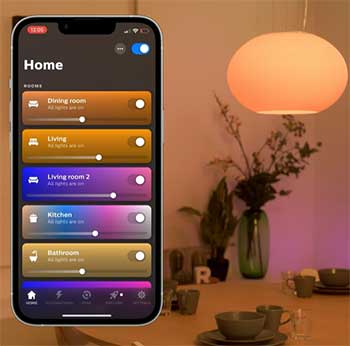
Philips Hue demands a premium for its quality—think $200 for a starter kit versus WiZ’s $50 for similar coverage.
If you’re budget-conscious like I was for my guest room, WiZ delivers 80% of the experience at half the cost, especially with its low-entry bulbs that perform well in everyday tests.
But for long-term investment, Hue’s durability justifies the spend, particularly now with the Essentials line bringing prices down to $15 per bulb for basics, making it less intimidating to scale up without feeling overcommitted right away.
- Connectivity and Setup Battle
Hue’s Zigbee bridge ensures rock-solid links, ideal for big homes where I needed coverage across floors, and the new Bridge Pro’s upgraded hardware—boasting 1GB RAM and support for 500 devices—makes it even more reliable for expansive networks.
WiZ’s Wi-Fi is quicker to start but falters in crowded networks, though its direct connection shines for small spaces. Setup-wise, WiZ wins for speed; I had lights going in under five minutes, while Hue took planning around the hub, but the Pro model’s faster processing cuts down on pairing times noticeably.
- Feature Face-Off
Both offer color tuning and scenes, but Hue edges out with adaptive lighting that mimics natural daylight, which I used for productivity boosts, and its TV sync creates a more cinematic vibe during evenings.
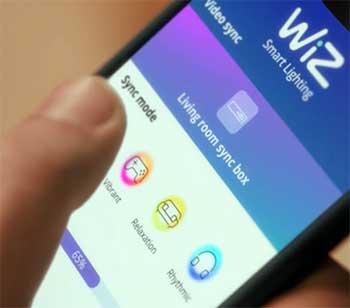
WiZ counters with unique perks like music sync and switch-based controls, perfect for casual users, and its SpaceSense motion detection adds hands-free convenience without buying extras. In my tests, Hue’s TV sync felt more immersive for movies, but WiZ’s rhythms add everyday variety, especially in 2025 models with smoother transitions that keep the fun factor high.
- Compatibility Clash
Matter makes both versatile, but Hue’s bridge unlocks deeper HomeKit ties, which mattered in my Apple-heavy household, allowing for intricate automations like linking lights to door sensors.
WiZ integrates directly, saving hassle, though I found its app presets more limited for custom routines, and some advanced voice features need tweaks—yet its seamless Siri Shortcuts support keeps it competitive for mixed ecosystems without the need for additional hardware.
- Reliability and Performance Duel
Hue’s instant responses and accurate colors made it my go-to for precision tasks, bolstered by the Bridge Pro’s enhanced stability that handles firmware updates without lag.
WiZ held up well but had minor hitches like post-update glitches, though in 2025, its bulbs show improved lux output for brighter rooms.
Over months, both proved dependable, but Hue felt more pro-grade, especially with the faster bridge handling more devices, while WiZ’s value shines in consistent daily performance for less demanding setups.
- Ecosystem Expansion Matchup
Hue’s vast array lets you grow into fixtures, sensors, and even entertainment zones—I added a gradient strip for ambiance, and the new 5- or 10-meter Essentials lightstrips made customizing larger areas easier.
WiZ sticks to core lights and cameras, which suited my simple bedroom refresh but felt restrictive for full integration, though its no-hub freedom shines for modular additions like the recent smart downlights that fit recessed ceilings without rewiring.
- User Experience Roundup
From a real-world view, Hue suits enthusiasts building smart homes with its polished app and expandable options, while WiZ appeals to starters seeking fun without commitment, offering quick wins like effortless music modes.
I mixed them in one space: Hue for main areas where reliability counts, WiZ for accents that add flair cheaply, and found the combo worked well for balanced coverage, especially as 2025 updates make both feel more refined for hybrid use.
Also Read: Comparison of Cam v4 And v3 Spotlights.
Pros of Philips Hue

When I first set up Philips Hue in my living room, it felt like stepping into a more polished world of smart lighting. This system stands out for its thoughtful design and depth.
- Exceptional Build Quality and Durability
One thing I appreciate about Philips Hue is how solid everything feels. The bulbs are built to last, with LEDs that hold up over years of daily use. In my experience, they’ve handled power fluctuations without skipping a beat, and the materials resist wear better than cheaper alternatives.
This reliability means less hassle replacing units, which adds up in a busy household. Plus, with the new brighter models rolling out, like the updated Iris Table Lamp, I’ve noticed they push more lumens without sacrificing that premium feel, making them ideal for larger rooms where you need consistent illumination day in and day out.
- Broad Ecosystem and Accessories
Philips Hue isn’t just about bulbs; it’s a full lineup. I love how you can add items like gradient light strips for behind your TV or outdoor path lights that sync with indoor scenes. With over 300 products, it’s easy to expand from a single room to the entire house.
For instance, I paired mine with motion sensors that trigger gentle wake-up lights in the morning, creating a seamless flow. The recent launch of the Essentials line has made entry-level options more affordable, starting at around $15 per bulb, which lowers the barrier for newcomers while still tying into the vast accessory range, including new Matter-ready strips that integrate smoothly with other smart devices.
- Superior Color Accuracy and Lighting Effects
Colors pop with Philips Hue in a way that feels natural. Whether setting a warm amber for reading or a vibrant blue for movie nights, the shades are precise and consistent across devices.
The app lets you fine-tune whites from cool to warm, and features like adaptive lighting adjust based on time of day.
I’ve found this especially useful in my kitchen, where bright whites help with cooking prep. In 2025, the color rendering has gotten even better with enhanced LEDs that deliver rock-solid hues, though some users note the whites can feel a tad mediocre in direct comparison to specialized fixtures—but for general use, it’s top-tier and beats out many rivals in vividness.
- Strong Smart Home Integration
Integration is where Philips Hue shines. It works smoothly with major platforms, and with the bridge, you get deeper control. I connected mine to my voice assistant setup, and commands like dimming lights during dinner feel effortless. Matter support ensures it plays well with future devices, too.
The new Bridge Pro, with its beefed-up processor that’s five times faster and 15 times more memory, handles up to 500 devices without a hitch, making it a powerhouse for complex setups where you want everything from lights to shades syncing perfectly.
- Offline Functionality with the Bridge
The bridge creates a dedicated network, so even if Wi-Fi dips, your lights stay responsive. This was a game-changer during a recent outage—I could still control basics locally without relying on the cloud.
It adds a layer of security and stability that’s hard to match, especially in homes with spotty internet, and the Zigbee protocol keeps things snappy even in crowded smart environments.
Cons of Philips Hue
Despite its appeal, Philips Hue has drawbacks that made me pause before committing fully.
- High Cost Barrier: The price hits hard. Starting with a few bulbs and the required bridge quickly adds up to hundreds. In my setup, expanding to multiple rooms meant budgeting more than expected, which isn’t ideal if you’re testing the waters.
- Dependency on the Bridge: Without the bridge, you’re limited to Bluetooth, which struggles through walls or in larger spaces. I noticed this in my two-story home, where signals weakened upstairs. It’s functional, but for full remote access or automations, the extra hardware is a must.
- Steeper Initial Configuration: Setting up involves more steps: pairing the bridge, adding bulbs one by one. It took me about 20 minutes longer than simpler systems, and troubleshooting app connections felt frustrating at times.
- Limited Hub-Free Options: If you skip the bridge, features like schedules or group controls are basic. I missed the advanced scenes when traveling, as cloud access requires the hub.
- Potential Overkill for Small Setups: For just a lamp or two, Philips Hue feels excessive. In a small apartment test, the ecosystem’s scale went underused, making the investment seem mismatched.
Pros of WiZ
Switching to WiZ for my bedroom felt refreshing, like a no-fuss upgrade that delivered without the extras.
- Affordable Entry Point: WiZ wins on value. Bulbs cost a fraction of competitors, letting me outfit several rooms cheaply. I grabbed a pack for under $20, and the savings allowed experimenting with colors without regret. In recent models, the pricing stays low while adding more color options, making it a smart pick for budget builds or rentals where you don’t want to invest heavily.
- No Hub Required: Direct Wi-Fi connection means instant setup. I plugged in a bulb, scanned the app, and had control in minutes. This simplicity suits renters or those avoiding clutter. With Matter support baked in, it connects seamlessly to ecosystems without extra gear, and the Wi-Fi reliability has improved in 2025 updates for better remote access.
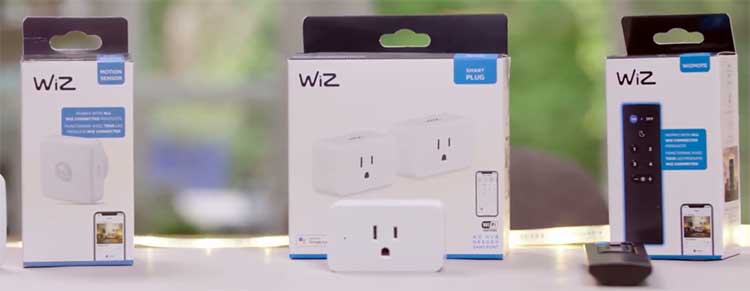
- Innovative Everyday Features: WiZ packs clever touches like WiZclick, where flipping the switch twice activates a preset scene—great for quick night modes. SpaceSense uses built-in sensors for motion-triggered lights, which worked well in my hallway without extra gadgets. Newer bulbs include rhythms that shift colors based on time or music, adding dynamic flair that’s fun for casual use.
- Versatile Presets and Scenes: The app offers 23 dynamic scenes, from party vibes to relaxing rhythms that shift colors over time. I enjoyed syncing lights to music for gatherings, adding fun without complexity. The library tab explains modes clearly, which helped me customize quickly, and the broad palette of colors feels expansive for the price.
- Broad Compatibility Without Extras: Matter support means it integrates directly with assistants. I linked mine to my smart speaker setup effortlessly, and voice controls felt natural from day one. It works with Alexa, Google, and Siri Shortcuts, though full HomeKit is limited in some models—but for most users, it’s plug-and-play paradise.
Cons of WiZ
WiZ isn’t perfect, and some quirks showed up in longer use.
- Network Congestion Risks: With Wi-Fi reliance, adding many bulbs can bog down your router. In my home with 10+ devices, I noticed slight lags during peak hours, though a strong network helped.
- Inconsistent Responsiveness: Delays of a second or two popped up occasionally, especially after updates. Power cycles fixed it, but it’s annoying compared to wired alternatives.
- Buzzing in Some Models: Larger bulbs emitted a faint hum even when off, noticeable in quiet spaces. I swapped one in my bedroom to avoid the distraction.
- Power Outage Behavior: After blackouts, bulbs default to on, which startled me a few times. No easy fix beyond manual resets.
- Limited Advanced Ecosystem: While solid for basics, WiZ lacks the depth for whole-home expansions. Outdoor or security options are fewer, so it suits contained areas better.
Also Read: Comparison of Wyze Floodlight V2 And Pro.
Frequently Asked Questions (FAQ)
It depends on your setup. WiZ matches Hue in basics like colors and compatibility at a lower price, but Hue offers better reliability and expansion for serious users.
Hue is the premium line with a bridge for advanced control, while WiZ (sometimes labeled as Hue WiZ in products) is the affordable Wi-Fi version without a hub, focusing on simplicity.
No, they operate on separate systems and apps, so you can’t mix bulbs or controls between them seamlessly.
Yes, WiZ is part of Signify, the company behind Philips lighting products.
Wrapping Up
Looking back on my journey with Philips Hue and WiZ, I’ve come to see them as complementary rather than rivals—Hue for that premium polish I crave in daily routines, and WiZ for the easy wins that keep things fresh without breaking the bank.
You might find, as I did, that starting with WiZ gets you hooked, then upgrading to Hue unlocks more possibilities.
Whichever you pick, think about your space and habits; both can transform how you live with light. If you’re ready to brighten your world, give one a try and see the difference yourself.