
I’ve always been the type who can’t stand clutter. Messy spice jars, unlabeled cables, or chaotic storage boxes drive me nuts. That’s why I jumped into portable label makers a couple years ago. I owned the Niimbot D11 first, then upgraded to the D110 when it came out.
Both are compact thermal printers that connect via Bluetooth and print ink-free labels—perfect for home organization, small business tagging, or quick office fixes. In this comparison, I’ll share my hands-on experience with both to help you pick the right one for your labeling needs.
| Aspect | Niimbot D11 | Niimbot D110 |
| Dimensions | 132 x 79 x 29 mm | 108 x 76 x 30 mm |
| Weight | About 208 grams | About 140-150 grams |
| Charging Port | Micro USB (older versions); some newer have USB-C | USB Type-C |
| Print Resolution | 203 DPI standard; some upgraded models hit 300 DPI | 203 DPI |
| Print Speed | 30-60 mm/s | 40 mm/s or slightly faster |
| Battery Capacity | 1200-1500 mAh | 1200-1500 mAh |
| Label Width Support | 10-15 mm | 12-15 mm |
| Overall Design | Larger rectangular shape | More compact and rounded |
| Portability Feel | Easy to carry but noticeable in pocket | Feels almost weightless |
Key Differences Between Niimbot D11 And D110
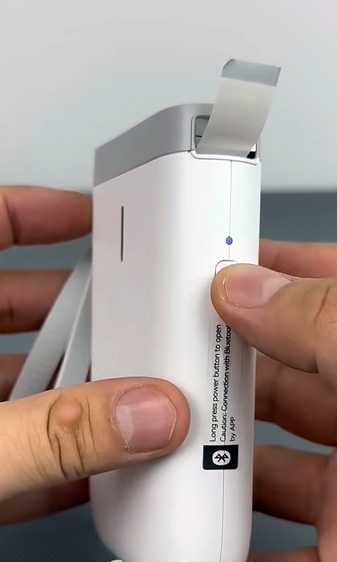
- Size and weight — The D110 is significantly smaller and lighter, making it the clear winner for true portability. I barely notice the D110 in my bag or even in a jacket pocket during errands, while the D11, though still portable, adds noticeable bulk that made me think twice before carrying it everywhere. This size reduction feels like a thoughtful evolution for anyone who labels on the move.
- Charging port — D110’s USB-C is a modern upgrade; my older D11 forced me to carry a separate micro USB cable, which was frustrating on trips when I forgot it. With the D110, I just use my phone charger—it’s faster to top up and feels future-proof in a world that’s mostly moved on from micro USB.
- Design evolution — D110 has a refreshed, more compact look with rounded edges that fit naturally in my palm—feels like a second-generation improvement over the D11’s boxier, more rectangular shape. The D110’s softer contours also make it less prone to sharp edges digging in during long sessions, and it just looks sleeker sitting out.
- Print speed and responsiveness — D110 feels faster overall, likely due to a smarter chip—simple labels print in seconds quicker, and multi-line or icon-heavy designs don’t lag as much. On the D11, I sometimes waited a beat longer during busy printing runs, but the D110’s snappier performance kept my workflow smoother, especially when I was in a rush.
- Portability in daily life — D110 wins hands-down for travel, quick tasks at someone else’s place, or tossing in a purse; the D11 is better if you prefer something that sits stably on a desk without sliding around. I used the D110 for labeling at parties or while helping friends organize, whereas the D11 stayed more as my at-home station printer.
- Label width range — D11 offers slightly more flexibility with 10 mm options for super-narrow tags like individual cables; D110 starts at 12 mm, which is fine for 95% of my uses but meant occasional workarounds for the thinnest wires. If you do a lot of tiny tagging, that small gap matters.
- Battery and efficiency — Similar capacity on paper, but D110 stretches it further thanks to lower weight, optimized internals, and less power draw—I’ve gone longer between charges on the D110 during similar projects. The D11 held its own, but the D110’s efficiency edge showed up in real-world mixed use.
- Overall feel — D11 feels like a reliable workhorse with a solid, reassuring heft that says “I’m built to last”; D110 feels like a sleek everyday carry that’s nimble and modern, prioritizing convenience over that substantial presence.
My Experience With The Niimbot D11
I bought the D11 first because it was everywhere online for organizing pantries and craft rooms. It’s a solid little machine that got me hooked on thermal labeling—no ink cartridges, no fading, just clean prints on demand.
Key Features of The Niimbot D11
- Compact yet sturdy build — At around 208 grams, it feels substantial in hand without being heavy. The rectangular design sits nicely on a desk, and I never worried about it tipping over even when I knocked it accidentally during a busy labeling spree.
- Bluetooth connectivity — Pairs quickly with the Niimbot app on iOS or Android. I labeled an entire set of storage bins in one afternoon without hiccups, and the connection stayed rock-solid even when I walked to another room.
- Thermal printing technology — No ink needed; it uses heat to print on special label rolls. I loved how the labels come out waterproof and durable—great for kitchen jars that get splashed or even outdoor plant tags that face rain.
- Variety of templates and customization — The app offers dozens of fonts, frames, icons, and symbols. I made cute labels with borders for kids’ toy boxes, minimalist text for office files, and even seasonal ones with holiday icons.
- Battery life — A full charge lasted me weeks of occasional use. I once printed over 100 labels on a single charge during a big declutter session, and it still had juice left for touch-ups the next day.
- Label size flexibility — Supports 10-15 mm widths, so I could do narrow tags for individual charger cables or wider ones for larger pantry jars without wasting tape.
- Barcode and QR code support — Handy for small inventory tracking—I scanned QR codes on my homemade jam jars to link directly to recipes stored on my phone.
- Easy paper loading mechanism — The roll slides in smoothly with a clear compartment window, so I could always check remaining tape without guessing.
Pros of The Niimbot D11
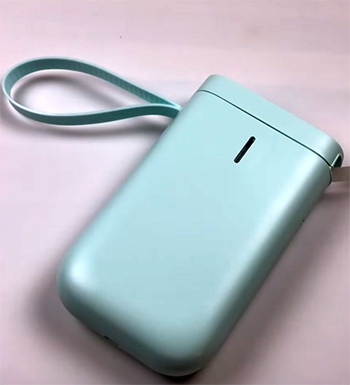
- Reliable everyday performance → It never jammed on me once, even with cheap third-party labels from different brands—I tested colorful, transparent, and patterned rolls, and it handled them flawlessly.
- Affordable label refills → Rolls are cheap and widely available online; I stocked up on bulk packs of transparent, white, and colored ones without spending much, making long-term use budget-friendly.
- Clear print quality → Text comes out sharp for its 203 DPI resolution—I could read small fonts easily on narrow labels, and icons looked crisp without blurring.
- Long battery endurance → Perfect for all-day projects without hunting for a charger; it powered through marathon sessions like reorganizing my entire garage.
- Stable app connection → Rarely dropped Bluetooth, even when my phone was in another room or connected to multiple devices.
- Versatile for home use → I labeled everything from freezer bags to holiday decorations to tool drawers, and the labels stuck strong on plastic, glass, metal, and fabric.
- Good value for beginners → If you’re new to label makers, this one teaches you the ropes without overwhelming features, yet it has enough customization to grow with your needs.
Cons of The Niimbot D11
- Bulkier than newer models → It takes up more pocket space, so I didn’t carry it as often as I wanted for quick fixes away from home.
- Micro USB charging on older units → Annoying when everything else uses USB-C—I had to carry an extra cable on trips, and charging felt slower compared to modern standards.
- Slower print speed in practice → At busier times with complex designs, it felt sluggish compared to faster alternatives, adding a few extra seconds per label.
- No major upgrades in standard version → Some newer D11 variants got 300 DPI, but my original stayed at 203 DPI, which was fine but not cutting-edge.
- App can feel cluttered → Too many template options sometimes slowed me down when I just wanted plain text—I’d scroll past dozens before finding the simple one.
- Slightly heavier feel → After prolonged use in one hand, it tired my wrist more than lighter options, especially during extended projects.
Also Read: Comparison of Neptune 3 Pro And Neptune 4 Pro FDM Printer.
My Experience With The Niimbot D110
After loving the D11, I grabbed the D110 as soon as it launched in late 2021. It’s clearly the successor—smaller, lighter, and more refined. I now reach for this one daily because it slips into my bag effortlessly.
Key Features of The Niimbot D110
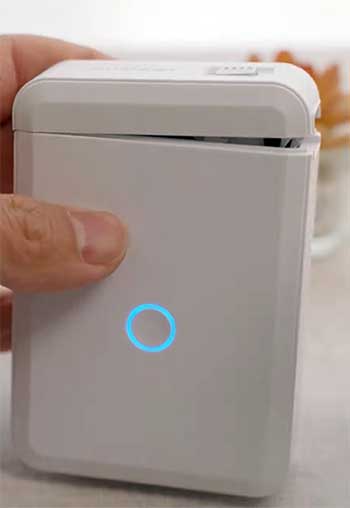
- Ultra-compact design — At just 140-150 grams, it’s noticeably lighter. The rounded edges make it comfortable to hold for long sessions without digging into my palm.
- USB Type-C charging — Modern and fast—I use the same cable as my phone and laptop, which is a huge convenience for travel and daily top-ups.
- Improved chip for smarter operation — Prints feel snappier, and the app responds faster on this model, reducing wait times between designing and printing.
- Same powerful app integration — All the templates, fonts, symbols, and barcode options as the D11, but it loads quicker and feels more responsive overall.
- Excellent battery efficiency — Despite similar capacity, real-world use stretches even further because of the lighter build and optimized power management—I got extra days out of it.
- Focused label width — Sticks to 12-15 mm, which covers most everyday needs like jars, boxes, and files without unnecessary narrow options.
- Faster print speeds — I noticed labels popping out quicker, especially for multi-line designs or batches, keeping my momentum going.
- Intuitive one-button operation — Simple power and feed button makes it easy to start up and troubleshoot on the fly.
Pros of The Niimbot D110
- True pocket-sized portability → I toss it in my purse, backpack, or even coat pocket and forget it’s there until I need a quick label at a friend’s house or on the go.
- Modern USB-C port → No more fumbling with old cables—charges quickly too, often reaching full in under an hour.
- Lighter weight for extended use → I labeled an entire office or craft room without hand fatigue, making it ideal for longer sessions.
- Slightly sharper and faster prints → The upgraded chip makes text and icons look cleaner with less wait time, noticeable on detailed designs.
- Refreshed design → Looks more modern and premium despite the low price, with a matte finish that resists fingerprints better.
- Better for on-the-go labeling → I’ve used it at friends’ houses, while traveling, or even in the car—super convenient for spontaneous organization.
- Strong adhesion and durability → Labels hold up just as well as the D11, even on curved surfaces like bottles or irregular containers.
Cons of The Niimbot D110
- Smaller size can feel fiddly → The compact build means tiny buttons and a smaller compartment—I occasionally hit the wrong one or struggled to load tape with cold fingers.
- No wider label support → Starts at 12 mm, so very narrow tags require workarounds like trimming, which added extra steps for cable management.
- Standard 203 DPI only → No upgraded high-res versions like some D11 models, so fine details on tiny text weren’t quite as razor-sharp.
- App upsells can annoy → Same as D11, but it felt more noticeable on the newer model with occasional prompts for premium templates.
- Slightly higher price initially → Though it drops quickly on sales, it started a bit above the D11, which might deter budget shoppers.
- Less grip for larger hands → The slim profile sometimes slipped if my hands were sweaty or oily from cooking.
Which One Should You Choose?
From my experience, it comes down to your priorities. If you want maximum portability and modern conveniences like USB-C, go with the D110—I’ve made it my daily driver.
If you’re on a tighter budget or prefer a slightly larger device that feels more substantial, the D11 still holds up amazingly well. Both deliver crisp, ink-free labels that transform organization, and the app experience is nearly identical.
Also Read: Comparison of Dymo And Brother Label Makers.
Frequently Asked Questions (FAQ)
The D110 is the newer, more compact version—smaller, lighter, with USB-C charging and slightly faster printing. The D11 is bulkier but offers similar core features.
Yes, especially if portability matters to you. It’s a clear upgrade in design and convenience over the D11.
Consider your use case: pick the D110 for on-the-go labeling and modern ports, or the D11 for a sturdy feel and potentially lower cost.
The D101 is a different model with a square design and slightly varied features; it’s not a direct successor like the D110.
Final Thoughts
In wrapping this up, I’ve genuinely enjoyed both printers—they’ve made my spaces neater and my life easier. If you’re tired of messy drawers or unlabeled containers, you can’t go wrong with either.
Pick based on how and where you’ll use it most, and you’ll wonder how you ever organized without one.
Happy labeling!