
When my old thermostat finally decided to quit right in the middle of a heatwave, I knew it was time for an upgrade. I wasn’t just looking for something to turn the air on; I wanted legitimate control over my home’s climate without needing a PhD in engineering.
That led me down the rabbit hole of the Honeywell T5 and the Honeywell T6. My goal here is straightforward: I’m going to break down the differences, similarities, and real-world performance of these two units so you can decide which black square belongs on your wall.
We are looking at the DIY-friendly T5 against the contractor-grade T6 to see which one actually handles life better.
| Feature | Honeywell T5 (Lyric) | Honeywell T6 Pro Smart |
| Target Audience | DIY / Retail Consumers | Professional Install / Contractors |
| Power Source | C-Wire required (adapter included in some) | C-Wire or Battery (model dependent) |
| Mounting System | Standard Wall Plate | UWP Mounting System |
| Smart Home | Apple HomeKit, Amazon Alexa, Google | Apple HomeKit, Amazon Alexa, Google, Z-Wave (optional) |
| Geofencing | Yes (Built-in priority) | Yes (via App) |
| Ventilation Control | No | Yes (Specific models) |
| Design Aesthetic | Glossy, modern, tech-forward | Matte, traditional, blends in |
The Core Philosophy: Retail Vs. Professional
Before we tear into the specifics, you need to understand the DNA of these two devices. The T5 is built for the person walking into a big-box store on a Saturday morning. It is designed to be unpacked, installed, and connected to Wi-Fi before lunch. It prioritizes a sleek look and app-based interaction.
The T6, on the other hand, comes from the “Pro” series.1 This is the unit your HVAC technician has in their van. It is engineered for reliability, universal compatibility with complex systems, and longevity.
While you can buy it online, it assumes you know a little more about what those wires in your wall actually do.
The Honeywell T5: The Modern DIY Choice
I started my testing with the T5. Right out of the box, it screams “modern gadget.” The shiny grey interface and the touchscreen responsiveness feel very much in line with other smart devices we use daily. It is compact, unassuming, and tries very hard to be helpful.
Key Features of The Honeywell T5
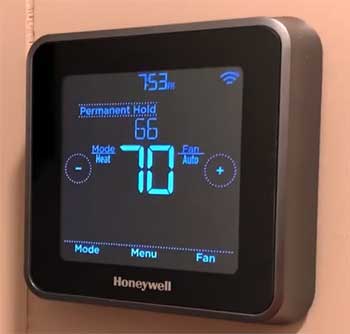
- Geofencing Technology: This is the bread and butter of the T5. Instead of rigidly sticking to a time-based schedule, the T5 uses your smartphone’s location to figure out if you are home or away.2 If I run out to the grocery store, it knows I’m gone and adjusts the temp to save money. As soon as I cross the invisible fence back toward my house, it kicks the A/C back on.
- Adaptive Recovery: The T5 is smart enough to learn how long it takes your house to heat up or cool down. If you want it to be 72 degrees at 6:00 PM, the thermostat calculates exactly when to turn the system on to hit that target right on the dot, rather than just starting the cycle at 6:00 PM.
- Touchscreen Interface: The screen is a monochrome digital display with touch capabilities.3 It isn’t a color OLED like a smartphone, but the numbers are sharp, and the backlight makes it easy to read in the middle of the night without blinding you.
Pros of The Honeywell T5
- Ideally Suited for Irregular Schedules: If you are like me and your work hours change, or you take random trips on weekends, the rigid 7-day schedule of older thermostats is annoying. The T5’s reliance on geofencing means it adapts to your life rather than forcing you to adapt to a schedule.4 It feels fluid.
- Included C-Wire Adapter: Many older homes don’t have a “C-wire” (Common wire), which provides continuous power to smart thermostats.5 The T5 typically ships with a power adapter kit. I found this to be a lifesaver. You install it at the furnace end, and it magically allows the thermostat to power up without running new copper through your walls.
- Resideo App Integration: The app is clean. It pushes alerts to my phone if the humidity gets too high or if the temperature drops to a pipe-freezing level. The interface mimics the thermostat screen, so there is zero learning curve when switching between the wall unit and the phone.
Cons of The Honeywell T5
- The Glossy Screen Magnet: While it looks premium, that glossy screen loves fingerprints. In certain lighting conditions, especially late afternoon sun, the glare can make the numbers hard to read from across the room.
- Limited Ventilation Support: If you have a fancy HVAC system with a whole-house humidifier, dehumidifier, or ventilator, the T5 might struggle. It is designed for standard heating and cooling. It lacks the extra terminals on the backplate to handle those complex accessories natively.
- Connectivity Drops: During my time with it, I experienced a couple of Wi-Fi dropouts. It wasn’t constant, but the T5 seems a bit more sensitive to router distance than some other devices. If your router is on the other side of the house, you might need an extender.
The Honeywell T6 Pro: The Reliable Workhorse
Switching over to the Honeywell T6 Pro felt like trading a sports car for a heavy-duty truck. It doesn’t have the same “wow” factor when you unbox it, but the moment you snap it onto the wall, you feel the stability.
This device is part of the T-Series that uses the UWP (Universal Wall Plate) mounting system, which is a dream for anyone who plans on swapping thermostats in the future.6
Key Features of The Honeywell T6
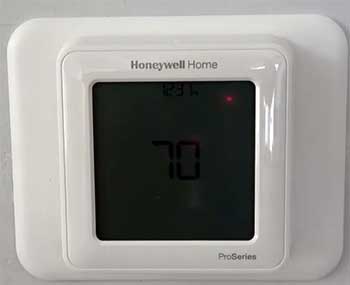
- UWP Mounting System: I cannot stress enough how good this mounting system is. It separates the wiring from the thermostat interface entirely. You wire up the plate, push the wires back, and then the thermostat just snaps on top. It offers a standard footprint that covers up old paint lines better than the smaller T5.
- Dual Fuel and Ventilation Support: The T6 is built to handle complex setups. If you have a heat pump with a gas furnace backup (dual fuel), the T6 manages the switchover natively. It also has terminals specifically for controlling dampers or ventilators, which is crucial for modern, airtight homes that need fresh air exchange.
- Flexible Scheduling Options: While it does have geofencing capabilities through the app, the T6 shines with its internal scheduling. You can do 5-1-1 (weekdays same, Sat/Sun different), 5-2, or a straight 7-day schedule. It stores this schedule locally on the device, meaning if the Wi-Fi goes down, your schedule keeps running perfectly.
Pros of The Honeywell T6
- Rock-Solid Reliability: In my testing, the T6 never dropped its connection. Because it is often powered by batteries acting as a backup to the C-wire (or specifically battery-operated in some Z-Wave models), it feels bulletproof. It just works.
- Better On-Device Controls: Sometimes I don’t want to pull out my phone. The T6 has a larger physical footprint with a clear, matte display. The menu system on the device is deeper, allowing you to change installer setups, Wi-Fi configuration, and schedule parameters without ever opening the app.
- Ecosystem Flexibility: The T6 comes in different flavors. There is a Wi-Fi version, but there is also a Z-Wave version. If you are building a local smart home hub using SmartThings or Hubitat and don’t want to rely on the cloud, the T6 Z-Wave is one of the best options on the market. The T5 is Wi-Fi only.
Cons of The Honeywell T6
- Requires a C-Wire (Mostly): Unlike the T5, the Wi-Fi version of the T6 usually does not come with a power adapter kit in the box. If you don’t have a C-wire, you are going to be fishing new wires or buying a separate adapter. It assumes a professional installation environment where the wire is already there.
- Utilitarian Design: It looks like a thermostat. That’s it. It isn’t trying to be a piece of wall art. If you are looking for that futuristic glass vibe, the T6 looks a bit “office building” by comparison. The matte white plastic is functional, not fashionable.
- Setup Complexity: Because it can do so much (dual fuel, stages of heat/cool), the initial setup menu has “ISU” (Installer Setup Utility) codes.7 You have to scroll through numbers like “130,” “200,” or “218” and select options. You need the manual next to you. The T5 setup is largely a guided wizard on the phone; the T6 requires you to read the instructions.
Analytical Comparison: Usage In The Real World
Now that we have looked at them individually, I want to compare how they feel to live with day-to-day.
- The Installation Experience
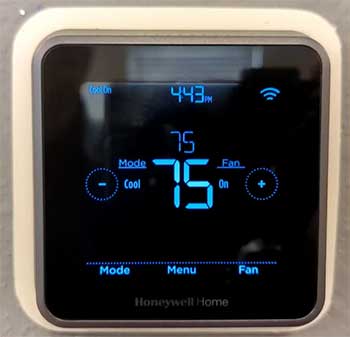
If you are doing this yourself on a Sunday afternoon and you have standard wiring, the T5 is the winner.
The inclusion of the power adapter kit essentially guarantees you can make it work.
The app walks you through wiring with pictures. It holds your hand.
The T6 installation felt more like a construction project. I had to identify my wires more carefully.
However, the UWP mounting plate on the T6 is superior engineering. The wires slot in easier, the door closes cleaner, and it feels more secure on the drywall.
If I were installing thermostats in ten different houses, I would choose the T6 every time for the hardware quality alone.
- The “Smart” Factor
Both devices work with the Resideo app (formerly Honeywell Home). The experience on the phone is nearly identical. You can adjust temps, set schedules, and link them to Alexa or Google Home.8
However, the T5 feels like it was designed for the app. It relies on the app for deep configuration. The T6 feels like a standalone computer that happens to have an app. If I lost my phone, I would feel more comfortable managing my climate with the T6’s on-wall interface.
The geofencing on the T5 seemed slightly more aggressive and accurate in my testing. It really wants to save you money. The T6 supports geofencing, but because it prioritizes its internal schedule, I found myself fighting it occasionally until I configured the priority settings correctly.
Also Read: Is Zero Breeze Mark 3 Worth It?
Frequently Asked Questions (FAQ)
No, the standard Honeywell T5 Wi-Fi thermostat does not use replaceable batteries for operation. It requires 24VAC power from your HVAC system, typically via a C-wire.9 If you lack a C-wire, you must use the included power adapter.
Generally, no. The T5 and T6 use different backplates. The T6 uses the UWP (Universal Wall Plate) system, which allows you to swap between different T6 models or T4/T10 models, but the T5 has its own unique wiring plate.10 You cannot snap a T5 onto a T6 mount.
Yes. The Honeywell T6 Pro Smart is a fully connected thermostat that works with Wi-Fi, the Resideo app, Apple HomeKit, Amazon Alexa, and Google Assistant.11 However, there are non-smart versions of the T6, so you must check the model number (usually T6 Pro Wi-Fi or Z-Wave) to ensure you are getting the connected version.
The T5 is a mid-range smart thermostat designed primarily for the DIY retail market. It features a touchscreen interface, built-in geofencing technology, and works with the Lyric/Resideo app to control heating and cooling remotely.
Final Verdict
Choosing between the Honeywell T5 and T6 comes down to how you view your home technology.
If you are looking for a quick upgrade to modernize your hallway, save some cash on energy bills, and you plan to do the install yourself with basic tools, the Honeywell T5 is your best bet.
It is sleek, the geofencing is fantastic for busy lifestyles, and the power adapter kit saves you from electrical headaches. It’s the “set it and forget it” option for the modern homeowner.
However, if you prioritize longevity, have a complex HVAC system (like a heat pump with auxiliary gas heat), or you prefer a system that doesn’t rely entirely on a cloud server to function well, the Honeywell T6 Pro is the superior piece of hardware.
It is less flashy, but it is built to last. The mounting system is better, the ventilation controls are stronger, and it feels like a professional tool rather than a consumer gadget.
Personally, I stuck with the T6 for my downstairs main unit because I wanted the ventilation control, but I put a T5 upstairs in the guest suite for its simplicity. Assess your wiring, look at your HVAC manual, and pick the one that fits your infrastructure.