
As someone who’s spent years tinkering with smart home setups, I often get asked about affordable ways to light up a space versus going premium.
In this article, I’ll compare Govee and Philips Hue from my own experiences, highlighting what each brings to everyday use.
My main goal is to help you decide which fits your needs, whether you’re budget-conscious or seeking top-tier integration.
| Feature | Govee | Philips Hue |
| Price Range | Starts at $20 for basic strips, up to $100 for advanced kits | Begins around $50 for bulbs, kits often $150+ |
| Hub Requirement | Many products hub-free, app-only control | Requires Hue Bridge for full features |
| Color Options | RGBIC for independent segment colors | RGB with millions of shades, but uniform per bulb |
| App Usability | Intuitive with music sync and scenes | Robust with automation and third-party support |
| Smart Home Compatibility | Works with Alexa, Google Assistant; limited Matter | Broad: Alexa, Google, Apple HomeKit, Matter-ready |
| Build Quality | Solid plastic, good for casual setups | Premium materials, durable for long-term use |
| Customization | DIY modes, effects like flowing colors | Advanced routines, geofencing |
| Energy Efficiency | LED-based, low power draw | Efficient LEDs, but hub adds slight consumption |
| Warranty | 1-2 years depending on product | Typically 2-3 years |
| User Community | Growing, focused on creative lighting | Established, with developer tools |
Head-to-Head Comparison of Govee And Philips Hue
Now, let’s put them side by side on key aspects, drawing from my hands-on time with both. I’ve tested these in real scenarios, like holiday decorations and daily routines, to see how they stack up.
- Price and Value
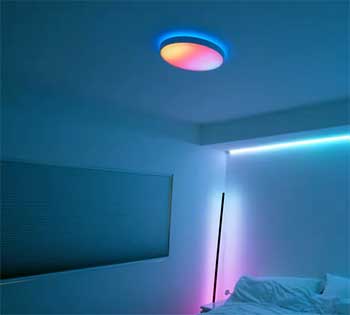
Govee wins for budget buyers.
I outfitted a game room with Govee strips for half what Hue equivalents cost, yet got comparable brightness and even some extra effects like music reactivity that Hue charges more for.
Hue justifies its price with longevity—I expect my Hue bulbs to last five years versus Govee’s two—but if you’re testing waters, Govee’s lower barrier lets you start small and scale without immediate regret.
- Setup and Ease of Use
Govee’s no-hub approach made my initial installs quicker; plug in, app connect, done in under five minutes for most items. Hue requires the bridge, adding steps like Ethernet connection and initial pairing, but once set, it’s more reliable for complex commands across multiple devices.
For me, Govee suits quick projects or temporary setups, while Hue excels in permanent fixtures where stability matters over speed.
- Features and Customization
Both offer colors and scenes, but Govee’s RGBIC adds playful effects like color chases, which I used for holidays to create flowing rainbow patterns that kids loved. Hue counters with precise controls, like 16 million shades and adaptive lighting that shifts with daylight for natural ambiance.
In my tests, Hue’s automation felt smarter, predicting needs via routines, whereas Govee shines in creative, user-driven tweaks without needing extra apps.
- Compatibility and Integration
Hue dominates here. It pairs with everything from smart locks to thermostats, creating a cohesive home ecosystem that responds to events like door openings. Govee handles basics well but lacks Hue’s Matter support depth, often requiring voice commands as a bridge.
I integrated Hue with my Nest camera seamlessly for security lighting, something Govee struggled with due to limited protocols.
- Build Quality and Durability
Hue’s premium feel shines—metal bases, even heat distribution, and resistance to daily wear.
Govee holds up for everyday but shows wear faster, like fading adhesives or slight color inconsistencies after prolonged use.
In humid spots like my kitchen, Hue resisted better during my year-long comparison, maintaining brightness where Govee dimmed slightly over time.
- Energy Use and Efficiency
Both use LEDs, but Hue’s app tracks consumption precisely, helping me optimize schedules to cut power during off-hours. Govee’s efficient too, with similar low draw per device, but without detailed metrics, I had to guess savings based on bills.
For eco-conscious setups, Hue edges out by offering insights that let you fine-tune usage more effectively.
- App and User Interface
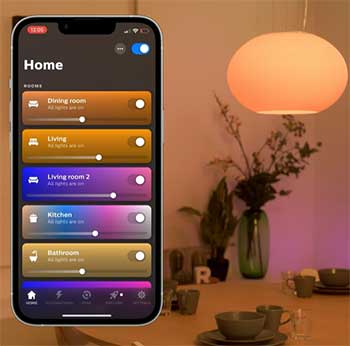
Govee’s app is fun, with quick access to effects and a vibrant community gallery for inspiration, but it can feel cluttered with options. Hue’s is cleaner, with organized tabs for rooms, automations, and accessories, making management straightforward.
I preferred Hue for daily tweaks in a busy household, though Govee’s community shares inspire creativity for special occasions like parties.
- Specific Use Cases
For ambient TV lighting, Govee’s DreamView kit mirrored colors affordably, enhancing movies with reactive glows that matched explosions or sunsets. Hue’s Sync Box does it better with HDMI pass-through for pixel-perfect accuracy, ideal for home theaters.
In outdoor settings, Hue’s weatherproof options lasted through rains and winds, while Govee’s needed shelter to avoid water damage during extended exposure.
- Customer Support and Updates
Hue’s support responded faster in my queries, with detailed guides and live chat options that resolved issues quickly. Govee’s improving, but forums and email helped more than direct contact, sometimes taking days.
Both update regularly, but Hue’s changes feel more substantial, adding integrations like new voice commands, whereas Govee focuses on fun effects and bug fixes.
Pros of Govee
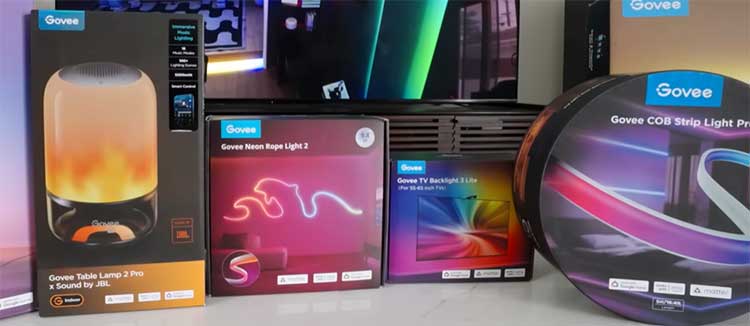
I’ve used Govee products in my living room for over a year, and they stand out in several ways that make them appealing for anyone starting out or experimenting without breaking the bank.
- Affordability That Doesn’t Skimp on Fun
One thing I appreciate about Govee is how accessible it is. You can grab a LED strip light for under $30 and transform a dull shelf into a vibrant display. Unlike pricier options, Govee packs in features like reactive lighting that pulses with your music or TV sounds.
In my setup, I synced a Govee Glide wall panel to my playlist, and it turned casual evenings into mini parties. This affordability extends to their range—outdoor strings, floor lamps, even car interiors—letting you experiment across your home without committing huge sums.
- Easy Setup for Beginners
From my trials, Govee shines in plug-and-play simplicity. Most items connect directly via Bluetooth or Wi-Fi to their app, skipping the need for extra hardware. I remember unboxing a Govee Lyra floor lamp and having it running in minutes: download the app, scan the QR code, and you’re choosing colors.
This approach suits renters or those wary of complex wiring, as I was when I first dipped into smart lights. Plus, their app includes community-shared scenes, so you can import effects others have created, saving time on custom tweaks.
- Innovative Effects and Customization
Govee often surprises me with creative touches. Their RGBIC technology lets segments of a strip light up in different colors, creating gradients or patterns that feel alive. I used this on a Govee DreamView kit behind my TV, where it mirrors on-screen colors for an immersive feel during movies.
It’s not just static; you can set timers, automate based on time of day, or link to weather apps for mood lighting. For gamers like me, the reactive modes sync with PC audio, adding flair to sessions without lag.
- Expanding Ecosystem on a Budget
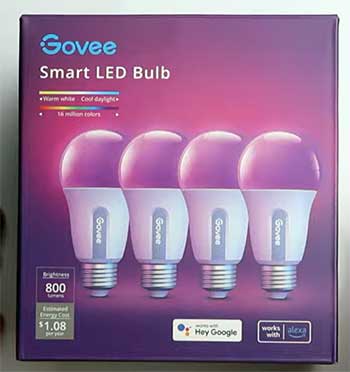
Over time, I’ve built a Govee network without feeling locked in. They offer bulbs, panels, and humidifiers with lights, all controllable from one app. Compatibility with voice assistants means I can say, “Alexa, turn on party mode,” and everything activates.
While not as seamless as some rivals, it’s reliable for daily use, and frequent updates add features like group control, which I’ve used to link multiple strips in my kitchen for even lighting during cooking.
Cons of Govee
That said, Govee isn’t perfect, and I’ve run into limitations that might frustrate users wanting a polished, integrated system.
- Limited Advanced Integration
In my experience, Govee’s smart home ties feel basic.
It works with Alexa and Google, but deeper automation—like tying lights to door sensors—requires workarounds.
I tried integrating with IFTTT, but it wasn’t as smooth as I’d hoped, leading to occasional delays.
For someone like me who values a unified home, this means Govee often operates in its own silo, not blending perfectly with other devices.
- Build Quality Trade-Offs
While functional, Govee’s materials can feel less premium. The adhesive on their strips sometimes peels after months, especially in humid areas like my bathroom. I’ve had to reapply tape, which is a minor hassle but noticeable compared to sturdier alternatives.
Durability holds up for indoor use, but outdoor products faded quicker in sunlight than I expected during a summer trial.
- App Glitches and Overload
The Govee app is packed, but that leads to clutter. I’ve encountered bugs, like scenes not saving or connections dropping during updates. With so many effects, navigating feels overwhelming at first, and I wished for a simpler interface.
Battery life on remotes or sensors drains faster too, requiring frequent charges that interrupt routines.
- Scalability Issues for Large Setups
As I added more Govee items, synchronization across rooms became spotty. Wi-Fi dependency means crowded networks cause lags, unlike wired hubs.
In my multi-room test, group commands sometimes failed, making it less ideal for whole-home lighting compared to systems designed for expansion.
Pros of Philips Hue
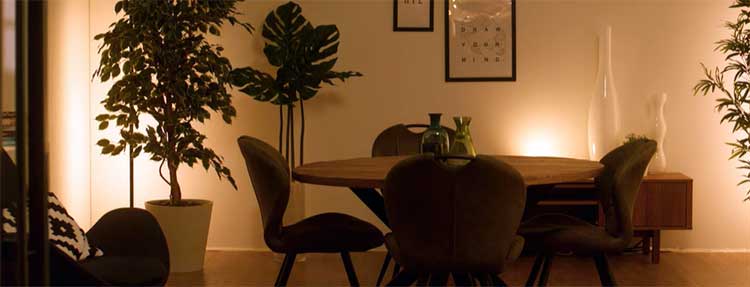
Switching to Philips Hue in my bedroom revealed why it’s a go-to for serious smart home enthusiasts. The quality and depth make it feel like an investment.
- Seamless Smart Home Ecosystem
Philips Hue integrates effortlessly with major platforms. With the Hue Bridge, I’ve linked it to Apple HomeKit, setting scenes that trigger with motion sensors or time. “Hey Siri, bedtime” dims lights gradually, mimicking sunset—perfect for winding down.
This level of polish extends to Zigbee protocol, ensuring stable connections even in larger homes like mine.
- Superior Build and Longevity
The hardware impresses me every time. Bulbs feel weighty, with glass that’s resistant to fingerprints, and strips adhere firmly. I’ve had a Philips Hue Play bar running daily for two years without dimming or color shifts.
Their energy-efficient LEDs save on bills, and the warranty gives peace of mind for long-term setups.
- Advanced Automation Features
Hue’s app allows intricate routines. I programmed geofencing so lights welcome me home, or randomized patterns for security when away. Integration with entertainment systems—like syncing to Philips Ambilight TVs—creates cinema-like experiences.
For productivity, I’ve set circadian rhythms that adjust color temperature throughout the day, boosting my focus.
- Vast Product Variety and Accessories
From gradient strips to outdoor path lights, Hue covers it all. I added a Hue Iris lamp for accent lighting, and accessories like dimmer switches enhance control without phones.
The ecosystem grows with partners, offering bulbs in various shapes, making it versatile for any decor.
Cons of Philips Hue
Despite the strengths, Philips Hue has drawbacks that I’ve felt, especially in cost and complexity.
- High Entry Cost: Getting started hits the wallet hard. The starter kit with bridge and bulbs runs over $100, and expanding adds up quickly. I balked at paying $50 per bulb when cheaper alternatives exist, making it less approachable for casual users like I was initially.
- Dependency on the Bridge: Everything revolves around the Hue Bridge, which means extra setup and a potential single point of failure. If it glitches—as mine did during a firmware update—your whole system pauses. Bluetooth fallback exists, but it’s limited, lacking full app features.
- Steeper Learning for New Users: The app’s depth can overwhelm. Customizing zones or bridges took me trial and error, and while rewarding, it’s not as intuitive as simpler apps. I’ve helped friends set it up, and they often needed guides for advanced scenes.
- Occasional Connectivity Hiccups: In busy Wi-Fi environments, I’ve noticed delays in commands. Zigbee helps, but interference from other devices caused flickering once. Updates sometimes introduce bugs, requiring resets that disrupt daily use.
Also Read: Is Ring Spotlight Cam Plus Worth It?
Frequently Asked Questions (FAQ)
It depends on your priorities. Govee offers better value for fun, affordable lighting, while Philips Hue excels in premium integration and durability.
No direct replacement dominates yet, but brands like Nanoleaf and LIFX are gaining with similar smart features at varying prices.
Not natively; they use different protocols. You can control both via Alexa or Google Assistant, but full integration requires third-party apps.
Yes, Govee is based in China, focusing on innovative LED products for global markets.
Wrapping Up
As I wrap this up, I’ve shared my real-world insights from using both Govee and Philips Hue in various setups, from cozy apartments to full homes. You might find Govee sparks joy on a dime, or Hue builds a lasting foundation—either way, think about what lights up your life.
Whichever you choose, starting small lets you test without regret. Thanks for reading; I hope this guides your next smart light purchase.