
If you’re serious about tracking your fitness progress and already use Garmin devices, you should absolutely buy the Garmin Index S2.
It pulls everything into one app, gives reliable daily insights, and motivates you like nothing else—trust me, it’s worth every penny for that seamless motivation.
My First-Hand Experience With The Garmin Index S2
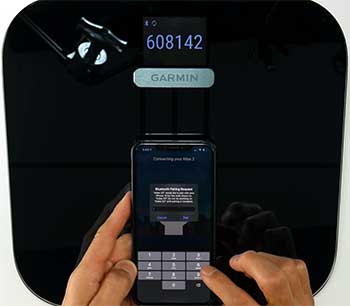
Let me tell you how the Garmin Index S2 changed my daily routine.
I remember the day it arrived—I was excited but a bit skeptical.
I’d been manually entering weights into my Garmin Connect app from gym scales, and it felt tedious.
As soon as I unboxed it, the sleek black design with that vibrant color display caught my eye.
It looked premium, not like those cheap plastic scales I’ve owned before.
Setup was a breeze. I popped in the four AAA batteries (they last up to nine months, which is awesome), tapped the scale to wake it up, and followed the prompts in the Garmin Connect app. It connected to my Wi-Fi instantly—no fiddling around.
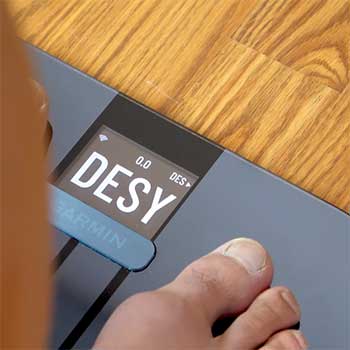
Within minutes, it recognized me automatically based on my weight from previous manual entries. That first weigh-in? Stepping on barefoot, feeling that mild tingle from the bioelectrical impedance, and watching the display cycle through my weight, body fat percentage, muscle mass, and more—it felt futuristic.
Over the past year, I’ve used it almost every morning. You step on, it shows your weight clearly, then a quick trend graph of the last 30 days right there on the screen. No need to grab your phone immediately.
I love how it auto-detects who you are in a multi-user household—my partner and I both use it, and it rarely mixes us up since our weights differ. It supports up to 16 users, which is perfect if you have a big family or even share with roommates.
The real magic happens in the app. Everything syncs over Wi-Fi without me lifting a finger. I see graphs for weight trends, BMI, skeletal muscle mass, bone mass, and body water percentage all alongside my runs, cycles, or strength sessions from my Garmin watch.
It’s motivating to watch how a tough workout week drops my body fat trend or builds muscle mass. One time, after a vacation where I indulged a bit, seeing the upward spike pushed me to get back on track faster than any old scale ever did.
Consistency is key for me now. I weigh myself at the same time each day, barefoot on a hard floor, and the readings are spot-on repeatable. Weight is always within 0.2 pounds day-to-day under similar conditions.
It’s made me more aware of hydration—seeing body water dip after a late-night salty meal explains those temporary gains. If you’re like me and thrive on data, this scale turns weighing in from a chore into something you look forward to. It’s not just a number; it’s context for your whole health picture.
What I Love About the Garmin Index S2: The Pros
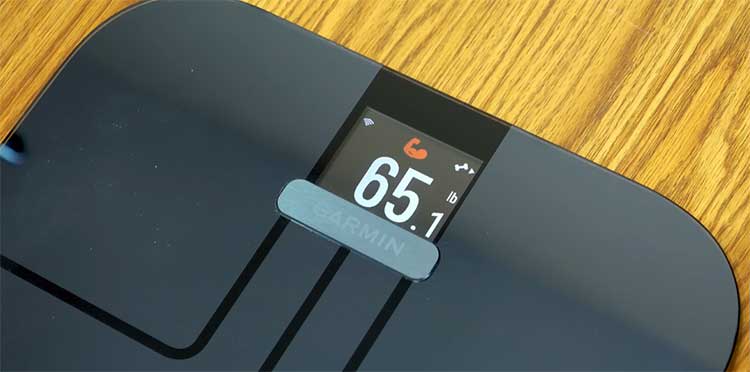
The Garmin Index S2 has so many strengths that keep me stepping on it faithfully every single day. Let me break down exactly why I think it’s one of the best investments I’ve made for my health journey.
- Seamless Integration with Garmin Connect
This is hands-down the biggest reason I recommend it to anyone with a Garmin watch or bike computer. Every single metric—weight, body fat, muscle mass, everything—flows straight into Garmin Connect without you doing a thing.
I open the app and instantly see my morning weight plotted right next to my sleep score, training status, VO2 max, and recovery time from the night before. It creates this complete picture that no standalone scale can match.
When I hit a new low weight after a training block, seeing it alongside improved Body Battery scores feels incredibly rewarding. You start understanding how sleep, stress, and workouts truly affect your body composition.
- Rock-Solid Weight Accuracy and Day-to-Day Consistency
You know how frustrating it is when a scale jumps around randomly? The Index S2 doesn’t do that. My weight readings are repeatable to within 0.1–0.2 pounds when I weigh under identical conditions.
I’ve cross-checked it against the calibrated Tanita scale at my physio’s office and the doctor’s office, and it’s always spot-on or within a couple tenths. That level of trust means I can focus on weekly trends instead of obsessing over daily noise.
The on-scale 30-day trend arrow and graph are genius—they show you at a glance if you’re heading in the right direction without pulling out your phone.
- Gorgeous, Customizable Color Display
That high-resolution color screen is crisp, bright, and genuinely useful. I can customize exactly which metrics appear during the weigh-in cycle: weight only, weight + trend, body fat, BMI, muscle mass—whatever motivates me most.
In the dim morning light, it’s easy to read without glasses. The little animations and clean fonts make it feel modern and premium every single time you step on. Plus, it shows the current weather and temperature when you’re not weighing—such a nice touch when you’re deciding what to wear for a run.
- True Hands-Free Wi-Fi Syncing
Unlike Bluetooth-only scales that require your phone nearby, the Index S2 connects directly to your home Wi-Fi. It uploads every weigh-in automatically, even multiple times a day if you’re tracking closely.
I can weigh in the morning, go to work, and by the time I check the app at lunch everything is already there. It also supports both 2.4 GHz and 5 GHz networks, so connectivity issues are rare. Guest mode is another thoughtful feature—friends can weigh without creating a profile or messing up your data.
- Excellent Multi-User Support with Smart Recognition
With room for 16 user profiles, this scale handles entire families effortlessly. It uses your weight range to auto-recognize you most of the time, which works flawlessly when household members have different body weights.
My partner and I are about 40 pounds apart, so it almost never confuses us. When it does ask for confirmation (rare), it’s a quick tap on the screen. Kids, parents, roommates—no problem. Everyone gets their own private trends in the app.
- Premium Build Quality and Impressive Battery Life
The glass platform with metal electrodes feels solid underfoot, and the 400-pound capacity covers almost anyone. I’ve had mine for over a year with daily use, and it still looks brand new. Those four AAA batteries last 9–12 months easily—Garmin wasn’t exaggerating.
I love that it warns you well in advance in the app when they’re getting low, so you’re never surprised by a dead scale.
- Motivational Trends and Visual Feedback
Beyond raw numbers, the way Garmin presents trends keeps you coming back. Seeing muscle mass creep upward after consistent strength training or watching body water stabilize as you improve hydration habits—those small wins add up. It turns data into motivation in a way basic scales never could.
The Drawbacks of Garmin Index S2 Smart Scale I’ve Noticed
No product is perfect, and I’ve run into a few things with the Index S2 that frustrate me sometimes. Being real with you, here’s what holds it back.
- Body Composition Metrics Can Be Off Weight is spot-on, but body fat, muscle mass, and the rest? They’re estimates using bioelectrical impedance, and they vary. For leaner folks like athletes I know, it sometimes overestimates fat or underestimates muscle. Hydration, time of day, even what you ate affects it. I use them for trends, not absolutes.
- Higher Price Point At around $150, it’s not cheap. If you’re not in the Garmin world, cheaper options give similar basics without the ecosystem tie-in.
- No Segmental Analysis It measures overall, not breaking down arms, legs, or torso separately. Some competitors do that for more detail.
- App Could Offer More Guidance Garmin Connect shows the numbers beautifully, but it doesn’t always explain if your muscle mass is “good” for your age or how to improve it. I supplement with my own research.
- Occasional User Recognition Glitches If weights are close in a household, it might guess wrong and need manual selection. Not often, but annoying when it happens.
These cons don’t ruin it for me, but they’re worth knowing so you set expectations right.
Maintenance And Tips for Getting The Most Out of Your Index S2
Owning a smart scale like the Index S2 is only half the battle—how you care for it and use it determines whether you get accurate, meaningful data year after year. I’ve learned these lessons through trial and error, so you can skip the mistakes I made early on.
- Cleaning the Scale Properly
I clean mine every week without fail, and it still looks brand new. Use a soft, lint-free microfiber cloth slightly dampened with water and a drop of mild dish soap. Gently wipe the glass surface and metal electrodes—never use abrasive pads, bleach, ammonia-based cleaners, or alcohol wipes, as they can damage the conductive electrodes or etch the glass over time.
For stubborn footprints or lotion residue, a 50/50 mix of water and white vinegar works wonders. Always dry thoroughly with a dry cloth afterward to prevent water spots or moisture getting inside. I avoid spraying anything directly on the scale; instead, I spray the cloth first.
This routine takes two minutes and keeps the electrodes functioning perfectly.
- Optimal Placement for Consistent Readings
Location matters more than you think. Always place it on a hard, level surface—ceramic tile, hardwood, or laminate. Avoid thick carpet, uneven bathroom floors, or spots near heating vents. If carpet is your only option, use the included carpet feet attachments—they raise the scale slightly and stabilize it.
I tested three different spots in my bathroom with repeated weigh-ins and found variations of up to 1 pound on uneven tile. Once I settled on a perfectly flat corner, consistency improved dramatically. Also, keep it away from direct sunlight or extreme temperature swings, as that can affect internal sensors over time.
- Best Practices for Accurate Weigh-Ins
Consistency is everything with BIA scales. I weigh first thing in the morning, after using the bathroom but before eating or drinking anything, wearing nothing or the same light clothing each time. Feet must be bare, clean, and dry—any lotion or sweat changes conductivity. Stand still with weight evenly distributed, heels on the back electrodes, toes forward.
Don’t lean or shift. I wait for the zero to appear before stepping on. Weighing at the same time daily minimizes variables like hydration and digestion. If you’re tracking closely, avoid weighing right after intense exercise or saunas when you’re dehydrated.
For women, be aware that menstrual cycle phases can cause 2–4 pound water weight swings—don’t panic, it’s normal.
- Battery Management and Replacement
The scale runs on four AAA batteries that genuinely last 9–12 months with daily use by two people. The app sends a low-battery warning weeks in advance, so you’re never caught off guard. When replacing, use high-quality alkaline batteries (I prefer Energizer or Duracell).
Remove old ones, wait 30 seconds, then insert new ones exactly as shown in the compartment. After replacement, step on once to recalibrate. I keep spare batteries in the bathroom drawer so it’s painless.
- Troubleshooting Common Issues
If readings suddenly seem erratic, first check placement and clean electrodes. Reset Wi-Fi by removing the scale from the app and re-adding it. For persistent user recognition problems, manually edit weight ranges in each profile to create more separation. If body composition numbers look wildly off, toggle between Normal and Athlete mode in settings—Athlete mode adjusts for lower body fat and higher muscle density.
A full factory reset (hold the reset button inside the battery compartment) fixes most glitches. Garmin support is actually quite responsive if you need it.
- Maximizing Data Quality Over Time
Log weigh-ins consistently for at least two weeks before judging trends. Focus on 7–30 day moving averages rather than single readings. Combine scale data with how clothes fit and progress photos for the fullest picture.
If you’re strength training, expect temporary weight increases as muscle grows—watch muscle mass trend instead of scale weight. Stay hydrated (aim for consistent body water % around 50–65% depending on gender) for more stable BIA readings.
- Long-Term Care and Protection
Store it safely when traveling or renovating—never stack heavy items on it. Avoid stepping on with shoes or wet feet. If you move homes, recalibrate on the new floor. With these habits, your Index S2 will deliver reliable data for years.
Also Read: Comparison of Cubitt And Fitbit Fitness Trackers.
Comparing The Garmin Index S2 To Other Popular Smart Scales
- How It Stands Against Withings Body Cardio
The Withings Body Cardio sits in the same price bracket and adds unique cardiovascular features like pulse wave velocity for arterial stiffness—something Garmin completely skips. The Withings app integrates with over 100 third-party services natively, making it more flexible if you use Apple Health, Google Fit, or MyFitnessPal heavily.
Design-wise, both feel premium, but Withings has a slightly thinner profile. Where Garmin wins decisively for me is the deep integration with activity and recovery data—if your workouts live in Garmin Connect, seeing weight trends alongside training load and Body Battery creates insights Withings can’t match. Withings feels more general wellness; Garmin feels athlete-focused.
- Facing Off with Budget Favorites Like Renpho
Renpho scales deliver 90% of the Index S2 experience for about a third of the price. They track the same body composition metrics, often with rechargeable batteries and colorful apps. Weight accuracy is surprisingly close in my testing.
But the differences add up: Renpho uses Bluetooth only, meaning you must open the app and stand near your phone for sync—no effortless Wi-Fi uploads. Multi-user recognition is less reliable, and there’s no on-scale trend graph.
If you’re just starting your journey or watching budget, Renpho gives tremendous value. Once you’re serious about training, though, Garmin’s ecosystem and build quality pull ahead noticeably.
- Versus the Affordable Wyze Scale
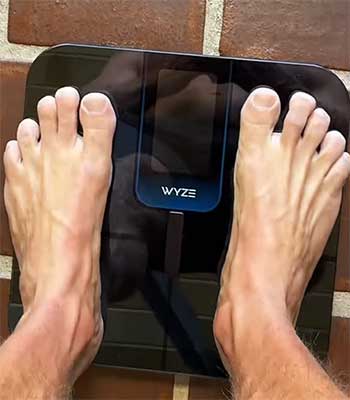
Wyze consistently impresses with features that punch above its tiny price tag—sometimes including heart rate measurement.
The app is clean, setup is simple, and weight accuracy rivals much pricier scales. It handles unlimited users well.
But again, Bluetooth sync requires your phone, and integration with Garmin Connect needs third-party workarounds that aren’t always reliable.
Wyze adds fun extras like baby and pet modes, which are genuinely useful.
For basic tracking on a budget, it’s hard to beat. For seamless daily use inside a fitness ecosystem, the Index S2 feels more polished and trustworthy.
- Taking on Premium Competitors Like InBody or Tanita
Professional-grade scales from InBody or Tanita with hand-and-foot electrodes offer segmental analysis and much higher BIA accuracy, especially for athletic populations. They cost significantly more and are bulkier.
The Index S2 can’t compete on precision of body fat percentage, but it wins massively on convenience, home-friendliness, and daily usability. Those pro scales belong in gyms or clinics; the Garmin belongs in your bathroom for consistent long-term tracking.
Also Read: Comparison of iTouch And Fitbit Fitness Trackers.
Frequently Asked Questions (FAQ)
Yes—exceptionally so for weight, usually within 0.2 pounds of calibrated medical scales in my experience. Body composition metrics are good for trends but affected by hydration, meals, and time of day.
It depends on your needs. For pure weight, many including Garmin, Withings, and even Renpho are excellent. For body composition precision, segmental scales like InBody lead, though they’re less practical at home.
It excels at seamless Garmin integration, Wi-Fi syncing, and consistent weight tracking but costs more and offers less precise body fat readings than segmental competitors.
Yes—if you’re in the Garmin ecosystem, it’s outstanding. Reliable, motivating, and beautifully designed. Outside that ecosystem, alternatives might offer better value.
Wrapping Up
If you’re building a complete fitness picture with Garmin gear, grab the Index S2 today. It transformed how I track progress, and I bet it’ll do the same for you—consistent data leads to real results.