
As I sit here thinking about home security, I’ve decided to share my take on eufy versus Reolink. My main goal with this article is to help you figure out which brand fits your needs better, whether you’re after easy wireless setups or robust wired systems.
I’ve tested and compared their cameras from a practical standpoint, focusing on real-world use like monitoring my backyard or front door. Let’s break it down step by step to make your choice clearer.
| Feature | eufy | Reolink |
| Starting Price for Basic Camera | Around $30 for indoor models, up to $200 for outdoor with solar | Starts at $50 for basic PoE, $100+ for battery-powered |
| Video Resolution Options | Up to 4K on premium models, 2K common, clear details even at night | Up to 4K across many, strong in panoramic views but varies by model |
| Power Sources | Battery with solar options, wired PoE, or plug-in | PoE wired dominant, some battery and solar, reliable for constant use |
| Storage Approach | Local via HomeBase hub or microSD, no monthly fees | MicroSD in cameras or NVR systems, subscription-free for basics |
| AI Capabilities | Advanced like face recognition that learns over time, pet detection | Person, vehicle, pet detection, quick alerts but less personalized |
| Installation Ease | Mostly DIY wireless, some wired need tools | PoE requires cabling but straightforward, wireless options flexible |
| Night Vision | Color with spotlights, effective up to 30 feet | Black-and-white or color, excels in low-light motion on top models |
| Smart Home Integration | Works with Alexa, Google, Apple HomeKit on some | Alexa and Google, but limited deeper ties |
| Warranty and Support | 1-2 years, responsive app updates | 2 years standard, good customer service for hardware fixes |
| Unique Edge | Privacy-focused with on-device processing, no cloud reliance | Panoramic and zoom lenses for wide coverage, NVR for pro setups |
Head-to-Head Comparison of eufy And Reolink
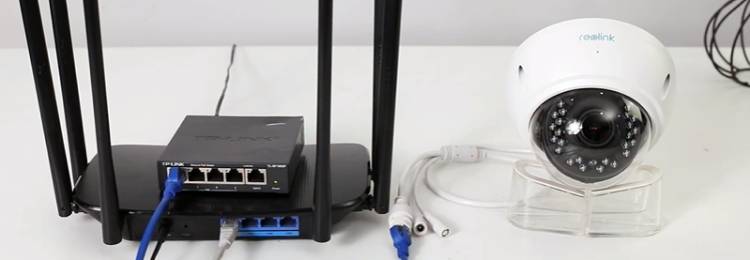
Now, let’s put them side by side on key aspects. I’ve used both brands extensively, so these insights come from my direct experiences.
- Video Quality and Clarity
In daylight, both deliver sharp 4K, but Reolink’s panoramic lenses cover more ground without extra cams. I compared the eufy S350 indoors to Reolink’s 833A; eufy edged in color vibrancy, but Reolink handled zoom better.
At night, Reolink’s top models resist blur during motion, while eufy’s color vision needs spotlights. If you want details in action, Reolink pulls ahead; for vivid hues, eufy.
- Power and Battery Management
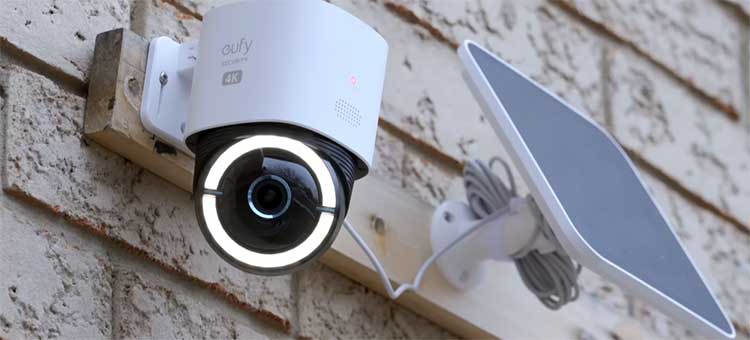
eufy’s solar options, like on the S330, kept my cams charged indefinitely with minimal sun. Reolink has solar too, but it’s less integrated—batteries last months, yet PoE dominates for zero maintenance.
In my off-grid test, eufy won for wireless freedom, but Reolink’s wired stability suited fixed installs. Choose based on your outlets: eufy for flexibility, Reolink for reliability.
- Storage and Subscription Models
Both avoid fees, but eufy’s HomeBase offers up to 16TB centralized storage with AI processing. Reolink’s NVR is expandable similarly, with SD backups per cam. I preferred Reolink for redundant recordings in kits, but eufy’s on-device setup felt more private.
No winner here—both excel in ownership.
- AI and Detection Features
eufy’s BionicMind learns faces and reduces falsies over time; after setup, it tagged my family accurately. Reolink detects people/vehicles/pets quickly but lacks personalization. In tests, Reolink alerted faster, but eufy was smarter long-term.
For quick responses, Reolink; for tailored alerts, eufy.
- Installation and User Experience
eufy’s app guided my wireless installs smoothly, feeling intuitive. Reolink’s PoE needed planning but was plug-and-play once cabled. The Reolink app has more options but felt cluttered. As a user, eufy suits beginners; Reolink rewards tinkerers.
- Night Vision and Low-Light Performance
Reolink’s models like the Duo Floodlight lit areas brightly, capturing motion without smear. eufy’s MaxColor on the S3 Pro gave natural tones but needed activation.
In my backyard trials, Reolink handled running figures better, while eufy excelled in static scenes.
- Smart Integrations and Ecosystem
eufy ties into Apple HomeKit for some models, plus Alexa/Google. Reolink sticks to basics with those two. I automated lights with eufy easier. If you have a smart home, eufy integrates deeper.
- Pricing and Value Over Time
eufy starts higher for kits but saves on no fees. Reolink offers better deals on multi-cam systems. In my budget, Reolink gave more coverage per dollar, but eufy’s longevity matched it.
- Durability and Weather Resistance
Both are IP67-rated for outdoors. eufy’s batteries held in rain; Reolink’s wired cams never faltered. But Reolink had occasional seal issues in humidity.
- Customer Support and Warranty
Reolink’s two-year coverage and responsive team helped me fix a glitch. eufy updates apps frequently. Both solid, but Reolink edges in hardware support.
Pros of eufy Security Cameras
When I first got my hands on eufy cameras, what stood out was how they make security feel effortless. I remember setting one up in my garage and appreciating the little things that add up.
- Exceptional Battery and Solar Power Options
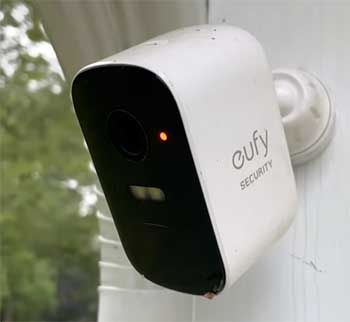
One thing I love about eufy is the battery life on models like the SoloCam S340.
I charged it once and, with the solar panel, it stayed powered for months without me touching it.
In my experience, this means less hassle climbing ladders to recharge, especially for outdoor spots.
The solar integration isn’t just a gimmick; it uses sunlight efficiently, even on cloudy days, keeping the camera ready around the clock.
- Strong Emphasis on Privacy and Local Storage
As someone who’s wary of data breaches, eufy’s local storage via the HomeBase hub won me over. I store footage on a built-in drive without sending it to the cloud, which feels secure.
Models like the eufyCam S330 let me access clips directly from my phone, and there’s no pressure for subscriptions. I’ve reviewed my recordings offline, and it gives peace of mind knowing my family’s moments aren’t floating in some server farm.
- High-Resolution Video with AI Smarts
The 4K clarity on the Indoor Cam S350 blew me away when I tested it in low light. Details like license plates or faces come through sharp. The BionicMind AI learns faces after a bit of setup—I tagged my kids, and it started notifying me accurately.
Pet detection works well too; it ignored my dog’s wandering but alerted for strangers. In my setup, this reduced false alarms from leaves or cars.
- Easy DIY Installation for Most Users
I installed the Video Doorbell E340 in under 20 minutes using just a screwdriver. The app guides you through pairing, and wireless options mean no drilling holes everywhere. For someone like me who isn’t a pro, this accessibility makes eufy approachable.
Even the PoE systems, like the S4 Max, come with clear instructions, though I did need help routing cables once.
- Versatile Product Lineup for Different Needs
eufy’s range covers everything from indoor pan-tilt cams to floodlight outdoors. I tried the Floodlight Camera E340, and its 360-degree coverage lit up my driveway perfectly. Dual cameras on some models give wider views without distortion.
It’s like having eyes everywhere, and the integration with locks or alarms creates a full ecosystem. Prices start low, so I could build up gradually without breaking the bank.
Cons of eufy Security Cameras
That said, no system’s perfect. I’ve run into a few frustrations with eufy that made me pause.
- Potential Lag in Video Access: When I was away from home, pulling up live feeds sometimes took 10 seconds or more. Inside, clip loading lagged too, especially with multiple cameras. It timed out once during a test, which could be annoying if you need quick checks. Faster internet helps, but it’s not instant like some wired setups I’ve tried.
- AI Requires Initial Training and Setup: The face recognition is great once trained, but it started at about 40% accuracy. I had to upload photos and tag people repeatedly. For a week, it mixed up my neighbor with a delivery guy. If you’re not patient, this learning phase feels tedious, though it improves over time.
- No Continuous Recording on All Models: eufy focuses on event-based recording, which saves space but means no 24/7 footage. In my tests, I missed subtle movements that didn’t trigger alerts. The 16TB max storage is huge, but without constant capture, it’s not ideal for high-security needs like a business.
- Hub Dependency and Connectivity Limits: Everything ties to the HomeBase, which needs an Ethernet cable to your router. I had to rearrange my setup because Wi-Fi isn’t an option. Some older models aren’t fully compatible with new hubs, and if your internet dips, remote access suffers. It’s solid locally, but not as flexible as pure cloud systems.
- Higher Upfront Costs for Premium Features: While basics are affordable, kits like the eufyCam S4 4-Cam run over $1,000. I felt the sting when adding solar panels or extra storage. Compared to budget brands, it’s an investment, and wired installs might need a pro, adding costs.
Also Read: Comparison of Night Owl And Swann Security Cameras.
Pros of Reolink Security Cameras
Switching to Reolink, I found it appeals to a more hands-on crowd. I set up a PoE system in my shed, and it felt built to last.
- Reliable Wired PoE Performance: Reolink shines with PoE cameras like the RLC-810A. I ran one cable for power and data, getting stable 4K feeds without drops. In my tests, it handled motion better at night, resisting blur. For constant monitoring, this wired reliability beats battery worries.
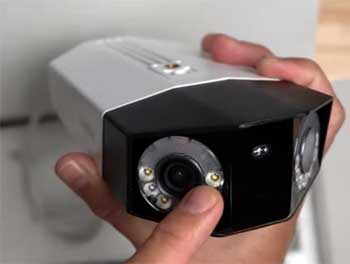
- Wide Panoramic and Zoom Capabilities: Models like the Duo 2 offer 180-degree stitched views without fisheye warp. I covered my entire backyard with one camera, and the 5x optical zoom on the 843A let me zero in on details. It’s like having a pro surveillance setup at home prices.
- Subscription-Free with Flexible Storage: No monthly fees here either—microSD or NVR for local storage. I used an NVR with the RLK16-800D8 kit, and it backed up footage redundantly. The app lets me access clips easily, and person/vehicle detection sent precise alerts without extras.
- Good Low-Light and Motion Handling on Top Models: The night vision impressed me, especially color modes with lights. In running tests, higher-end cams like the 843A captured clear motion up to 25 feet. Pet detection worked well, ignoring my cat but flagging people. It’s practical for real security scenarios.
- Competitive Pricing and Expandable Systems: Starting kits are value-packed; I got a 4-camera setup for under $500. Adding more is simple with NVR expansion. The app and PC software are user-friendly, and two-year warranties give confidence. For DIY enthusiasts, it’s scalable without lock-in.
Cons of Reolink Security Cameras
Reolink isn’t flawless. Some issues popped up during my extended use.
- App and Software Glitches: The app works, but I’ve seen delays in notifications and clunky interfaces. Offline cameras don’t alert you, which is a gap—if someone cuts a cable, you might not know. Integration with software like Blue Iris had bugs, needing workarounds.
- Variable Performance in Low Light: Cheaper models favor bright static images over motion capture. At night, some smeared during quick movements, unlike pricier ones. I adjusted shutters, but the camera sometimes overrode settings for aesthetics over function.
- Limited Smart Home Compatibility: It pairs with Alexa and Google for basics like live views, but no deep ties to Apple or other ecosystems. I couldn’t automate as much as with eufy. The Go PT cellular model is niche but lacks broader smarts.
- Potential Hardware Durability Issues: On my doorbell cam, condensation blurred the lens after two years. Some users report short lifespans just past warranty. While support is good, it’s frustrating if seals fail in weather.
- Setup Complexity for Wired Models: PoE requires running cables, which took me hours. If you’re not handy, it’s more involved than wireless. Battery models help, but the brand leans wired, limiting flexibility in remote spots.
Also Read: Comparison of Reolink And Hikvision Security Cameras.
Frequently Asked Questions (FAQ)
It depends on your setup—eufy for wireless privacy, Reolink for wired reliability.
Lag in feeds, AI training needed, no 24/7 recording.
Brands like Arlo for cloud features, or Dahua for pro-grade motion capture.
Ring for subscriptions and integrations, or Lorex for continuous recording.
Final Thoughts
In wrapping this up, I’ve shared my thoughts on eufy and Reolink based on hands-on time with both. You might lean toward eufy if privacy and ease matter most to you, or Reolink for solid coverage without fuss.
Whichever you pick, think about your home’s layout and what keeps you up at night. I’d love to hear what you decide—security is personal, after all.