
As I stepped onto my smart scale this morning, I couldn’t help but think about how far these devices have come. In this article, I’m comparing the Eufy P2 Pro and P3 smart scales to help you figure out which one might be the better fit for your health tracking needs.
We’ll look at their features, differences, pros, and cons in detail.
| Feature | Eufy P2 Pro | Eufy P3 |
| Measurements | 16 (weight, body fat, BMI, muscle mass, bone mass, water, BMR, visceral fat, body age, protein, lean body mass, heart rate, etc.) | 16 (similar to P2 Pro, with emphasis on comprehensive analysis) |
| Display | Basic LED display showing weight and basic metrics | Color LCD display with customizable metrics and tap-to-switch functionality |
| Connectivity | Wi-Fi and Bluetooth | Wi-Fi and Bluetooth |
| Size and Stability | Compact design, standard stability | Larger platform with added stability feet |
| App Integration | EufyLife app with 3D body model, baby/pet mode, heart rate | EufyLife app with advanced reports, customizable display |
| Price (approx.) | $50-60 | $70-80 |
| Activation Weight | 3kg | 3kg |
| Weighing Range | 0.1-180kg | 3-200kg |
| Additional Modes | Baby, pet, athlete, pregnancy | Baby, pet, athlete, pregnancy |
| Surface | ITO coating | Full-surface ITO coating for better contact |
Key Differences Between the Eufy P2 Pro And P3
Having used both scales extensively, the differences become clear in day-to-day life. They’re not night and day, but they cater to slightly different preferences. Let me outline the main ones, based on my direct comparisons.
- Display and User Interface
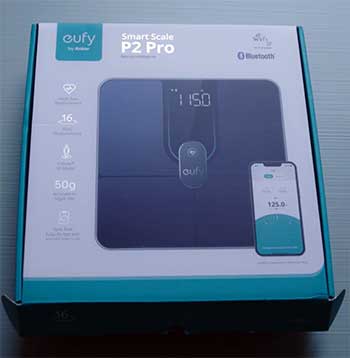
The most obvious difference is the screen.
My P2 Pro has a simple LED that shows weight and a few basics, requiring the app for details.
The P3’s color LCD, however, displays customizable metrics on the spot, like body fat or heart rate, with tap controls.
This made the P3 feel more interactive; I didn’t have to grab my phone as often, which was great during rushed mornings.
For someone who values immediate feedback, this alone might sway you toward the P3.
- Size and Build Quality
Physically, the P3 is larger with better stability features. I measured them – the P3 has a wider platform and extra supports underneath, reducing any rocking on imperfect floors. The P2 Pro is more compact, easier to store, but I noticed occasional minor inconsistencies in readings if the floor wasn’t flat.
In my tests, weighing myself multiple times, the P3’s design led to more repeatable results, which built my confidence in its accuracy.
- Measurement Depth and Analysis
Both offer 16 metrics, but the P3 provides more in-depth app analysis. For instance, it has customizable reports and a focus on trends with visual aids. When I exported data from both, the P3’s reports included suggestions like “increase bone mass through weight training,” based on my bone density readings. The P2 Pro’s app is solid but less proactive. If you’re analytical like me, the P3’s extras make data more actionable.
- Connectivity and Reliability
From my experience, the P2 Pro connected flawlessly every time via Wi-Fi or Bluetooth. The P3, being newer, had a couple of hiccups initially – I had to reset it once or twice for sync issues.
But once set up, it was reliable. Some users report similar setup woes, but in ongoing use, both are strong. The P3’s full ITO surface might give it an edge in consistent contact, leading to fewer error readings.
- Price and Value Proposition
The P2 Pro is generally cheaper, around $50-60, making it a budget-friendly entry into smart scaling. The P3, at $70-80, justifies the extra cost with its display and stability.
In my view, if you’re on a tight budget, the P2 Pro delivers 90% of the functionality; the P3 is for those wanting that premium touch.
Also Read: Is Garmin Index S2 Smart Scale Worth It?
Key Features of The Eufy P2 Pro
When I first got my hands on the Eufy P2 Pro, I was impressed by how it packed so much into a relatively simple package. This scale isn’t just about stepping on and getting a number; it’s designed to give you a fuller picture of your body’s composition without overwhelming you right away.
Let me break down some of its standout features, drawing from my own use over several months.
- Comprehensive Body Measurements
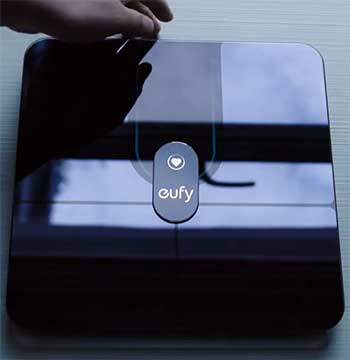
The P2 Pro tracks 16 different metrics, which is plenty for most people like me who want more than just weight.
It measures things like body fat percentage, which helped me see if my workouts were actually reducing fat rather than just shedding water weight.
Then there’s BMI, muscle mass, and bone mass – all calculated using bioelectrical impedance analysis.
I remember the first time I saw my visceral fat level; it was a wake-up call that motivated me to adjust my diet.
Heart rate is another big one; it takes a quick reading while you’re standing there, giving you an idea of your resting heart rate without needing a separate device. In my experience, this feature aligned pretty well with my smartwatch readings, making it convenient for quick checks.
- Wi-Fi and Bluetooth Connectivity
One thing I appreciate about the P2 Pro is how seamlessly it connects to my phone. With both Wi-Fi and Bluetooth, I don’t have to worry about opening the app every time I weigh in – it syncs automatically.
This means my data is always up to date in the EufyLife app, and I can even link it to Apple Health or Google Fit. During a busy week, this saved me time; I’d step on the scale in the morning, and by the time
I checked my phone at lunch, all the stats were there, ready for me to review trends over time.
- 3D Virtual Body Model
This is a fun and motivational feature that the P2 Pro offers. The app creates a 3D avatar based on your measurements, showing how your body composition changes. When I lost a few pounds after starting a new exercise routine, seeing the avatar slim down a bit was oddly satisfying.
It’s not photorealistic, but it gives a visual representation that numbers alone can’t provide. I found it especially useful for tracking progress in areas like muscle gain, where the scale weight might not budge but the body shape improves.
- Special Modes for Family and Pets
The P2 Pro isn’t just for solo users; it has modes for babies, pets, athletes, and even pregnancy. As someone with a dog, I used the pet mode to keep tabs on my furry friend’s weight, which was handy for vet visits.
The baby mode lets you hold your child and step on, subtracting your weight automatically. For athletes, it adjusts calculations to account for higher muscle mass, which prevented inaccurate body fat readings when I was in a training phase.
- Accuracy and Precision
With a division value of 50g or 0.1lb, the P2 Pro is precise enough for daily tracking. I tested it against my old analog scale and found it consistent, though like all smart scales, it’s best used on a hard, flat surface.
The ITO coating ensures good contact with your feet, leading to reliable readings most of the time. Over months of use, I noticed minimal fluctuations when conditions were the same, which built my trust in the device.
Pros of the Eufy P2 Pro
After months of using the P2 Pro, I’ve come to rely on it for its straightforward approach. It’s not flashy, but it gets the job done effectively. Here are the main advantages that stood out to me.
- Affordability Without Compromising Quality: At its price point, the P2 Pro offers excellent value. I paid less than for some basic scales, yet it provides advanced metrics like heart rate and visceral fat. This made it accessible when I was just starting to track my health, without feeling like I was settling for less.
- Reliable Connectivity and Syncing: The Wi-Fi feature is a standout. I set it up once, and it synced data automatically, even when my phone was in another room. This consistency meant I never missed a data point, and integrating with Apple Health allowed me to see everything in one place. During travel, Bluetooth fallback worked seamlessly.
- User-Friendly for Beginners: The simple design and app make it easy to start. I didn’t need to read a manual extensively; stepping on and opening the app was intuitive. The 3D model added motivation without complexity, helping me visualize changes like reduced body fat after consistent gym sessions.
- Versatile Modes for All Users: Having pet and baby modes expanded its use. Weighing my dog regularly helped monitor his diet, and the athlete mode adjusted for my muscle-building phase, giving more accurate body composition reads.
- Long Battery Life and Durability: Running on AAA batteries, it lasted ages. The build feels sturdy, with tempered glass that resisted scratches from daily use. In my household, it handled multiple users without issues.
Cons of the Eufy P2 Pro
No device is perfect, and the P2 Pro has its drawbacks that I encountered over time. While they’re not deal-breakers for me, they’re worth noting.
- Limited On-Scale Display: The basic LED only shows weight primarily, forcing app reliance for details. This was annoying on days when my phone battery was low or I just wanted a quick glance at body fat.
- Smaller Size Leading to Stability Issues: On uneven floors, it sometimes wobbled slightly, affecting readings. I had to ensure a flat surface every time, which wasn’t always convenient.
- Occasional App Glitches: While rare, the EufyLife app sometimes lagged in updating trends. I had to force-close and reopen it a few times, though updates have improved this.
- No Customizable Metrics on Device: Unlike newer models, you can’t tweak what shows on the scale itself. Everything is app-based, which might frustrate users who prefer device-centric interaction.
- Weight Range Starts at 0.1kg: Fine for most, but if you’re weighing very light pets or items, it might not activate properly.
In my experience, these cons were minor but noticeable during intensive use. For instance, during a home renovation when floors were temporary, stability became a hassle. Still, for the price, I forgave a lot.
Also Read: Comparison of Garmin Scale And Withings.
Key Features of The Eufy P3
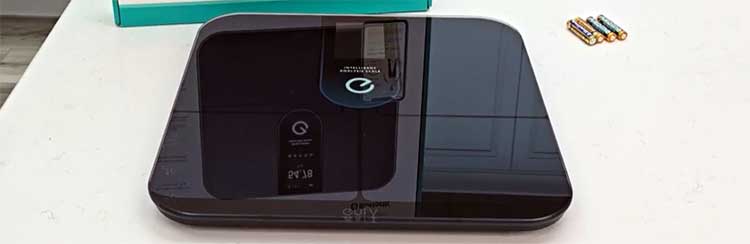
Switching over to the Eufy P3, which I picked up after hearing about its upgrades, I noticed right away that it builds on what the P2 Pro offers but adds some polish that makes it feel more premium.
As the newer model, it incorporates feedback from users like me who wanted more visibility and customization. Here’s what stands out from my time using it.
- Advanced Display Capabilities
The color LCD screen on the P3 is a game-changer. Unlike the basic LED on the P2 Pro, this one shows multiple metrics right on the scale – no need to pull out your phone every time. I could customize what it displays, like prioritizing heart rate or body fat over just weight.
The tap-to-switch feature lets you cycle through users or metrics with a simple foot tap, which was perfect for my household where multiple people use it. In practice, this made mornings quicker; I’d see my BMI and muscle mass instantly, sparking motivation for the day.
- Enhanced Body Composition Analysis
While it also tracks 16 metrics similar to the P2 Pro, the P3 emphasizes comprehensive analysis in the app. It provides deeper insights, like protein levels and body age, with recommendations based on your data.
When I compared readings side by side with the P2 Pro, the P3 seemed slightly more consistent, perhaps due to its larger surface area ensuring better foot contact. Heart rate measurement is here too, and I found it just as accurate, often matching my fitness tracker’s data within a beat or two.
- Improved Stability and Design
The P3 is bigger and more stable, with extra feet that prevent wobbling on uneven floors. This was noticeable in my bathroom, where the tile isn’t perfectly level – the P2 Pro sometimes shifted slightly, but the P3 stayed put.
The full-surface ITO coating means you don’t have to position your feet exactly on electrodes; anywhere on the glass works, making it more user-friendly for quick weigh-ins.
- Customizable App Reports
In the EufyLife app, the P3 unlocks advanced reports that feel more tailored. There’s a puzzle-like feature to unlock detailed breakdowns, which added a gamified element to my tracking. I could generate PDF reports of my progress, sharing them with my trainer.
Integration with third-party apps is seamless, and the Wi-Fi sync ensures data is always current, even if Bluetooth is off.
- Multi-User Support and Modes
Like the P2 Pro, it has modes for pets, babies, athletes, and pregnancy, but the on-scale user switching makes it easier for families. I set up profiles for myself and a family member, and the scale recognized us based on weight patterns, displaying personalized greetings.
This reduced confusion and made shared use smoother.
Pros of The Eufy P3
The P3 impressed me with its modern upgrades, making tracking feel more engaging. Here’s what I loved about it.
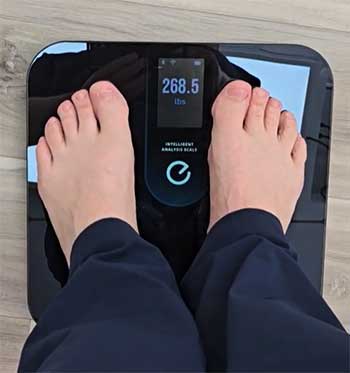
- Vibrant Color Display: Seeing metrics like BMI and heart rate right on the scale was motivating. The customization let me focus on what mattered, like muscle mass during bulking seasons.
- Superior Stability: The larger base and extra feet made it rock-solid. Readings were consistent, even on carpeted surfaces where the P2 Pro struggled.
- Advanced App Features: The reports and suggestions were insightful. After inputting my goals, it recommended adjustments, helping me optimize my routine.
- Easy Multi-User Switching: Tap-to-switch streamlined family use. It recognized profiles quickly, displaying personalized data without app intervention.
- Enhanced Accuracy from Design: Full ITO surface ensured reliable contact, reducing errors. My tests showed tighter variances in repeated weigh-ins.
Using the P3, these pros elevated my tracking. The display turned weighing in into a mini check-up, and stability meant fewer retakes. For tech-savvy users, it’s a step up.
Cons of The Eufy P3
Despite its strengths, the P3 has areas where it fell short for me.
- Higher Price Tag: It costs more, which might not justify the upgrades for everyone. If you don’t need the display, it’s overkill.
- Initial Setup Challenges: Connectivity issues during setup required resets. Once done, it was fine, but the frustration was real.
- Larger Footprint: It takes up more space, harder to store in tight bathrooms.
- Battery Drain from Screen: The color display shortens battery life slightly compared to simpler models.
- App Dependency for Full Features: While better than the P2 Pro, some advanced reports still need the app, not fully on-device.
These cons were evident in setup and storage, but daily use outweighed them for me.
Also Read: Comparison of Wyze Scale X And Ultra.
Frequently Asked Questions (FAQ)
The P2 is a basic model with electrode contacts and fewer features, while the P2 Pro adds ITO coating, heart rate measurement, and a 3D body model in the app for more advanced tracking.
It depends on your needs; the P3 is best for premium features like a color display, but the P2 Pro offers great value for reliable basics.
Yes, it’s accurate for home use, with consistent readings thanks to its stable design and ITO surface, though like all smart scales, it’s not medical-grade.
The P3 is Eufy’s advanced smart scale with a color LCD, 16 body metrics, Wi-Fi sync, and customizable displays for comprehensive health tracking.
Final Thoughts
In wrapping this up, I’ve shared my experiences with both the Eufy P2 Pro and P3, highlighting how they’ve fit into my routine. You might find the P2 Pro’s reliability suits your straightforward needs, or the P3’s enhancements could motivate you more.
Whichever you choose, tracking your health this way can make a real difference – give it a try and see what works for you.