
As someone who’s spent countless hours tinkering with smart home gadgets, I’ve put both the Echo Show and Echo Dot through their paces in my daily routine.
In this article, I’ll break down their differences, features, pros, and cons to help you decide which one suits your needs—whether you’re after a visual hub or a compact audio companion.
My goal is to give you a clear, user-focused comparison based on real experiences.
| Feature | Echo Show | Echo Dot |
| Display | 5.5-inch to 15-inch touchscreen (depending on model) | No screen |
| Audio Quality | Built-in speakers with Dolby processing; varies by model | 1.6-inch speaker; basic audio |
| Camera | Front-facing camera for video calls | No camera |
| Price Range | $80 – $250+ | $25 – $50 |
| Size | Larger, desk or counter-friendly | Compact, fits anywhere |
| Smart Home Hub | Built-in Zigbee hub in some models | No built-in hub |
| Primary Use | Visual interactions, video, recipes | Music, alarms, voice commands |
| Power Source | AC adapter | AC adapter |
| Models Available | Echo Show 5, 8, 10, 15 | Echo Dot 3rd/4th/5th Gen, with clock |
Key Differences Between Echo Show And Echo Dot
Let’s get into what sets these apart. I’ve compared them side by side in my home setup, and the contrasts are stark. I’ll outline the main differences with detailed breakdowns.
- Screen Presence and Visual Capabilities
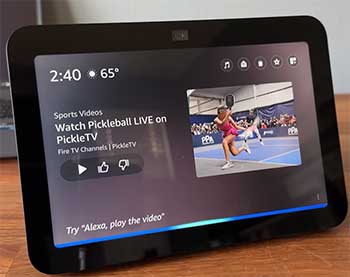
The Echo Show’s touchscreen is a game-changer.
On my Echo Show 8, I can swipe through photo albums or see lyrics while music plays. It’s interactive—tap to pause videos or zoom in on maps.
The Dot? Purely voice-based.
No visuals mean you rely on spoken responses, which is fine for simple tasks but limiting for complex ones like browsing recipes.
In my experience, the Show’s display makes interactions feel more intuitive, especially for visual learners.
Think about checking the time: Show displays it boldly, while Dot just tells you. Over time, I’ve noticed this visual element reduces miscommunications—Alexa shows exactly what she means instead of describing it.
- Audio Performance and Speaker Quality
Sound-wise, the Dot holds its own for its size. My 5th Gen Dot has a 1.73-inch speaker that delivers clear vocals and decent bass for podcasts or casual listening. But the Echo Show steps it up with larger speakers and sometimes Dolby audio.
On the Show 10, which has a 10-inch screen and dual tweeters plus a woofer, music fills the room better. I’ve played the same playlist on both, and the Show’s richer sound makes it ideal for parties or kitchens where you want immersion.
Analytically, if audio is your priority, neither is audiophile-grade, but the Show edges out for multimedia due to its size allowing better acoustics.
- Camera and Video Calling Features
This is where the Show pulls ahead dramatically. It has a built-in camera—5MP on smaller models, up to 13MP on larger ones—for video calls via Alexa or apps like Zoom. I’ve used it to chat with family while cooking, and the auto-framing on the Show 10 keeps me in view as I move.
The Dot lacks any camera, so calls are audio-only. From a privacy angle, I appreciate the Show’s physical shutter, but it’s something to consider if you’re camera-shy. In real use, this difference means the Show doubles as a communication device, while the Dot stays in the background for voice chats.
- Size, Design, and Placement Options
The Dot’s compact form—about 3.9 inches wide—lets me tuck it anywhere: nightstand, shelf, even bathroom counter. It’s unobtrusive and comes in fun colors or with a clock display. The Show is bulkier; the Show 5 is 5.8 inches wide, up to the Show 15’s wall-mountable slab.
I’ve mounted a Show on my wall for calendar views, but it needs more space. Analytically, the Dot wins for portability and discretion, making it perfect for multi-room setups without dominating decor.
- Smart Home Integration and Hub Capabilities
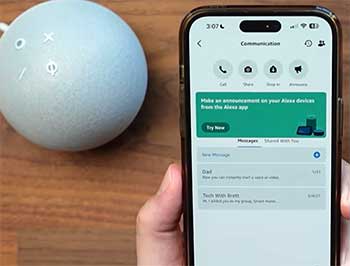
Some Echo Shows, like the Show 10, include a Zigbee hub for direct control of compatible devices without extra bridges.
I’ve connected lights and plugs seamlessly. The Dot requires separate hubs or relies on Wi-Fi/Bluetooth.
This makes the Show a better central controller in smart homes.
In my setup, the Show’s screen shows device statuses visually, which speeds up troubleshooting compared to the Dot’s voice-only feedback.
- Power Consumption and Energy Efficiency
Both are efficient, but the Show’s screen draws more power—around 10-15W versus the Dot’s 5W. I’ve monitored this with a smart plug; the Dot sips energy for always-on listening, while the Show spikes during video playback.
For eco-conscious users like me, the Dot is greener for background tasks.
- Price Points and Value Proposition
Dots start cheap, often under $50, making them impulse buys. Shows range higher due to added hardware. From my budget analysis, the Dot offers core Alexa for less, but the Show justifies its cost with extras.
I’ve found deals make Shows accessible, but Dots are entry-level kings.
- Accessibility Features for Different Users
The Show’s screen aids those with hearing impairments via captions, while the Dot’s simplicity suits visually impaired users. I’ve customized both for family members, and the Show’s touch interface adds flexibility, though voice remains primary.
Key Features of The Echo Show
The Echo Show packs features that make it feel like a smart display rather than just a speaker. Here’s what stands out from my usage.
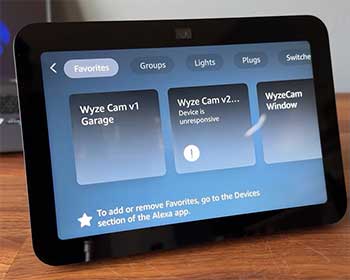
- Touchscreen Interface for Enhanced Interaction: The responsive screen lets me navigate menus, adjust settings, or even draw on it for fun. I’ve used it to create shopping lists by tapping, which feels more natural than dictating.
- Video Streaming and Entertainment Options: Integration with Prime Video, Netflix, and YouTube means movie nights on a small scale. I’ve binged shows while prepping meals, and the picture quality on HD models is crisp.
- Home Monitoring and Security Integration: With the camera, I can drop in on other rooms or view Ring doorbell feeds. It’s like having a security console; I’ve checked on pets remotely via the Alexa app.
- Recipe Guidance and Kitchen Assistance: Visual step-by-step recipes from sites like Allrecipes make cooking foolproof. I’ve followed along without pausing to ask questions, saving time and mess.
- Calendar and Productivity Tools: Syncing with Google Calendar, it displays events at a glance. I’ve set reminders that pop up visually, helping manage my schedule better than voice alerts alone.
- Photo Frame Mode for Personalization: It cycles through family photos when idle, turning it into decor. I’ve customized albums, adding a warm touch to my living room.
- Adaptive Brightness and Sound: Sensors adjust screen and audio based on ambient light/noise. In my bright kitchen, it auto-brightens for visibility.
- Multi-Room Audio and Grouping: Pair with other Echos for whole-home sound. I’ve grouped Shows and Dots for parties, with the Show as the visual hub.
Pros of The Echo Show
From my extensive testing, the Show has upsides that make it indispensable in certain setups.
- Visual Feedback Enhances User Experience: Seeing responses reduces errors. I’ve avoided mix-ups on complex queries, like weather maps shown instead of described.
- Versatile for Video Calls and Communication: Family video chats are seamless. During holidays, I’ve connected with relatives, feeling closer than audio calls.
- Ideal for Kitchen and Recipe Use: Step-by-step visuals transformed my cooking. No more forgetting ingredients mid-recipe.
- Serves as a Smart Home Dashboard: Control everything from one spot. I’ve monitored energy usage via connected plugs on-screen.
- Entertainment Hub for Small Spaces: Watch news or videos hands-free. It’s my morning routine companion for headlines.
- Privacy Controls with Camera Shutter: Easy to block the lens. Gives peace of mind in shared spaces.
- Larger Models Offer Better Sound: For music lovers, it’s a step up. I’ve hosted dinners with background tunes that impress.
- Customization Options Abound: Themes, widgets—make it yours. I’ve tailored mine for productivity.
- Future-Proof with Updates: Amazon pushes features like Matter support. Keeps it relevant longer.
- Accessibility for All Ages: Touch helps kids/elderly. My parents use it intuitively.
Cons of The Echo Show
No device is perfect, and the Show has drawbacks I’ve encountered.
- Higher Price Tag Compared to Dot: It’s an investment. Budget users might balk at $100+ versus $30.
- Requires More Space and Placement Planning: Not as hideable. I’ve rearranged furniture to accommodate.
- Power-Hungry with Screen Always On: Bills tick up slightly. Idle mode helps, but it’s noticeable.
- Privacy Concerns with Built-in Camera: Even with shutter, some worry about hacks. I’ve disabled features for caution.
- Overkill for Basic Tasks: If you just need alarms, it’s unnecessary. Wasted potential in simple setups.
- Screen Glare in Bright Rooms: Without perfect placement, readability suffers. I’ve adjusted angles often.
- Heavier and Less Portable: Moving it room-to-room is cumbersome compared to Dot.
- Dependency on Wi-Fi for Visuals: Lags if connection dips. Audio still works, but visuals falter.
- Learning Curve for Touch Features: Voice users might underuse screen. Took me time to fully utilize.
- Limited Battery Life Options: All plugged-in; no portable versions like some competitors.
Key Features of The Echo Dot
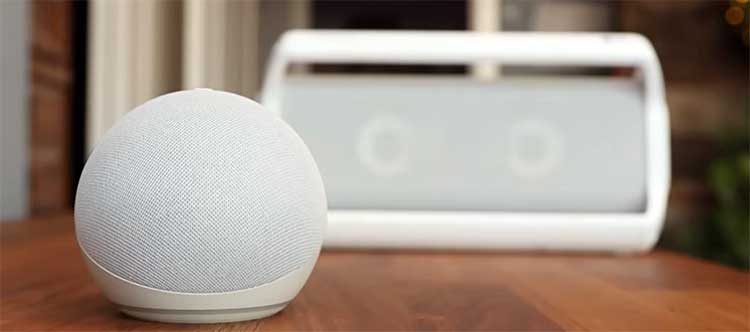
Don’t underestimate the Dot—it’s feature-rich in a tiny package. Here’s what I’ve appreciated.
- Compact Design for Versatile Placement: Its small size fits in tight spots. I’ve hidden one behind books for discreet control.
- Improved Audio with Each Generation: The 5th Gen has better clarity for calls and music. I’ve used it for bedtime stories, where voice quality shines.
- Clock Display Option: Models with LED clocks show time, weather icons. It’s my nightstand essential, glancing at time without voice commands.
- Tap-to-Snooze and Gesture Controls: Tap to snooze alarms—handy when groggy. Some models detect motion for lights.
- Alexa Routines and Automation: Set complex routines like morning briefings. I’ve automated my wake-up with news, lights, coffee maker.
- Music and Podcast Playback: Streams from Spotify, Apple Music. I’ve created playlists voice-commanded, perfect for workouts.
- Voice Shopping and Lists: Add items to carts or lists effortlessly. I’ve reordered staples without touching my phone.
- Games and Skills Library: Thousands of skills for trivia, meditation. I’ve played games with kids, keeping it engaging.
Also Read: Differences Between Govee And Nanoleaf Smart Lightings.
Pros of The Echo Dot
The Dot’s strengths lie in its no-frills approach, which I’ve come to love.
- Affordable Entry to Smart Home Tech: Great starter device. I’ve gifted them without breaking the bank.
- Space-Saving and Discreet Design: Fits anywhere without notice. Perfect for apartments.
- Energy-Efficient Operation: Low power draw. Runs all day without guilt.
- Excellent for Multi-Room Audio Setups: Cheap to buy multiples. My home has Dots in every room synced.
- Simple Setup and Use: Plug in, connect—done. Ideal for tech novices.
- Reliable Voice Recognition: Far-field mics pick up commands well. Even in noisy environments.
- Clock Model Adds Utility: Time at a glance. My bedside essential.
- Fun Color and Theme Options: Matches decor. Kids love the character editions.
- Seamless Integration with Other Devices: Pairs with TVs, speakers. Expands ecosystems affordably.
- Portable for Travel: Small enough for trips. I’ve taken one on vacations for routines.
Cons of The Echo Dot
Despite its appeal, the Dot has limitations I’ve bumped into.
- Limited Audio Quality for Music Enthusiasts: Bass lacks punch. Fine for talk, but not parties.
- No Visual Interface for Complex Info: Recipes via voice can confuse. I’ve switched to phone often.
- Lacks Camera for Video Features: Misses out on calls. Sticks to basics.
- Small Size Means Weaker Projection: In large rooms, volume struggles. Placement matters.
- No Built-in Hub for Advanced Smart Home: Needs extras for full control. Adds cost.
- Basic Design Lacks Wow Factor: Feels utilitarian. Not a statement piece.
- Dependent on Voice Only: Errors in noisy homes. My kitchen blender drowns it out sometimes.
- Limited Customization Without Screen: Settings via app only. Less intuitive.
- Aging Models Lose Support: Older gens miss updates. Upgrading needed.
- No Battery; Always Plugged In: Not truly wireless. Limits spots.
In-Depth Analysis: Which One Should You Choose?
Picking between the Echo Show and Echo Dot boils down to your lifestyle. If you’re like me and value visuals—say, for recipes, video calls, or glancing at info—the Show is transformative. I’ve placed one in my office for productivity boosts, seeing calendars and to-dos without pulling out my phone.
But if you’re budget-conscious or want something subtle for music and commands, the Dot delivers without extras.
Analytically, consider your space: Small apartment?
Dot. Family home with kitchen focus? Show. I’ve mixed them—Dots in bedrooms, Show in common areas—for a balanced setup. Both evolve with Alexa updates, adding skills like health tracking or games. Privacy-wise, I mute mics when needed, and Amazon’s security is solid.
Think about ecosystem lock-in: Both tie to Amazon, so if you’re Prime-heavy, they shine. I’ve integrated with Fire TV for voice control, enhancing entertainment. For smart homes, the Show’s hub saves money on bridges.
Ultimately, test drive if possible—Amazon’s returns are easy. My advice: Start with Dot, upgrade to Show if you crave more.
Also Read: Differences Between Arlo And Vivint Smart Home Security Systems.
Frequently Asked Questions (FAQ)
It depends on needs, but the Echo Show 8 balances features and price for most users.
No, Amazon continues updating and releasing new Echo models.
It’s great for video calls, recipes, home monitoring, and visual smart home control.
The Dot Kids is audio-only with parental controls and fun designs; the Show 5 Kids adds a screen for video content and educational visuals.
Wrapping It Up: Your Path To The Perfect Echo
I’ve shared my journey with the Echo Show and Dot, highlighting how they’ve shaped my daily life—from quick queries to full visual immersion. You might find, as I did, that the Show elevates routines with its screen, while the Dot keeps things simple and affordable.
Whichever you choose, it’ll bring Alexa’s magic home. What do you think—ready to pick one and transform your space?