
If you spend your days glued to a desk and your back is screaming for mercy, stop everything and get the Branch Ergonomic Chair Pro right now.
I used to dread long work sessions because every chair left me aching by lunch. This one fixed that completely. Its 14 adjustments mold perfectly to your body, the thick seat feels like sitting on a cloud, and the support keeps you energized instead of drained.
You deserve to feel this good at your desk, and once you try it, you will never go back. Trust me, it is the smartest upgrade you can make for your health and focus.
My Experience With The Branch Ergonomic Chair Pro
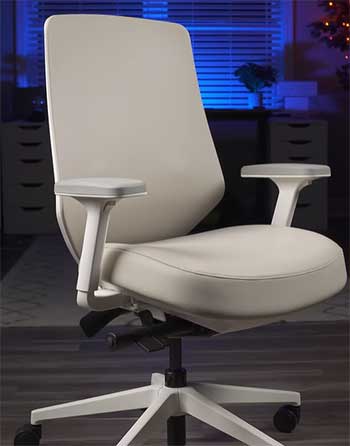
When the box showed up at my door, I knew this was different from the flat-packed junk I had bought before.
The packaging felt premium, with everything protected and labeled clearly.
I cleared space in my home office, grabbed a screwdriver, and started putting it together.
It took me about twenty minutes solo, no missing pieces, no confusing steps.
The aluminum base clicked in smoothly, the seat attached without a fight, and the backrest slid right into place.
I was already impressed before I even sat down.
The first time I lowered myself into it, I let out an actual sigh of relief. The high-density foam seat hugged me in the best way, not too firm, not sinking like quicksand. I immediately started playing with the controls.
I raised the seat height until my feet sat flat, slid the seat depth so my thighs had full support without pressure behind my knees, and dialed in the lumbar support until it nestled right into my lower back curve. The 5D armrests were next.
I adjusted the height, width, depth, and even pivoted them inward so my elbows stayed relaxed while typing. It felt custom-made for me, and I am five foot ten with average build.
That first full workday changed everything. I had back-to-back calls and deep-focus coding ahead. Normally I would shift every thirty minutes, stand up to stretch, and still end up with tight shoulders. Not this time.
I leaned forward using the tilt when I was typing fast, then reclined slightly during meetings to stay engaged without slouching. By 5 p.m. I still felt fresh. No numbness in my legs, no knot between my shoulder blades. I actually finished my tasks early because I could concentrate instead of fighting discomfort.
Over the next two weeks I fine-tuned everything even more. I discovered the forward tilt kept my core active during writing sessions, which stopped that afternoon energy crash I used to get.
On longer days when I pushed eight or nine hours, I used the recline to stretch my back during breaks without leaving the chair. My wife noticed I was standing taller around the house, and my shoulders stopped rolling forward.
After a month I realized I had not taken a single ibuprofen for desk-related pain, something that used to happen weekly.
Now, six months in, this chair still feels brand new. I use it for everything from early morning emails to late-night gaming with friends. The breathable mesh back keeps me cool even when the room warms up, and the materials have held up through two moves and daily use.
During one crazy deadline week I logged twelve hours straight and walked away only mildly tired instead of wrecked. You know that moment when you stand up after sitting forever and your body protests? I do not get that anymore.
This chair made my home office feel like a professional setup without the professional price tag. I catch myself smiling when I sit down now, because I know the next eight hours are going to be comfortable and productive.
If you are on the fence, just picture yourself finishing your workday without that familiar ache. That is exactly what happened to me, and it can happen for you too.
The Incredible Pros of The Branch Ergonomic Chair Pro
- The Thick High-Density Foam Seat That Keeps You Supported Hour After Hour
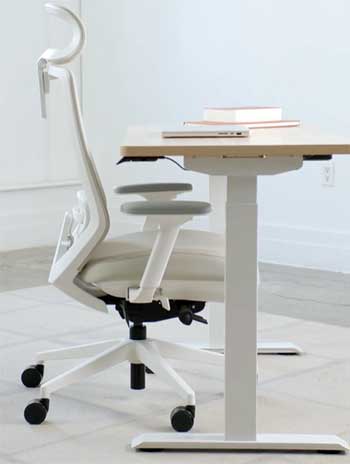
I cannot say enough about how this seat feels. It is generously padded with high-density foam that bounces back every single time I stand up.
You will not bottom out or get that numb-thigh feeling even after six straight hours.
I used to switch positions constantly in my old chair, but now I stay put because the cushion distributes weight evenly and promotes healthy circulation.
The seat depth slides in and out so you can match it to your leg length perfectly.
For me that means no pressure behind the knees, which used to cut off blood flow and leave me fidgety.
You will notice your legs thanking you by the end of the week, and the foam stays cool thanks to the way it is constructed. This alone makes every long work session way more bearable.
- Fourteen Adjustments That Let You Create Your Perfect Sitting Position
The sheer number of ways you can tweak this chair is what sets it apart. I adjust at least four settings every morning depending on what my day looks like. Seat height, seat depth, tilt tension, forward tilt, recline, lumbar height, lumbar depth, arm height, arm width, arm pad depth, arm pad width, arm pivot, and the optional headrest angles.
That is serious customization. When I am deep in spreadsheets I lock everything tight for stability. When I need to brainstorm I loosen the tilt and rock gently. You can match it to your exact body proportions so nothing feels off.
I have friends who are shorter or taller than me, and they all found settings that worked without compromise. This level of fine-tuning means the chair grows with you instead of forcing you to adapt.
- Lumbar Support That Actually Targets Your Lower Back Needs
The padded two-way lumbar is a revelation. I slide it up or down and push it in or out until it fills the natural curve in my spine. Before this chair my lower back would ache by mid-afternoon because nothing supported that area properly.
Now I feel gentle pressure exactly where I need it, which keeps my posture upright without effort. You will feel your spine align naturally, and that reduces strain on your hips and shoulders too.
I sometimes remove the lumbar cushion completely on very relaxed days, which is another nice option. The fact that it is removable and adjustable in two directions makes this feature stand out from most chairs I have tried.
- Five-Dimensional Armrests That Cradle Your Arms No Matter the Task
These arms adjust in every direction you can imagine. I raise them when I am typing, lower them for mouse work, slide them closer together for narrow desks, pivot them inward when I lean forward.
The pads are wide enough to rest my whole forearm, and the depth adjustment means I never have to hunch my shoulders. You will type faster and with less tension because your arms stay neutral.
I used to get wrist and elbow fatigue, but not anymore. Even during long video calls where I gesture a lot, the arms stay exactly where I positioned them.
- Smooth Recline and Forward Tilt That Match Your Natural Movement
The recline is buttery and controlled, up to a generous angle that lets me stretch without feeling like I am falling backward. The forward tilt locks me into an active position when I am focused and leaning over my keyboard.
You can switch between these modes effortlessly, which keeps your body moving subtly throughout the day. I use forward tilt for writing and recline for reading documents. This dynamic support prevents stiffness and helps maintain energy levels.
It feels like the chair is working with you instead of against you.
- Breathable Materials and Stylish Design That Look Great in Any Space
The mesh back lets air flow so I stay comfortable even on warm days. The fabric options, from soft performance mesh to sleek vegan leather, look modern and clean.
My chair in Mineral color blends perfectly with my light wood desk and does not scream “office equipment.” Guests always comment on how nice it looks. You will be proud to have this in your home office or even your living room setup.
- Outstanding Build Quality and Durability You Can Count On
The powder-coated aluminum base feels solid, the mechanisms move smoothly after months of daily use, and nothing has loosened or squeaked.
At 42 pounds it feels substantial without being impossible to move. I have rolled it across carpet and hardwood daily, and it still rolls like new. This chair is built to last through years of heavy use.
Cons I Experienced With The Branch Ergonomic Chair Pro
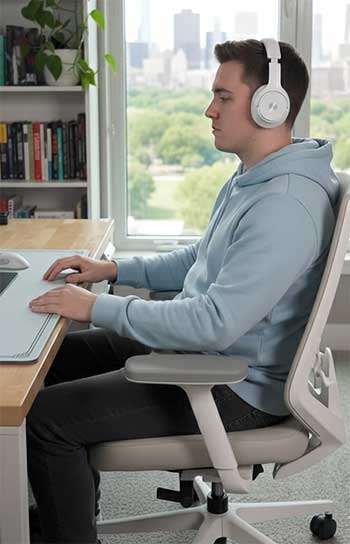
- Seat Softness That Some People Might Find Too Plush The thick foam is fantastic for most of the day, but after very long sessions some users might want firmer support. I occasionally notice it gives more than a super rigid seat would, though I adapted quickly. If you prefer a board-like feel, you may need to adjust expectations.
- Armrests That Can Feel a Bit Loose or Noisy Over Time The 5D arms are incredibly versatile, but they developed a slight rattle after a few months of heavy adjustment. Tightening helps, yet they never feel rock-solid like some higher-end models. The plastic pads are also harder than fabric-covered ones, which I notice on bare arms during summer.
- Overall Size and Weight That Takes Up Room This chair is bulkier than slim designs, so if your space is tiny you will feel it. Moving it around the room requires effort because of the 42-pound weight. It looks substantial, which I like, but smaller offices might feel crowded.
- Assembly Time and Effort for First-Time Users While straightforward, the process still takes twenty to thirty minutes and you need space to lay out parts. If you hate putting things together, you might want help or patience.
- Price Point That Feels Mid-Range for Some Budgets At around five hundred dollars it delivers great value, but it is still an investment. If you are coming from a fifty-dollar chair it feels like a splurge, even though the quality justifies it.
Usage Tips For Your Branch Ergonomic Chair Pro
- Daily and Weekly Cleaning Routines That Keep It Looking New I vacuum the mesh back every Sunday to remove dust and crumbs. For the seat I use a soft microfiber cloth with mild soap and water, never harsh chemicals that could break down the foam. Wipe the armrest pads weekly because skin oils build up. You will keep that fresh-out-of-box look for years if you stay on top of this. For lighter fabric colors like the ones I almost chose, spot clean stains immediately with a gentle fabric cleaner to prevent setting.
- Monthly Checks and Tightening to Prevent Wear Every four weeks I go over all the adjustment knobs and screws with a screwdriver. The mechanisms stay smooth when you catch any loosening early. I also test the tilt tension and forward tilt lock to make sure they still engage firmly. This quick five-minute habit has kept everything operating like day one. You should also inspect the wheels for hair or debris that can jam them.
- Optimizing Your Sitting Posture for Maximum Benefit I set the lumbar first every morning, then arms, then seat depth. Keep your feet flat, knees at ninety degrees, and screen at eye level. When I follow this I can sit longer without fatigue. You should change positions every forty-five minutes, using the recline or forward tilt to shift load. I alternate between upright focus mode and relaxed recline during calls. This active use actually extends the life of the foam and mechanisms because you are not staying static.
- Seasonal Care to Handle Temperature Changes In winter I keep the chair away from direct radiator heat so the foam does not dry out. In summer I make sure airflow reaches the mesh back. If you live in a humid area, a small dehumidifier nearby prevents any mildew risk on fabric options. I rotate my chair ninety degrees once a month so the sun does not fade one side more than the other.
- Troubleshooting Small Issues Before They Grow If the recline feels sticky, a tiny drop of silicone lubricant on the pivot points fixes it instantly. Rattling arms usually tighten with the hex key provided. For height adjustment that feels stiff, I lift the seat fully then lower it slowly a few times to redistribute the gas cylinder pressure. These quick fixes have saved me from bigger problems.
- Maximizing the Seven-Year Warranty and Replacement Parts I keep the original receipt and photos of the chair in a folder. If anything ever wears out, Branch customer service has been responsive in my experience with other products. You can order replacement cylinders or arm pads directly, which keeps costs low. I recommend registering the chair online the day you receive it so your coverage starts immediately.
- Long-Term Habits That Extend Comfort and Lifespan Avoid sitting with your wallet in your back pocket or crossing legs for long periods. Stand up and walk every hour even if the chair feels perfect. I use a footrest on extra tall days to keep pressure off my thighs. These small practices mean the chair continues delivering the same support month after month.
Seeing The Branch Ergonomic Chair Pro Side by Side With Other Leading Chairs
- Branch Ergonomic Chair Pro Versus the HON Ignition 2.0
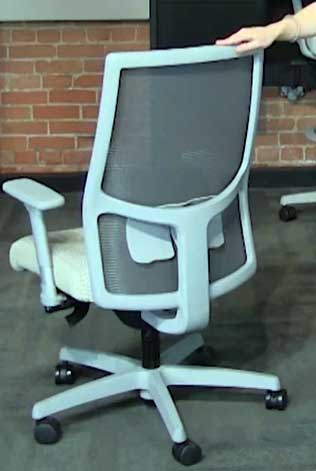
I had the chance to use the HON Ignition 2.0 for a full week in a friend’s office and the comparison made me appreciate my Branch Pro even more.
The HON is a reliable workhorse with good synchro-tilt and solid construction that stands up to daily abuse.
You get decent value for the money and it feels professional. But when I sat back in my Branch the difference in seat cushion hit me immediately.
The thick foam on the Branch keeps its shape and feels supportive all day long, while the HON seat can start to feel a bit flat after long stretches.
I love how the Branch lets me fine-tune the lumbar in two directions and gives me those full 5D armrests for perfect elbow positioning. The HON arms are functional but not nearly as versatile.
The forward tilt on my Branch helps me stay active during intense work sessions, something the HON lacks. At a similar price point the Branch Pro just offers more ways to make the chair truly yours, which means less fatigue and better posture for me every single day.
If you are looking for something tough for a busy environment the HON is great, but for personal comfort at home I would go with the Branch every time.
- Branch Ergonomic Chair Pro Versus the Sihoo M18m
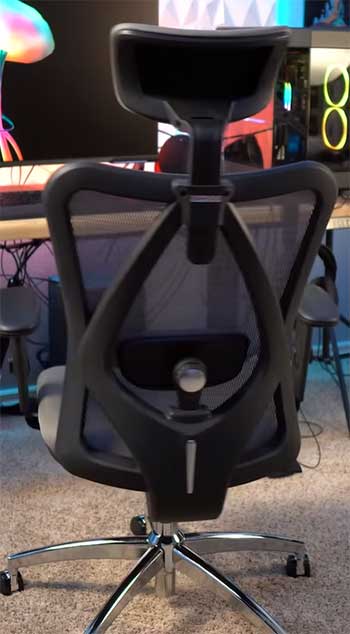
I borrowed a Sihoo M18m from a coworker for direct side-by-side testing, and it opened my eyes to what you get for the lower price.
The Sihoo brings solid basic ergonomics with adjustable lumbar and a recline that lets you kick back nicely.
You can save quite a bit of cash and still get decent support for shorter workdays. Yet the materials and feel tell the real story.
My Branch Pro feels substantial with smooth mechanisms and a seat that bounces back perfectly, while the Sihoo padding compresses more over time and the adjustments feel a little looser.
The armrests on the Branch adjust in every direction imaginable so I can always find the sweet spot, whereas the Sihoo offers fewer options and can develop some play after months of use.
The build quality on the Branch gives me confidence it will last years without issues.
While the Sihoo serves as a fantastic entry-level choice when budget is the biggest concern, once you experience the refined comfort and precise customization of the Branch Pro you will understand why the extra spend feels worth it. You get that premium experience without jumping to luxury prices.
- Branch Ergonomic Chair Pro Versus the Herman Miller Mirra 2
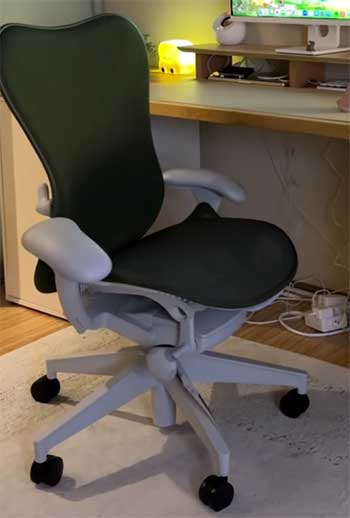
The Herman Miller Mirra 2 is the gold standard I tested extensively in a high-end showroom, and it really lives up to its reputation for dynamic support.
The flexible back lets you move freely and the overall engineering is impressive.
You pay a premium for that name and the long warranty, often two or three times more than the Branch Pro.
Coming back to my chair, I realized the Branch comes incredibly close in real-world comfort.
The thick cushioned seat on the Branch feels more forgiving for long hours than the Mirra’s thinner, more responsive one.
I use the forward tilt on the Branch constantly for focused typing, a feature that gives me an edge over the Mirra in active positions. Arm adjustments and lumbar support are comparable, but the Branch makes them easier to dial in for my exact body shape.
The Mirra wins on that ultra-light responsive feel and brand prestige, but for most home office setups the Branch Pro delivers ninety percent of the benefits at a fraction of the cost. You get the posture support and all-day energy without the sticker shock, which makes it the smarter pick for me and many others.
Final Thoughts
After six months with this chair I can honestly say it has improved every part of my workday. The aches are gone, my posture is better, and I actually look forward to sitting down. You will feel the same difference once you give it a chance.
Stop settling for discomfort and treat yourself to the Branch Ergonomic Chair Pro. Your back and your productivity will thank you every single day.